







Question: 1. Log into your Oracle account and run the script Procedures Tables.sql to refresh tables for the coffee store database. 2. (a) Create a PL/SQL
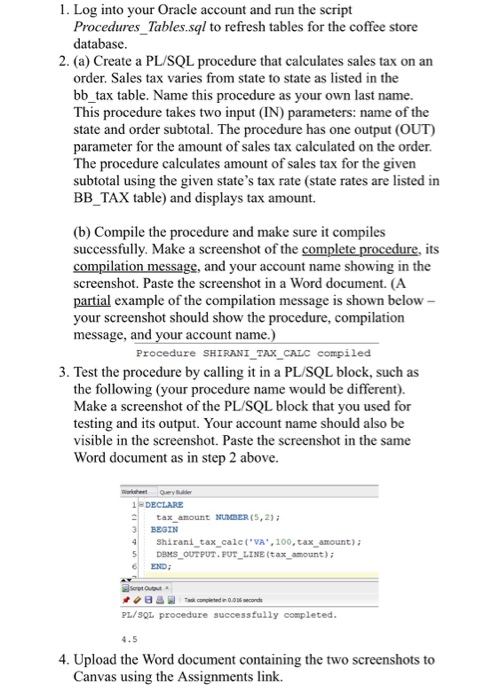
1. Log into your Oracle account and run the script Procedures Tables.sql to refresh tables for the coffee store database. 2. (a) Create a PL/SQL procedure that calculates sales tax on an order. Sales tax varies from state to state as listed in the bb_tax table. Name this procedure as your own last name. This procedure takes two input (IN) parameters: name of the state and order subtotal. The procedure has one output (OUT) parameter for the amount of sales tax calculated on the order The procedure calculates amount of sales tax for the given subtotal using the given state's tax rate (state rates are listed in BBTAX table) and displays tax amount. (b) Compile the procedure and make sure it compiles successfully. Make a screenshot of the complete procedure, its compilation message, and your account name showing in the screenshot. Paste the screenshot in a Word document. (A partial example of the compilation message is shown below your screenshot should show the procedure, compilation message, and your account name Procedure SHIRANI TAX_CALC compiled 3. Test the procedure by calling it in a PL/SQL block, such as the following (your procedure name would be different) Make a screenshot of the PL/SQL block that you used for testing and its output. Your account name should also boe visible in the screenshot. Paste the screenshot in the same Word document as in step 2 above. 1DECLARE tax anount NUMBER(5,2) BEGIN Shirani tax cal VA.100, tax anount): DBMS OUTPUT FUT LINE(tax amount)i END: PL/SQL procedure successfully completed 4. Upload the Word document containing the two screenshots to anvas using the Assignments link. 1. Log into your Oracle account and run the script Procedures Tables.sql to refresh tables for the coffee store database. 2. (a) Create a PL/SQL procedure that calculates sales tax on an order. Sales tax varies from state to state as listed in the bb_tax table. Name this procedure as your own last name. This procedure takes two input (IN) parameters: name of the state and order subtotal. The procedure has one output (OUT) parameter for the amount of sales tax calculated on the order The procedure calculates amount of sales tax for the given subtotal using the given state's tax rate (state rates are listed in BBTAX table) and displays tax amount. (b) Compile the procedure and make sure it compiles successfully. Make a screenshot of the complete procedure, its compilation message, and your account name showing in the screenshot. Paste the screenshot in a Word document. (A partial example of the compilation message is shown below your screenshot should show the procedure, compilation message, and your account name Procedure SHIRANI TAX_CALC compiled 3. Test the procedure by calling it in a PL/SQL block, such as the following (your procedure name would be different) Make a screenshot of the PL/SQL block that you used for testing and its output. Your account name should also boe visible in the screenshot. Paste the screenshot in the same Word document as in step 2 above. 1DECLARE tax anount NUMBER(5,2) BEGIN Shirani tax cal VA.100, tax anount): DBMS OUTPUT FUT LINE(tax amount)i END: PL/SQL procedure successfully completed 4. Upload the Word document containing the two screenshots to anvas using the Assignments link
Step by Step Solution
There are 3 Steps involved in it

Get step-by-step solutions from verified subject matter experts
 Study Help