







Question: 1) Match each term in the second column with its correct definition in the first column by writing the letter of the term on the
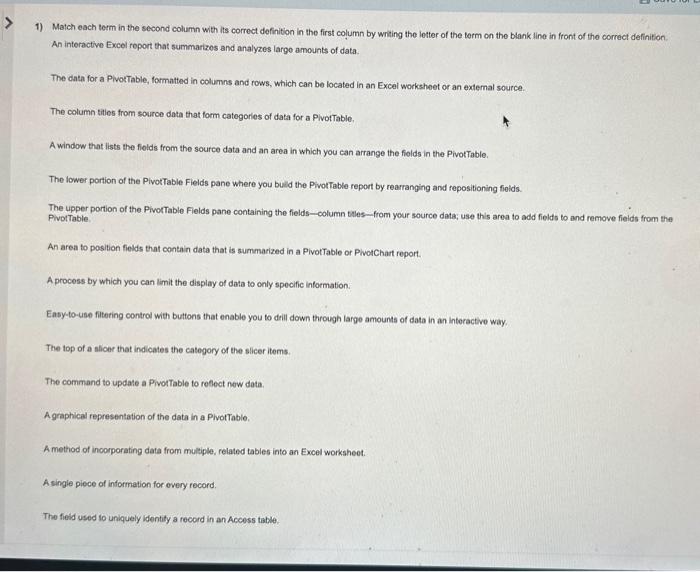
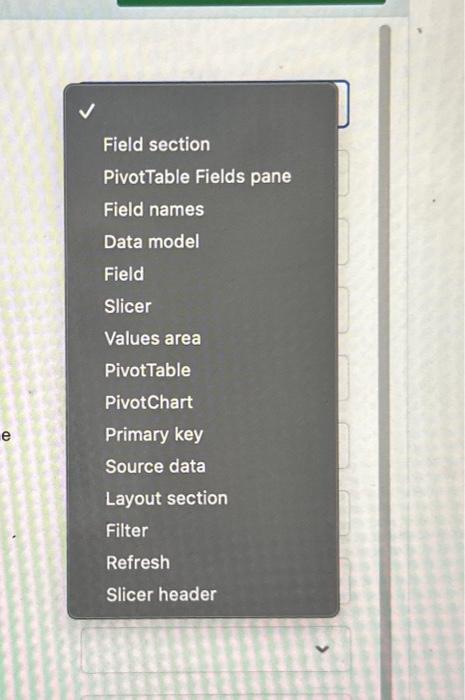
1) Match each term in the second column with its correct definition in the first column by writing the letter of the term on the blank line in front of the correct definition An interactive Excel report that summarizos and analyzes largo amounts of data. The data for a PivorTable, formatted in columns and rows, which can be located in an Excel worksheet or an extemal source. The column tities from source data that form categories of data for a PlvotTable, A window that lists the fields from the source data and an area in which you can arrange the fiolds in the PivotTable. The lower portion of the PivotTable Fields pane where you buld the PiwotTable report by rearranging and repositioning fiolds. The upper portion of the PivorTable Fields pane containing the fields-column tiles - from your source data; use this area to add fields to and remove fieids from the PivotTable, An area to position fields that contain data that is summarized in a PivotTable or PlwotChart report. A process by which you can limit the display of data to only specific information. Easy-to-use filtering control with buttons that enable you to drill down through large amounts of data in an interactive way. The top of a slicer that indicates the category of the slicer items. The command to update a Pivot Table to refect new data. A graphical representation of the data in a PivotTable. A method of incorporating data from multiple, related tables into an Excel worksheet. A single piece of information for every record. The fiedd used io uniquely identity a recond in an Access table. Field section PivotTable Fields pane Field names Data model Field Slicer Values area PivotTable PivotChart Primary key Source data Layout section Filter Refresh Slicer header
Step by Step Solution
There are 3 Steps involved in it

Get step-by-step solutions from verified subject matter experts
 Study Help