







Question: 1. Open SQL developer and create a new connection to Oracle server 2. Write in SQL a command that creates the table Supplier according to
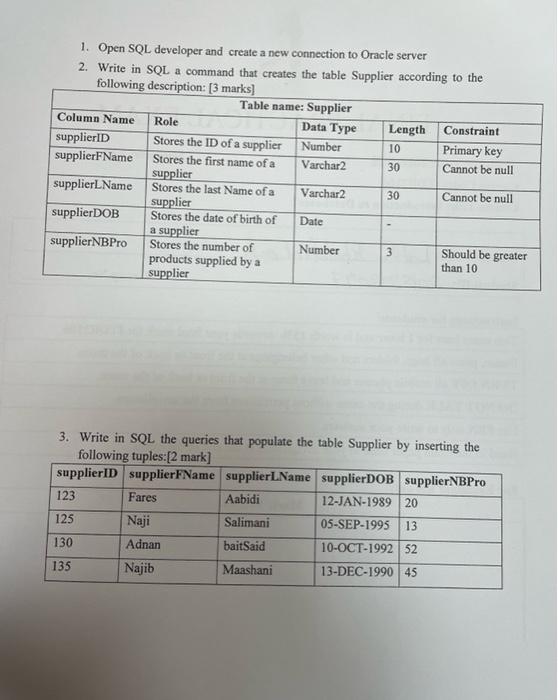
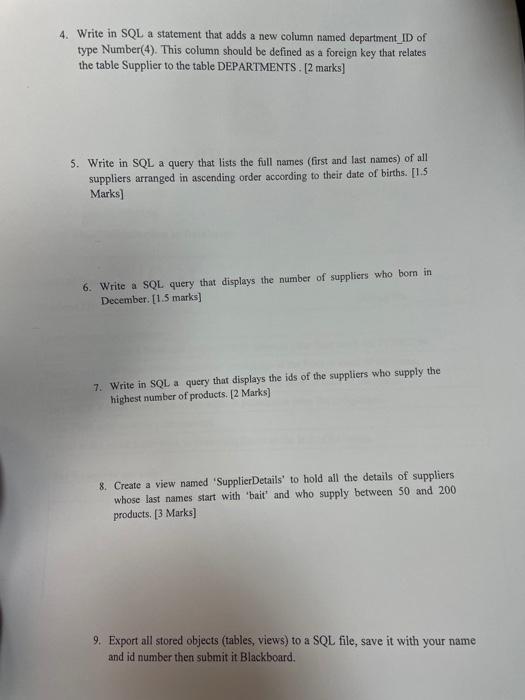
1. Open SQL developer and create a new connection to Oracle server 2. Write in SQL a command that creates the table Supplier according to the following description: [3 marks) Table name: Supplier Column Name Role Data Type Length Constraint supplierID Stores the ID of a supplier Number 10 Primary key supplierFName Stores the first name of a Varchar2 30 Cannot be null supplier supplierLName Stores the last Name of a Varchar2 30 Cannot be null supplier supplier DOB Stores the date of birth of Date a supplier supplier NBPro Stores the number of Number 3 Should be greater products supplied by a than 10 supplier 3 3. Write in SQL the queries that populate the table Supplier by inserting the following tuples:[2 mark] supplierID supplier FName supplierLName supplierDOB supplier NBPro 123 Fares Aabidi 12-JAN-1989 20 125 Naji Salimani 05-SEP-1995 13 130 Adnan baitSaid 10-OCT-1992 52 135 Najib Maashani 13-DEC-1990 45 4. Write in SQL a statement that adds a new column named department_ID of type Number(4). This column should be defined as a foreign key that relates the table Supplier to the table DEPARTMENTS. [2 marks] 5. Write in SQL a query that lists the full names (first and last names) of all suppliers arranged in ascending order according to their date of births. [1.5 Marks) 6. Write a SQL query that displays the number of suppliers who bom in December. [1.5 marks) 7. Write in SQL a query that displays the ids of the suppliers who supply the highest number of products. [2 marks] 8. Create a view named 'Supplier Details' to hold all the details of suppliers whose last names start with 'bait' and who supply between 50 and 200 products. [3 Marks) 9. Export all stored objects (tables, views) to a SQL file, save it with your name and id number then submit it Blackboard
Step by Step Solution
There are 3 Steps involved in it

Get step-by-step solutions from verified subject matter experts
 Study Help