







Question: 1 . Read and complete Chapters 5 and 6 from MS Project 2013 Step by Step (available online). Use the files Simple Tasks_Start, and Simple
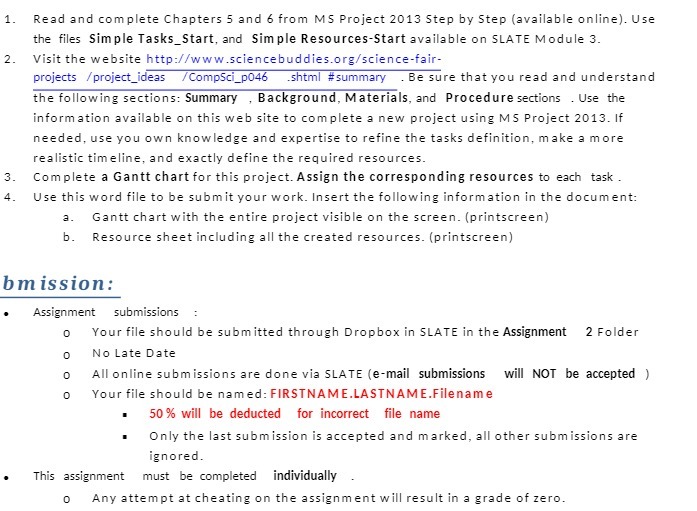
1 . Read and complete Chapters 5 and 6 from MS Project 2013 Step by Step (available online). Use the files Simple Tasks_Start, and Simple Resources-Start available on SLATE Module 3. 2 . Visit the website http://www.sciencebuddies.org/science-fair- projects /project_ideas /CompSci_p046 .shtml #summary . Be sure that you read and understand the following sections: Summary , Background, Materials, and Procedure sections . Use the information available on this web site to complete a new project using MS Project 2013. If needed, use you own knowledge and expertise to refine the tasks definition, make a more realistic timeline, and exactly define the required resources. 3. Complete a Gantt chart for this project. Assign the corresponding resources to each task . 4. Use this word file to be submit your work. Insert the following information in the document: Gantt chart with the entire project visible on the screen. (printscreen) b. Resource sheet including all the created resources. (printscreen) bmission: Assignment submissions Your file should be submitted through Dropbox in SLATE in the Assignment 2 Folder No Late Date 0 All online submissions are done via SLATE (e-mail submissions will NOT be accepted ) Your file should be named: FIRSTNAME.LASTNAME.Filename 50 % will be deducted for incorrect file name Only the last submission is accepted and marked, all other submissions are ignored. This assignment must be completed individually Any attempt at cheating on the assignment will result in a grade of zero
Step by Step Solution
There are 3 Steps involved in it

Get step-by-step solutions from verified subject matter experts
 Study Help