







Question: 1 red #0.00 Create a notepad and write your name and university id inside it. Data Definition Language (DDL) 1. Create table named Bank
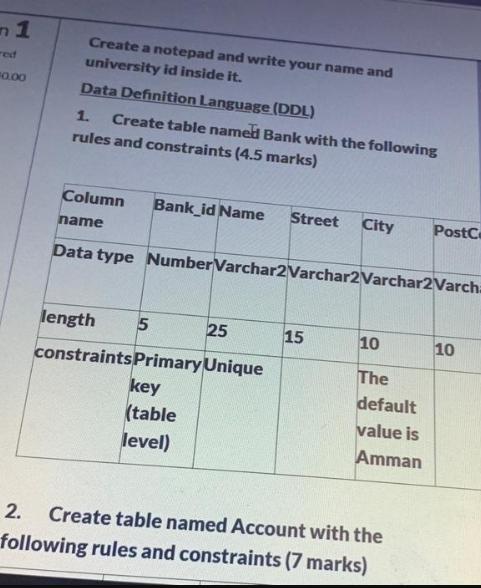
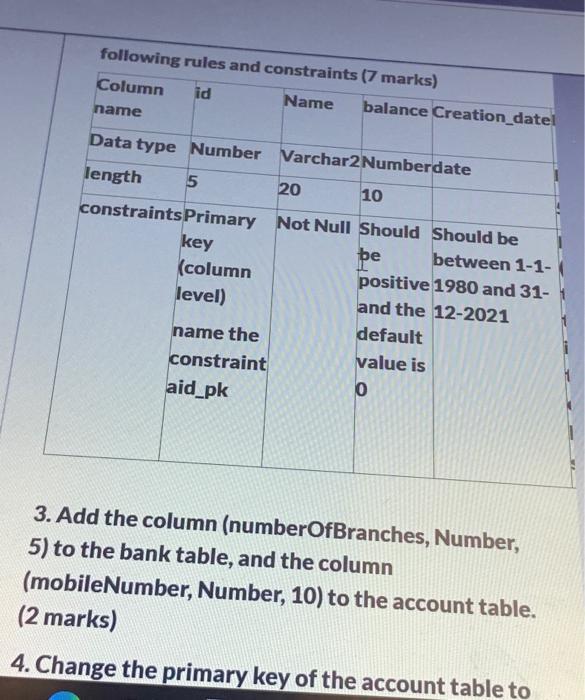
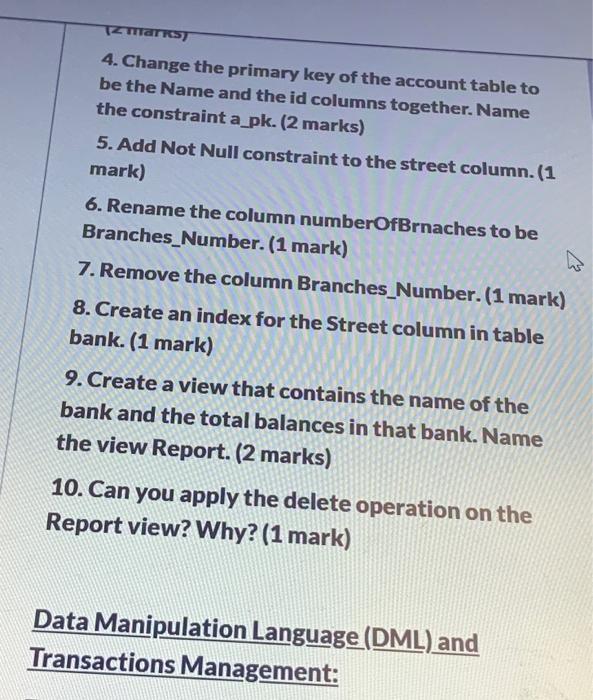
1 red #0.00 Create a notepad and write your name and university id inside it. Data Definition Language (DDL) 1. Create table named Bank with the following rules and constraints (4.5 marks) Column name Bank_id Name length 5 constraints Primary Unique key (table level) Street City Data type Number Varchar2 Varchar2 Varchar2 Varcha 25 15 10 The default value is Amman PostC 2. Create table named Account with the following rules and constraints (7 marks) 10 following rules and constraints (7 marks) Column id Name name Data type Number length 5 balance Creation_datel name the constraint aid_pk Varchar2 Numberdate 20 10 constraints Primary Not Null Should Should be key be between 1-1- (column positive 1980 and 31- level) and the 12-2021 default value is 0 3. Add the column (numberOfBranches, Number, 5) to the bank table, and the column (mobileNumber, Number, 10) to the account table. (2 marks) 4. Change the primary key of the account table to TZ Marksy 4. Change the primary key of the account table to be the Name and the id columns together. Name the constraint a_pk. (2 marks) 5. Add Not Null constraint to the street column. (1 mark) 6. Rename the column numberOfBrnaches to be Branches Number. (1 mark) 7. Remove the column Branches_Number. (1 mark) 8. Create an index for the Street column in table bank. (1 mark) 9. Create a view that contains the name of the bank and the total balances in that bank. Name the view Report. (2 marks) 10. Can you apply the delete operation on the Report view? Why? (1 mark) Data Manipulation Language (DML) and Transactions Management:
Step by Step Solution
There are 3 Steps involved in it
Answer CREATE TABLE Bank Ban... View full answer

Get step-by-step solutions from verified subject matter experts
 Study Help