







Question: 1. Remember the sorting algorithms quick sort (Tony Hoare, 1959) and merge sort (John von Neumann, 1945). 2. Write each sorting algorithm in C and
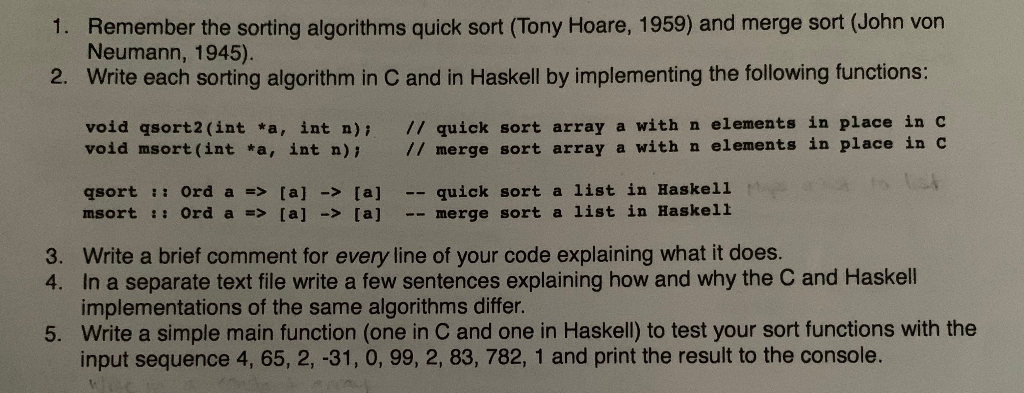
1. Remember the sorting algorithms quick sort (Tony Hoare, 1959) and merge sort (John von Neumann, 1945). 2. Write each sorting algorithm in C and in Haskell by implementing the following functions: void qsort2(int *a, int n); void msort(int *a, int n); // quick sort array a with n elements in place in C // merge sort array a with n elements in place in C qsort :: Ord a => [a] -> [a] msort :: Ord a => [a] -> [al -- quick sort a list in Haskell -- merge sort a list in Haskell 3. Write a brief comment for every line of your code explaining what it does. 4. In a separate text file write a few sentences explaining how and why the C and Haskell implementations of the same algorithms differ. 5. Write a simple main function (one in C and one in Haskell) to test your sort functions with the input sequence 4, 65, 2, -31, 0, 99, 2, 83, 782, 1 and print the result to the console. 1. Remember the sorting algorithms quick sort (Tony Hoare, 1959) and merge sort (John von Neumann, 1945). 2. Write each sorting algorithm in C and in Haskell by implementing the following functions: void qsort2(int *a, int n); void msort(int *a, int n); // quick sort array a with n elements in place in C // merge sort array a with n elements in place in C qsort :: Ord a => [a] -> [a] msort :: Ord a => [a] -> [al -- quick sort a list in Haskell -- merge sort a list in Haskell 3. Write a brief comment for every line of your code explaining what it does. 4. In a separate text file write a few sentences explaining how and why the C and Haskell implementations of the same algorithms differ. 5. Write a simple main function (one in C and one in Haskell) to test your sort functions with the input sequence 4, 65, 2, -31, 0, 99, 2, 83, 782, 1 and print the result to the console
Step by Step Solution
There are 3 Steps involved in it

Get step-by-step solutions from verified subject matter experts
 Study Help