







Question: 1. Run JGrasp (the Java programming environment) 2. Create a Java file and write a program that will print a poem to the screen. -
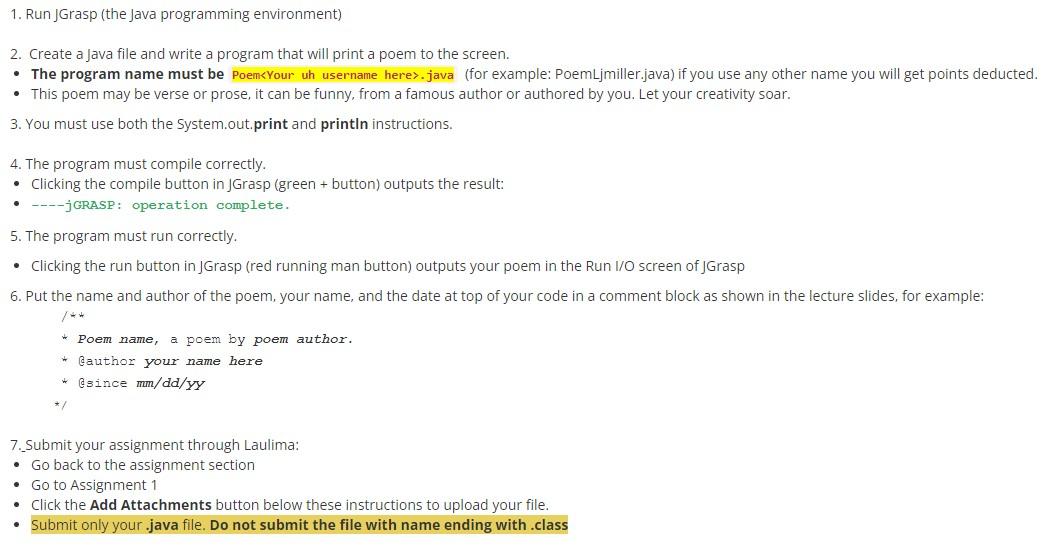
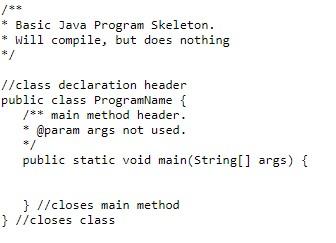
1. Run JGrasp (the Java programming environment) 2. Create a Java file and write a program that will print a poem to the screen. - The program name must be Poem.java (for example: PoemLjmiller.java) if you use any other name you will get points deducted. - This poem may be verse or prose, it can be funny, from a famous author or authored by you. Let your creativity soar. 3. You must use both the System.out. print and println instructions. 4. The program must compile correctly. - Clicking the compile button in JGrasp (green + button) outputs the result: - ---jGRASP: operation complete. 5. The program must run correctly. - Clicking the run button in JGrasp (red running man button) outputs your poem in the Run I/O screen of JGrasp 6. Put the name and author of the poem, your name, and the date at top of your code in a comment block as shown in the lecture slides, for example: /4 * Poem name, a poem by poem author. * Cauthor your name here * Csince mm/dd/YY */ 7._Submit your assignment through Laulima: - Go back to the assignment section - Go to Assignment 1 - Click the Add Attachments button below these instructions to upload your file. - Submit only your .java file. Do not submit the file with name ending with .class * Basic Java Program Skeleton. * Will compile, but does nothing */ //class declaration header public class ProgramName / main method header. * @param args not used. */ public static void main(String[] args) \} //closes main method \}//closes class
Step by Step Solution
There are 3 Steps involved in it

Get step-by-step solutions from verified subject matter experts
 Study Help