







Question: 1 SLA Checklist 2 ACFI - 101 3 Accounting Lab 4. 5 Use the following checklist to help ensure adequate completion of each SLA. After
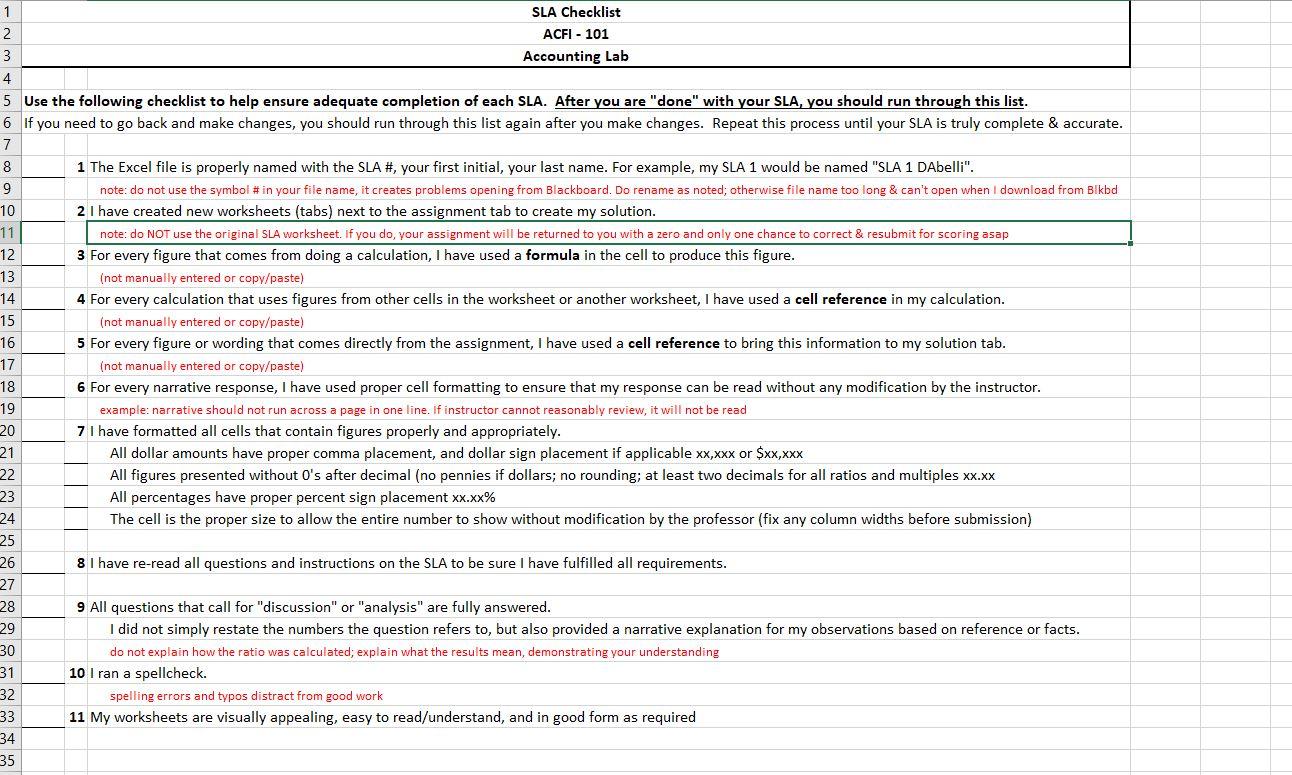
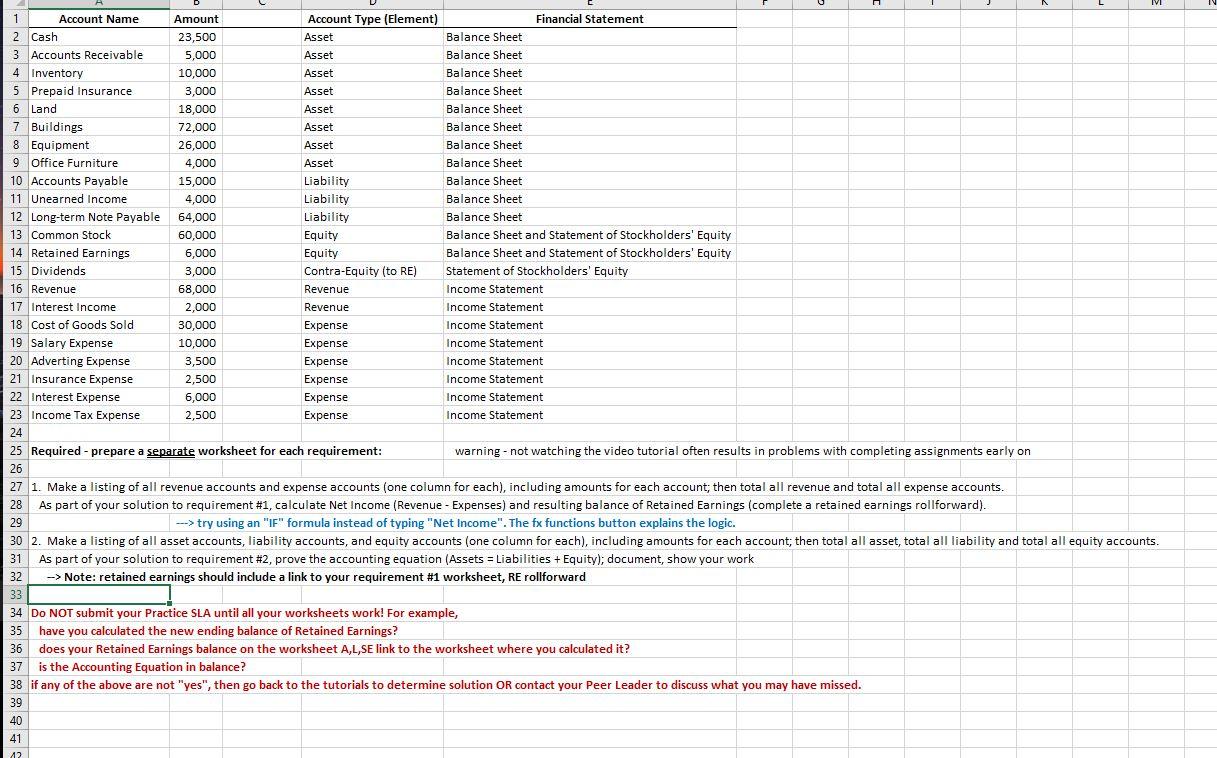
1 SLA Checklist 2 ACFI - 101 3 Accounting Lab 4. 5 Use the following checklist to help ensure adequate completion of each SLA. After you are "done" with your SLA, you should run through this list. 6 If you need to go back and make changes, you should run through this list again after you make changes. Repeat this process until your SLA is truly complete & accurate. 7 8 1 The Excel file is properly named with the SLA #, your first initial, your last name. For example, my SLA 1 would be named "SLA 1 DAbelli". 9 note: do not use the symbol #in your file name, it creates problems opening from Blackboard. Do rename as noted; otherwise file name too long & can't open when I download from Blkbd 10 2 I have created new worksheets (tabs) next to the assignment tab to create my solution. 11 note: do NOT use the original SLA worksheet. If you do, your assignment will be returned to you with a zero and only one chance to correct & resubmit for scoring asap 12 3 For every figure that comes from doing a calculation, I have used a formula in the cell to produce this figure. 13 (not manually entered or copy/paste) 14 4 For every calculation that uses figures from other cells in the worksheet or another worksheet, I have used a cell reference in my calculation. 15 (not manually entered or copy/paste) 16 5 For every figure or wording that comes directly from the assignment, I have used a cell reference to bring this information to my solution tab. 17 (not manually entered or copy/paste) 18 6 For every narrative response, I have used proper cell formatting to ensure that my response can be read without any modification by the instructor. 19 example: narrative should not run across a page in one line. If instructor cannot reasonably review, it will not be read 20 7 I have formatted all cells that contain figures properly and appropriately. 21 All dollar amounts have proper comma placement, and dollar sign placement if applicable xx,xxx or $xx,xxx 22 All figures presented without O's after decimal (no pennies if dollars; no rounding; at least two decimals for all ratios and multiples xx.xx 23 All percentages have proper percent sign placement xx.xx% 24 The cell is the proper size to allow the entire number to show without modification by the professor (fix any column widths before submission) 25 26 8 I have re-read all questions and instructions on the SLA to be sure I have fulfilled all requirements. 27 28 9 All questions that call for "discussion" or "analysis" are fully answered. 29 I did not simply restate the numbers the question refers to, but also provided a narrative explanation for my observations based on reference or facts. 30 do not explain how the ratio was calculated; explain what the results mean, demonstrating your understanding 31 10 I ran a spellcheck. 32 spelling errors and typos distract from good work 33 11 My worksheets are visually appealing, easy to read/understand, and in good form as required 34 35 1 Asset 1 Account Name Amount Account Type (Element) Financial Statement 2 Cash 23,500 Asset Balance Sheet 3 Accounts Receivable 5,000 Asset Balance Sheet 4 Inventory 10,000 Balance Sheet 5 Prepaid Insurance 3,000 Asset Balance Sheet 6 Land 18,000 Asset Balance Sheet 7 Buildings 72,000 Asset Balance Sheet 8 Equipment 26,000 Asset Balance Sheet 9 Office Furniture 4,000 Asset Balance Sheet 10 Accounts Payable 15,000 Liability Balance Sheet 11 Unearned Income 4,000 Liability Balance Sheet 12 Long-term Note Payable 64,000 Liability Balance Sheet 13 Common Stock 60,000 Equity Balance Sheet and Statement of Stockholders' Equity 14 Retained Earnings 6,000 Equity Balance Sheet and Statement of Stockholders' Equity 15 Dividends 3,000 Contra-Equity (to RE) Statement of Stockholders' Equity 16 Revenue 68,000 Revenue Income Statement 17 Interest Income 2,000 Revenue Income Statement 18 Cost of Goods Sold 30,000 Expense Income Statement 19 Salary Expense 10,000 Expense Income Statement 20 Adverting Expense 3,500 Expense Income Statement 21 Insurance Expense 2,500 Expense Income Statement 22 Interest Expense 6,000 Expense Income Statement 23 Income Tax Expense 2,500 Expense Income Statement 24 25 Required - prepare a separate worksheet for each requirement: warning - not watching the video tutorial often results in problems with completing assignments early on 26 27 1. Make a listing of all revenue accounts and expense accounts (one column for each), including amounts for each account; then total all revenue and total all expense accounts. 28 As part of your solution to requirement #1, calculate Net Income (Revenue - Expenses) and resulting balance of Retained Earnings (complete a retained earnings rollforward). 29 --->try using an "F" formula instead of typing "Net Income". The fx functions button explains the logic. 30 2. Make a listing of all asset accounts, liability accounts, and equity accounts (one column for each), including amounts for each account; then total all asset, total all liability and total all equity accounts. 31 As part of your solution to requirement #2, prove the accounting equation (Assets = Liabilities + Equity); document, show your work 32 -> Note: retained earnings should include a link to your requirement #1 worksheet, RE rollforward 33 34 Do NOT submit your Practice SLA until all your worksheets work! For example, 35 have you calculated the new ending balance of Retained Earnings? 36 does your Retained Earnings balance on the worksheet A,L,SE link to the worksheet where you calculated it? 37 is the Accounting Equation in balance? 38 if any of the above are not "yes", then go back to the tutorials to determine solution OR contact your Peer Leader to discuss what you may have missed. 39 40 41 12
Step by Step Solution
There are 3 Steps involved in it

Get step-by-step solutions from verified subject matter experts
 Study Help