







Question: 1 Small Program Write a program ( class ) called Target. The program will first ask the user to enter a target number from 0
Small Program
Write a program class called Target. The program will first ask the user to enter a target
number from to well call this target in this question and then ask how many numbers the
computer should generate well call this number n in this question Both of these numbers are
whole numbers. The program then generates n random integers from to and then displays how
many times the random numbers were the same as the target and the percentage of this happening.
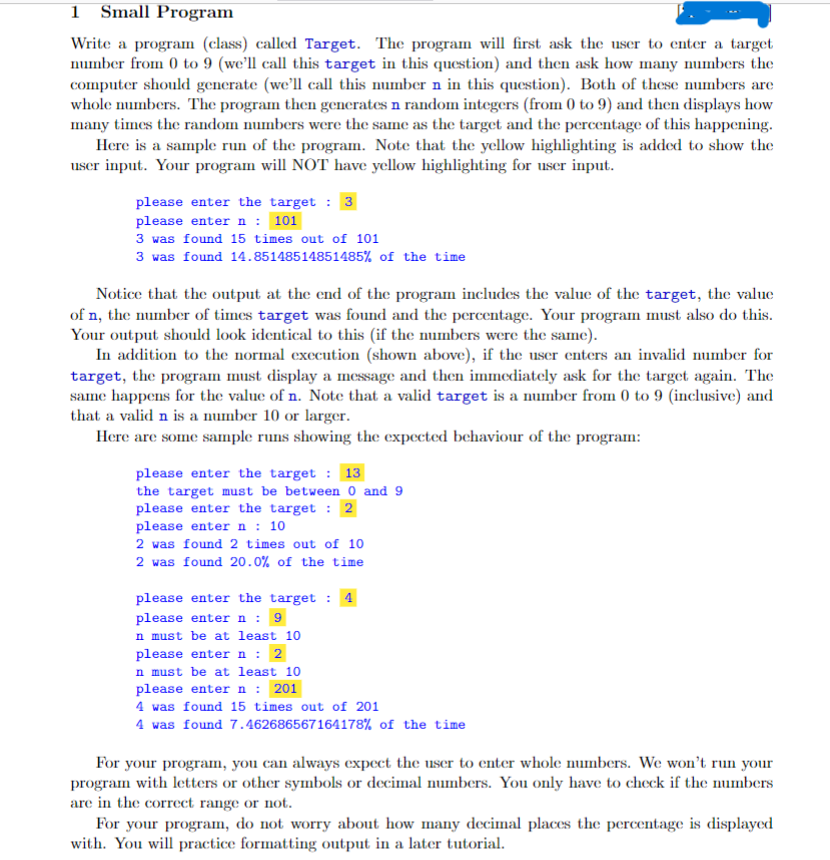
Here is a sample run of the program. Note that the yellow highlighting is added to show the
user input. Your program will NOT have yellow highlighting for user input.
please enter the target :
please enter n :
was found times out of
was found of the time
Notice that the output at the end of the program includes the value of the target, the value
of the number of times target was found and the percentage. Your program must also do this.
Your output should look identical to this if the numbers were the same
In addition to the normal execution shown above if the user enters an invalid number for
target, the program must display a message and then immediately ask for the target again. The
same happens for the value of n Note that a valid target is a number from to inclusive and
that a valid n is a number or larger.
Here are some sample runs showing the expected behaviour of the program:
please enter the target :
the target must be between and
please enter the target :
please enter n :
mathrm was found times out of
mathrm was found of the time
please enter the target :
please enter n :
nmathrm must be at least
please enter n :
n must be at least
please enter n :
was found times out of
was found of the time
For your program, you can always expect the user to enter whole numbers. We won't run your
program with letters or other symbols or decimal numbers. You only have to check if the numbers
are in the correct range or not.
For your program, do not worry about how many decimal places the percentage is displayed
with. You will practice formatting output in a later tutorial.
Step by Step Solution
There are 3 Steps involved in it
1 Expert Approved Answer
Step: 1 Unlock

Question Has Been Solved by an Expert!
Get step-by-step solutions from verified subject matter experts
Step: 2 Unlock
Step: 3 Unlock
 Study Help