







Question: 1. SOLVE USING JAVA FX ONLY.(Add comments please) Added two screenshots please check and solve thank you!! DateDialog is a booking application that allows large
1. SOLVE USING JAVA FX ONLY.(Add comments please)
Added two screenshots please check and solve thank you!!
DateDialog is a booking application that allows large machines such as excavators, to be booked. The main interface for the application is shown in Figure 1.0. Clicking on the New Hire Booking button shows a dialog. The dialog should have two datepicker controls to support the selection of start and end dates. The time interval between these two dates is calculated and multiplied by the cost per day as entered into a textfield by the user. On confirming the dialog, the booking information is shown in the labels on the main application interface (Figure 1.1).
(a) Create an application main interface similar to that shown in Figure 1.0, complete with labels, text fields and button. Apply insets and spacing as required to control the component layout. Use a stylesheet to style the main application interface. Add an entry to the stylesheet for the root style and a further entry to highlight a button on cursor hover. (10 marks)
(b) Design and create a dialog interface complete with datepickers, a text field for entry of the cost per day of hire, labels and buttons. Show the dialog when the New Hire Booking button is clicked. (10 marks)
(c) On confirming the dialog, the dates selected by the user as well as the cost per day are retrieved from the dialog's controls. (10 marks)
(d) Calculate the total cost of the booking based on the inclusive number of days booked as well as the figure from the Cost/Day text field. Finally, the finished booking information should be shown on the main application interface (Figure 1.1).
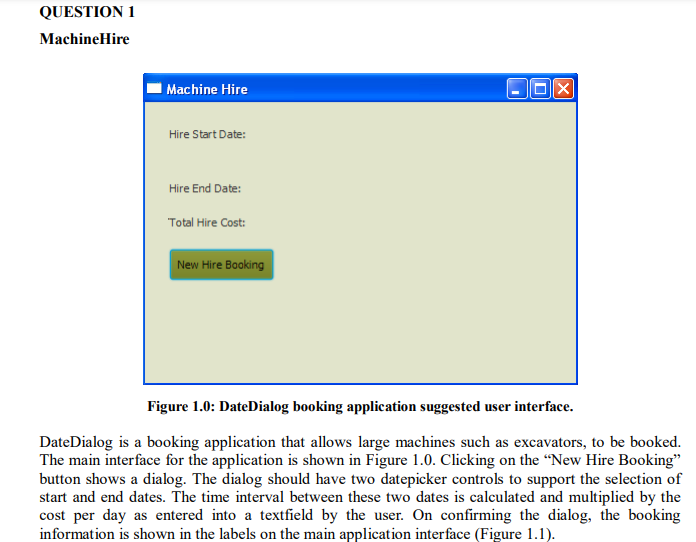
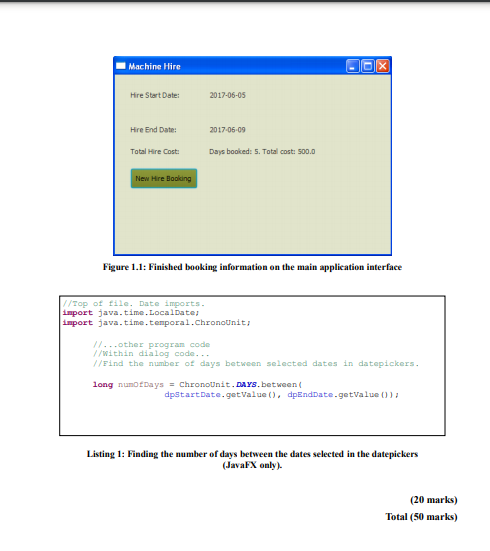
QUESTION 1 Machine Hire X Machine Hire Hire Start Date: Hire End Date: Total Hire Cost: New Hire Booking Figure 1.0: DateDialog booking application suggested user interface. DateDialog is a booking application that allows large machines such as excavators, to be booked. The main interface for the application is shown in Figure 1.0. Clicking on the New Hire Booking button shows a dialog. The dialog should have two datepicker controls to support the selection of start and end dates. The time interval between these two dates is calculated and multiplied by the cost per day as entered into a textfield by the user. On confirming the dialog, the booking information is shown in the labels on the main application interface (Figure 1.1). Machine Hire OOX Hire Start Date: 2017-06-05 Hire End Date: 2017-06-09 Total Hire Costi Days booked: 5. Total cost: 500.0 New Hire Booking Figure 1.1: Finished booking information on the main application interface //Top of file. Date imports. import java.time. LocalDate, import java.time. temporal.chronounit; //...other program code //within dialog code... //Find the number of days between selected dates in datepickers. long numot Days = Chronounit. DAYS. between dpstartDate.getValue(), dpEndDate.getValue 0); Listing 1: Finding the number of days between the dates selected in the datepickers (JavaFX only). (20 marks) Total (50 marks) QUESTION 1 Machine Hire X Machine Hire Hire Start Date: Hire End Date: Total Hire Cost: New Hire Booking Figure 1.0: DateDialog booking application suggested user interface. DateDialog is a booking application that allows large machines such as excavators, to be booked. The main interface for the application is shown in Figure 1.0. Clicking on the New Hire Booking button shows a dialog. The dialog should have two datepicker controls to support the selection of start and end dates. The time interval between these two dates is calculated and multiplied by the cost per day as entered into a textfield by the user. On confirming the dialog, the booking information is shown in the labels on the main application interface (Figure 1.1). Machine Hire OOX Hire Start Date: 2017-06-05 Hire End Date: 2017-06-09 Total Hire Costi Days booked: 5. Total cost: 500.0 New Hire Booking Figure 1.1: Finished booking information on the main application interface //Top of file. Date imports. import java.time. LocalDate, import java.time. temporal.chronounit; //...other program code //within dialog code... //Find the number of days between selected dates in datepickers. long numot Days = Chronounit. DAYS. between dpstartDate.getValue(), dpEndDate.getValue 0); Listing 1: Finding the number of days between the dates selected in the datepickers (JavaFX only). (20 marks) Total (50 marks)
Step by Step Solution
There are 3 Steps involved in it

Get step-by-step solutions from verified subject matter experts
 Study Help