







Question: 1. Source code and screenshot of the table for creating the Customer table. 2. Source code and screenshot of the table for creating the Item
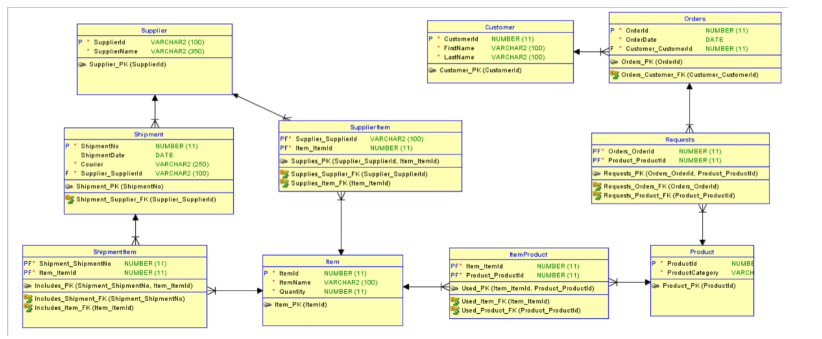
1. Source code and screenshot of the table for creating the Customer table.
2. Source code and screenshot of the table for creating the Item table.
3. Source code and screenshot of the table for creating the ItemProduct table.
4. Source code and screenshot of the table for creating the Orders table.
5. Source code and screenshot of the table for creating the Product table.
6. Source code and screenshot of the table for creating the Requests table.
7. Source code and screenshot of the table for creating the Shipment table.
8. Source code and screenshot of the table for creating the ShipmentItem table.
9. Source code and screenshot of the table for creating the Supplier table.
10. Source code and screenshot of the table for creating the SupplierItem table.
11. Write a DDL code the add new columns on the Customer table. The new columns name are Address, Postal Code, Province, Zip Code. The new columns are all data type Vachar2(100). Copy and paste the source code and screenshot of the updated table below:
12. Change the Quantity attribute to QTY in the item Table. Copy and paste the source code and screenshot of the updated table below:
13. Rename the following tables:
ItemProduct to DetailsOfProduct
ShipmentItem to ShipmentDetails
SupplierItem to SuppliersInvoice
Copy and paste the source code and screenshot of the updated table below:
14. Increase the number of characters on the attribute ProductCategory in the Product table. Increase it from 500 to 600. Copy and paste the source code and screenshot of the updated table below:
15. Type in Commit on the worksheet, to save the changes made. Copy and paste the code below:
16. Create a new table. Name the table TempTable. Create two attributes of your own, one of the attributes is an identifier. Copy and paste the source code and screenshot of the updated table below:
17. Delete the table TempTable. Copy the code you have used and take a screenshot of the your Recycle bin and paste it here:
18. Restore the table TempTable back to the Tables Schema. Copy and paste the source code and screenshot of the updated table below:
19. Make the table TempTable to an uneditable table. Copy and paste the source code and screenshot of the updated table below:
20. Create a comment on the column Customerid of the Customer table. Copy and paste the code below
Step by Step Solution
There are 3 Steps involved in it

Get step-by-step solutions from verified subject matter experts
 Study Help