







Question: 1. Specify the following query on the database and show the query results. Take a print screen of both the query code and the result
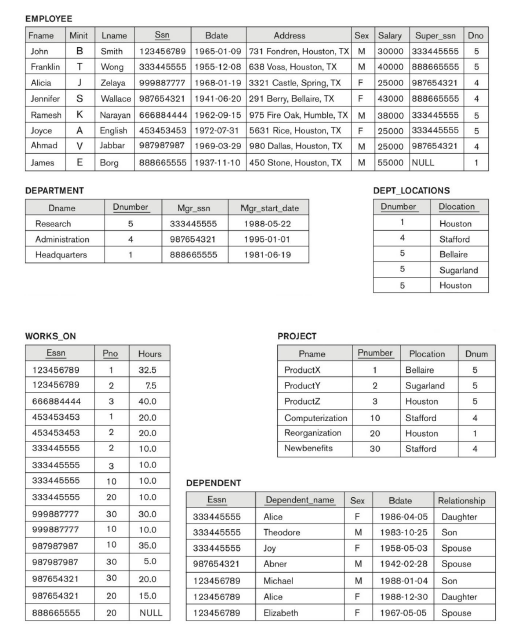
1. Specify the following query on the database and show the query results. Take a print screen of both the query code and the result table. Paste in the word document. Retrieve the names of the employees working on project # 1
2. Specify the following query on the database and show the query results. Take a print screen of both the query code and the result table. Paste in the word document. For each department whose average employee salary is more than $30,000, retrieve the department name and the number of employees working for that department.
EMPLOYEE DEPARTMENT DEPT_LOCATIONS \begin{tabular}{|c|l|} \hline Dnumber & Dlocation \\ \hline 1 & Houston \\ \hline 4 & Stafford \\ \hline 5 & Bellaire \\ \hline 5 & Sugarland \\ \hline 5 & Houston \\ \hline \end{tabular} WORKS_ON PROJECT \begin{tabular}{|c|c|c|} \hline Esan & Pno & Hours \\ \hline 123456789 & 1 & 32.5 \\ \hline 123456789 & 2 & 7.5 \\ \hline 666884444 & 3 & 40.0 \\ \hline 453453453 & 1 & 20.0 \\ \hline 453453453 & 2 & 20.0 \\ \hline 333445555 & 2 & 10.0 \\ \hline 333445555 & 3 & 10.0 \\ \hline 333446565 & 10 & 10.0 \\ \hline 333445555 & 20 & 10.0 \\ \hline 999887777 & 30 & 30.0 \\ \hline 999887777 & 10 & 10.0 \\ \hline 987987987 & 10 & 35.0 \\ \hline 987987987 & 30 & 5.0 \\ \hline 987654321 & 30 & 20.0 \\ \hline 987654321 & 20 & 15.0 \\ \hline 888665555 & 20 & NULL \\ \hline \end{tabular} \begin{tabular}{|l|c|l|c|} \hline \multicolumn{1}{|c|}{ Pname } & Pnumber & Plocation & Drim \\ \hline ProductX & 1 & Bellaire & 5 \\ \hline ProductY & 2 & Sugarland & 5 \\ \hline ProductZ & 3 & Houston & 5 \\ \hline Computerization & 10 & Stafford & 4 \\ \hline Reorganization & 20 & Houston & 1 \\ \hline Newbenefits & 30 & Stafford & 4 \\ \hline \end{tabular} DEPENDENT \begin{tabular}{|c|l|c|c|l|} \hline Essn & Dependent_name & Sex & Bdate & Relationship \\ \hline 333445555 & Alice & F & 19860405 & Daughter \\ \hline 333445555 & Theodore & M & 19831025 & Son \\ \hline 333445555 & Joy & F & 19580503 & Spouse \\ \hline 987654321 & Abner & M & 19420228 & Spouse \\ \hline 123456789 & Michael & M & 19880104 & Son \\ \hline 123456789 & Alice & F & 19881230 & Daughter \\ \hline 123456789 & Elizabeth & F & 19670505 & Spouse \\ \hline \end{tabular}Step by Step Solution
There are 3 Steps involved in it
1 Expert Approved Answer
Step: 1 Unlock

Question Has Been Solved by an Expert!
Get step-by-step solutions from verified subject matter experts
Step: 2 Unlock
Step: 3 Unlock
 Study Help