







Question: 1 Start Excel. Open the file named e 0 6 _ grader _ a 2 _ Assets.xlsx . Save the file with the name e
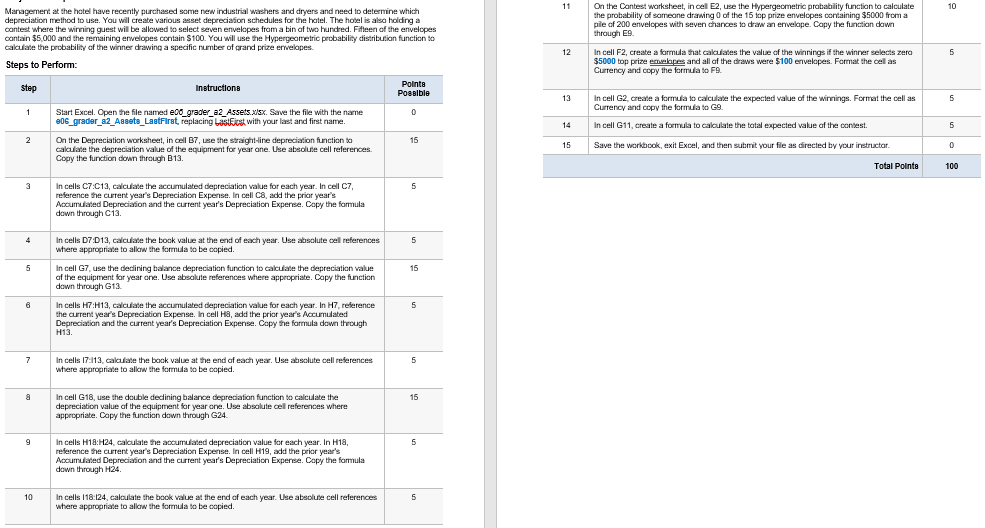
Start Excel. Open the file named egraderaAssets.xlsx Save the file with the name egraderaAssetsLastFirst, replacing LastFirst with your last and first name.
On the Depreciation worksheet, in cell B use the straightline depreciation function to calculate the depreciation value of the equipment for year one. Use absolute cell references. Copy the function down through B
In cells C:C calculate the accumulated depreciation value for each year. In cell C reference the current year's Depreciation Expense. In cell C add the prior year's Accumulated Depreciation and the current year's Depreciation Expense. Copy the formula down through C
In cells D:D calculate the book value at the end of each year. Use absolute cell references where appropriate to allow the formula to be copied.
In cell G use the declining balance depreciation function to calculate the depreciation value of the equipment for year one. Use absolute references where appropriate. Copy the function down through G
In cells H:H calculate the accumulated depreciation value for each year. In H reference the current year's Depreciation Expense. In cell H add the prior year's Accumulated Depreciation and the current year's Depreciation Expense. Copy the formula down through H
In cells I:I calculate the book value at the end of each year. Use absolute cell references where appropriate to allow the formula to be copied.
In cell G use the double declining balance depreciation function to calculate the depreciation value of the equipment for year one. Use absolute cell references where appropriate. Copy the function down through G
In cells H:H calculate the accumulated depreciation value for each year. In H reference the current year's Depreciation Expense. In cell H add the prior year's Accumulated Depreciation and the current year's Depreciation Expense. Copy the formula down through H
In cells I:I calculate the book value at the end of each year. Use absolute cell references where appropriate to allow the formula to be copied.
On the Contest worksheet, in cell E use the Hypergeometric probability function to calculate the probability of someone drawing of the top prize envelopes containing $ from a pile of envelopes with seven chances to draw an envelope. Copy the function down through E
In cell F create a formula that calculates the value of the winnings if the winner selects zero $ top prize envelopes and all of the draws were $ envelopes. Format the cell as Currency and copy the formula to F
In cell G create a formula to calculate the expected value of the winnings. Format the cell as Currency and copy the formula to G
In cell G create a formula to calculate the total expected value of the contest.
Save the workbook, exit Excel, and then submit your file as directed by your instructor.
PLEASE HELP WITH ALL!!!
Step by Step Solution
There are 3 Steps involved in it
1 Expert Approved Answer
Step: 1 Unlock

Question Has Been Solved by an Expert!
Get step-by-step solutions from verified subject matter experts
Step: 2 Unlock
Step: 3 Unlock
 Study Help