







Question: 1. Suppose you are browsing the Internet on your laptop at home. Suddenlink is your ISP (Internet service provider) with local DNS server. You type
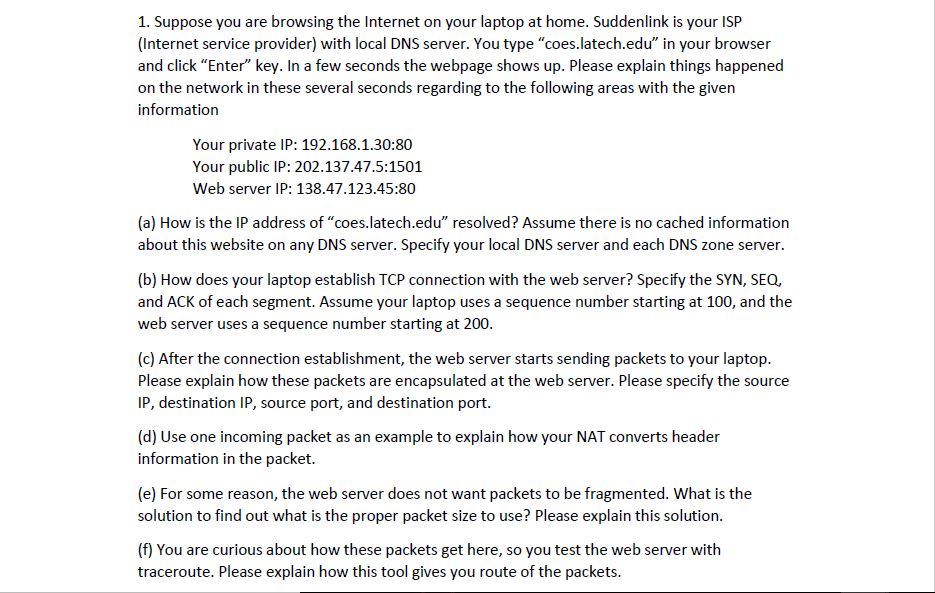
1. Suppose you are browsing the Internet on your laptop at home. Suddenlink is your ISP (Internet service provider) with local DNS server. You type "coes.latech.edu" in your browser and click "Enter" key. In a few seconds the webpage shows up. Please explain things happened on the network in these several seconds regarding to the following areas with the given information Your private IP: 192.168.1.30:80 Your public IP: 202.137.47.5:1501 Web server IP: 138.47.123.45:80 (a) How is the IP address of "coes.latech.edu" resolved? Assume there is no cached information about this website on any DNS server. Specify your local DNS server and each DNS zone server. (b) How does your laptop establish TCP connection with the web server? Specify the SYN, SEQ, and ACK of each segment. Assume your laptop uses a sequence number starting at 100, and the web server uses a sequence number starting at 200. (c) After the connection establishment, the web server starts sending packets to your laptop. Please explain how these packets are encapsulated at the web server. Please specify the source IP, destination IP, source port, and destination port (d) Use one incoming packet as an example to explain how your NAT converts header information in the packet. (e) For some reason, the web server does not want packets to be fragmented. What is the solution to find out what is the proper packet size to use? Please explain this solution. (f) You are curious about how these packets get here, so you test the web server with traceroute. Please explain how this tool gives you route of the packets. 1. Suppose you are browsing the Internet on your laptop at home. Suddenlink is your ISP (Internet service provider) with local DNS server. You type "coes.latech.edu" in your browser and click "Enter" key. In a few seconds the webpage shows up. Please explain things happened on the network in these several seconds regarding to the following areas with the given information Your private IP: 192.168.1.30:80 Your public IP: 202.137.47.5:1501 Web server IP: 138.47.123.45:80 (a) How is the IP address of "coes.latech.edu" resolved? Assume there is no cached information about this website on any DNS server. Specify your local DNS server and each DNS zone server. (b) How does your laptop establish TCP connection with the web server? Specify the SYN, SEQ, and ACK of each segment. Assume your laptop uses a sequence number starting at 100, and the web server uses a sequence number starting at 200. (c) After the connection establishment, the web server starts sending packets to your laptop. Please explain how these packets are encapsulated at the web server. Please specify the source IP, destination IP, source port, and destination port (d) Use one incoming packet as an example to explain how your NAT converts header information in the packet. (e) For some reason, the web server does not want packets to be fragmented. What is the solution to find out what is the proper packet size to use? Please explain this solution. (f) You are curious about how these packets get here, so you test the web server with traceroute. Please explain how this tool gives you route of the packets
Step by Step Solution
There are 3 Steps involved in it

Get step-by-step solutions from verified subject matter experts
 Study Help