







Question: 1. The cp command copies the source file specified by the SourceFile parameter to the destination file specified by the DestinationFile parameter. Write a C
1. The cp command copies the source file specified by the SourceFile parameter to the destination file specified by the DestinationFile parameter.
Write a C program that mimics the cp command using open() system call to open source.txt file in read-only mode and copy the contents of it to destination.txt using read() and write() system calls.
2. Repeat part 1 by writing a new C program) as per the following procedure:
(a) Read 100 characters from source.txt at a time, and among characters read, replace each character `1` with character `L` and all characters are then written in destination.txt (
b) Write characters "XYZ" into file destination.txt
(c) Repeat the previous steps until the end of file source.txt. The last read step may not have 100 characters.
General Instructions Use errorno/perror sub-routine to display meaningful error messages in case of system call failures. Properly close the files using close system call after you finish read/write. Learn to use man pages to know more about file management system calls (e.g, man read).
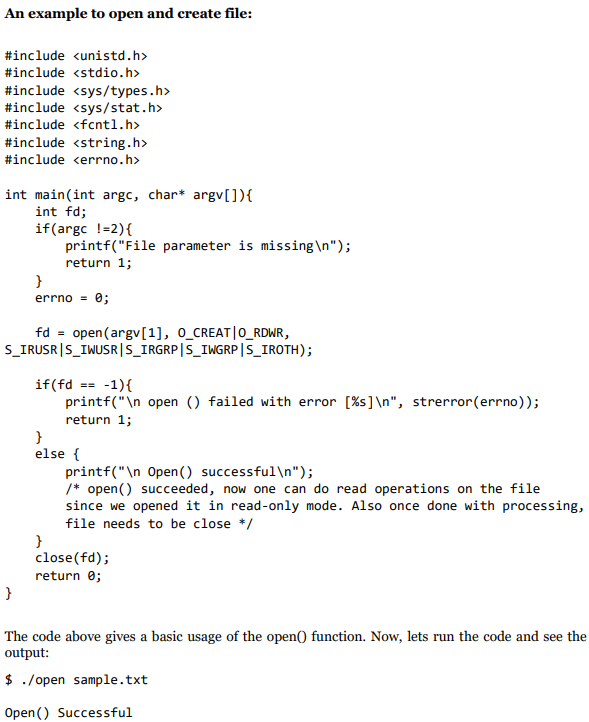
An example to open and create file: \#include \#include \#include int main(int argc, char* argv[]){ int fd; if (argcI=2){ printf("File parameter is missing ); return 1 ; \} errno =0; fd= open (argv [1], 0_CREAT 0_RDWR, S_IRUSR|S_IWUSR|S_IRGRP S_IWGRPS IROTH); if (fd==1){ printf(" open () failed with error [\%s] n ", strerror(errno)); return 1; \} else \{ printf(" Open() successful ); / open() succeeded, now one can do read operations on the file since we opened it in read-only mode. Also once done with processing, file needs to be close */ \} close(fd); return ; \} The code above gives a basic usage of the open( function. Now, lets run the code and see the output: $./ open sample.txt Open() Successful
Step by Step Solution
There are 3 Steps involved in it

Get step-by-step solutions from verified subject matter experts
 Study Help