







Question: 1. The program must be drawn in a window 500 pixels by 500 pixels with a white background 2. Function to create a face write
1. The program must be drawn in a window 500 pixels by 500 pixels with a white background
2. Function to create a face write a function that creates a face. The function takes three input/parameter (x coordinate, y coordinate, and fill color value). The shape/face must follow these specifications:
a. The face is an ellipse 30 pixels wide and 30 pixels in height placed at x and y coordinates (input/parameter values).
b. The face has two smaller circles filled with white colour for the eyes. You can use approximate values for the size of the eyes as long as the two eyes are aligned horizontally and are within the face/ellipse.
c. The face will have a straight horizontal white line to represent a mouth.
d. The face is filled with a random shade of red colour(fill input/parameter) value.
3. Call the above function to draw 30 faces at a random location on the top of the window. Your code must use an array to store the random locations/ coordinates of the 30 faces. At the start of the program, all the shapes are at the top of the screen.
4. As the program executes, each shape/ face will fall/ move towards the bottom of the screen, bouncing up once it touches the bottom with the following criteria:
a. Each shape/face will move towards the bottom of the window with a random speed between 1 to 10.
b. The speed value will increase by 0.1 on each frame.
c. Upon touching the bottom of the screen, the speed value will be set to negative 5 (-5). Note that the speed will continue to change by 0.1 on each frame.
the images below are what should the output look like within a sample code of speed affect.
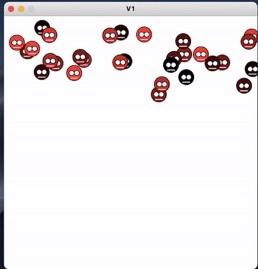
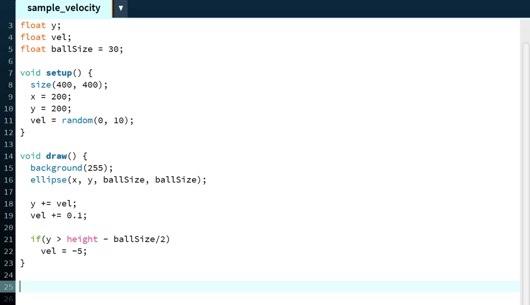
V1 sample_velocity 3 float y: 4 float vel; 5 ftoat ballsize = 30; 8 7 void setup() { size(400, 480); 9 X = 200; 18 y = 200; vel = random(@, 10); 12) 13 14 void draw() { 15 background (255); 16 ellipse(x, y, ballsize, ballSize); 17 18 y + vel; 19 vel + 0.1; 20 21 1f(y > height - ballsize/2) 22 vel = -5; 23 ) 24 25
Step by Step Solution
There are 3 Steps involved in it

Get step-by-step solutions from verified subject matter experts
 Study Help