







Question: . 1- To get into equation editing mode from regular text editing mode, what is the key stroke shortcut? 2. To type in the Greek
. 1- To get into equation editing mode from regular text editing mode, what is the key stroke shortcut?
2. To type in the Greek letter , what is the key stroke shortcut?
3. To type in the symbol , what is the key stroke shortcut?
4. To type in an angle 45, what is the key stroke shortcut?
5. To type in a formula (do not miss the center dot between and ), what is the key stroke shortcut?
6. To type in a vector cross product , what is the key stroke shortcut? (Please note the multiplication operator is not letter x.) Please also reproduce the following equations (4 points each) in the lab report. Please note 1. All variables must be in italic font. 2. Function names (the cos() function) must be in regular font
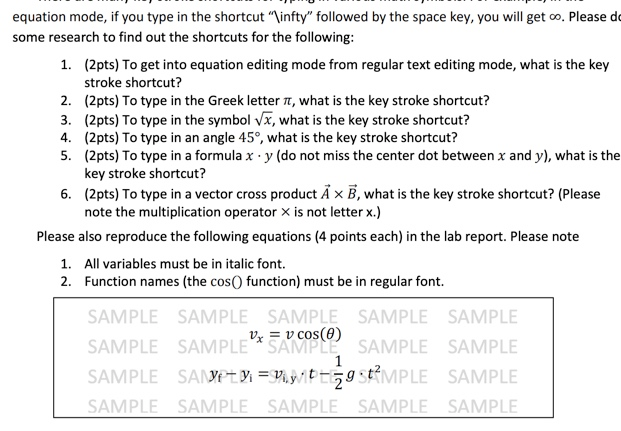
equation mode, if you type in the shortcut '\infty" followed by the space key, you will get co. Please de some research to find out the shortcuts for the following: 1. (2pts) To get into equation editing mode from regular text editing mode, what is the key stroke shortcut? 2. (2pts) To type in the Greek letter 1, what is the key stroke shortcut? 3. (2pts) To type in the symbol Vx, what is the key stroke shortcut? 4. (2pts) To type in an angle 45, what is the key stroke shortcut? 5. (2pts) To type in a formula x y (do not miss the center dot between x and y), what is the key stroke shortcut? 6. (2pts) To type in a vector cross product A X B, what is the key stroke shortcut? (Please note the multiplication operator X is not letter x.) Please also reproduce the following equations (4 points each) in the lab report. Please note 1. All variables must be in italic font. 2. Function names (the cos function) must be in regular font. SAMPLE SAMPLE SAMPLE SAMPLE SAMPLE SAMPLE SAMPLESAMPLE SAMPLE SAMPLE SAMPLE SAMT y =viyt-59t?MPLE SAMPLE SAMPLE SAMPLE SAMPLE SAMPLE SAMPLE 1
Step by Step Solution
There are 3 Steps involved in it

Get step-by-step solutions from verified subject matter experts
 Study Help