







Question: 1. Use packet tracer to create the following network map. Note - be sure to name the devices using the following naming convention 2911
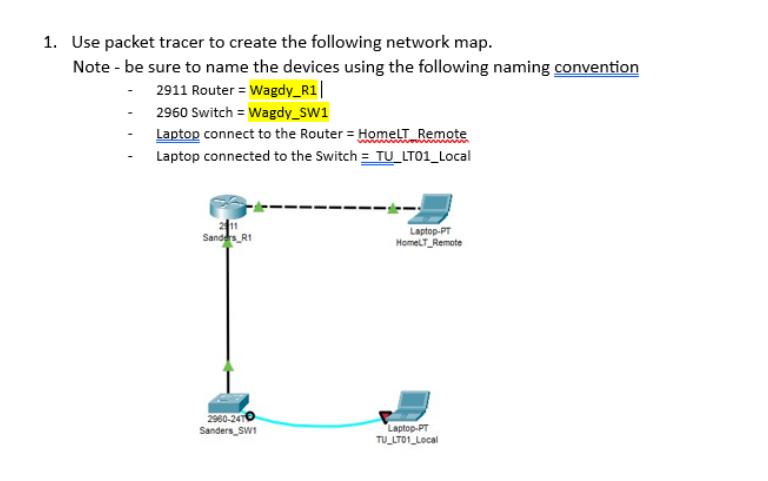
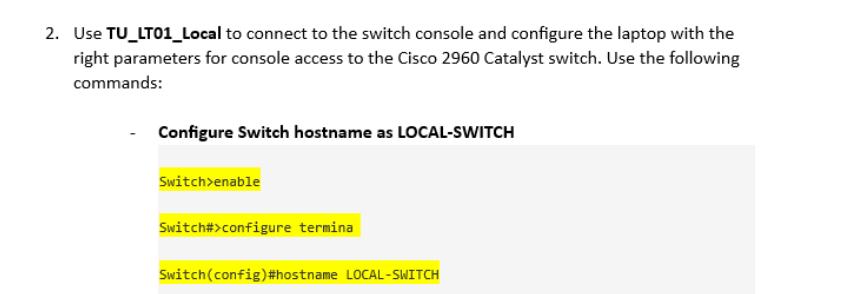
1. Use packet tracer to create the following network map. Note - be sure to name the devices using the following naming convention 2911 Router = Wagdy_R1| 2960 Switch = Wagdy_SW1 Laptop connect to the Router - HomeLT Remote Laptop connected to the Switch = TU_LTO1_Local Sanders R1 2960-2470 Sanders SW1 Laptop-PT HomeLT_Remote Laptop-PT TU_LTO1_Local 2. Use TU_LT01_Local to connect to the switch console and configure the laptop with the right parameters for console access to the Cisco 2960 Catalyst switch. Use the following commands: Configure Switch hostname as LOCAL-SWITCH Switch>enable Switch#>configure termina Switch(config)#hostname LOCAL-SWITCH
Step by Step Solution
There are 3 Steps involved in it
It appears that youre working with Packet Tracer a network simulation tool used to create and config... View full answer

Get step-by-step solutions from verified subject matter experts
 Study Help