







Question: 1. # Use Python to write function named adjustRedPercent(picture,adjustmentPercentage) # which takes in the adjustment value as a percentage. E.g. when the # value in
1.
# Use Python to write function named adjustRedPercent(picture,adjustmentPercentage) # which takes in the adjustment value as a percentage. E.g. when the # value in adjustmentPercentage is 70, the function should make the # image's red values 70% of their original values. If the adjustmentPercentage # is 140, it should make the image's red values 140% of their original # value. # Hint: There is no need for if-statements. # Note: Assume that adjustmentPercentage will only be 0 or greater. # There is no need to perform error-checking. # Note 2: You can create a corresponding driver in the space below as well.
-------------------------------------------------------------------------------------------------------------
-------------------------------------------------------------------------------------------------------------
2.
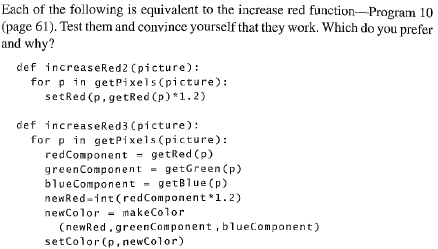
# Write a driver program that can call these 2 functions and include the 2 functions # as well in your final answer.
------------------------------------------------------------------------------------------------------------
-------------------------------------------------------------------------------------------------------------
3.

------------------------------------------------------------------------------------------------------------
-------------------------------------------------------------------------------------------------------------
Each of the following is equivalent to the increase red function-Program 10 (page 61). Test them and convince yourself that they work. Which do you prefer and why? def increaseRed2 Cpicture) for p in getPixelsCpicture): setRed (p,getRed (p)*1.2) def increaseRed3 Cpicture): for p in getPixels (picture): ent getRed (p) redCompon greenComponent getCreen(p) blueComponent-getBlue (p) newRed-int (redComponent*1.2) newColor-makeColor (newRed.greenComponent,blueComponent) setColor (p, newColor)
Step by Step Solution
There are 3 Steps involved in it

Get step-by-step solutions from verified subject matter experts
 Study Help