







Question: 1. Use the data below to create the financial statements in Excel: Re-create the income statement and balance sheet using formulas wherever possible. Each statement
1. Use the data below to create the financial statements in Excel:
- Re-create the income statement and balance sheet using formulas wherever possible. Each statement should be on a separate worksheet. Note, the tax rate is 40% and there is no payout ratio
- On another worksheet, create a statement of cash flows for 2018. Do not enter any numbers directly on this worksheet. All formulas should be linked directly to the source on previous worksheets.
- Using Excels outlining feature, create an outline on the statement of cash flows that, when collapsed, shows only the subtotals for each section.
- Please calculate the following financial ratio. For Gross Profit Margin, use the operating costs before depreciation and amortization as costs of goods sold.
- Please use DuPont method to analyze the change of ROE
-
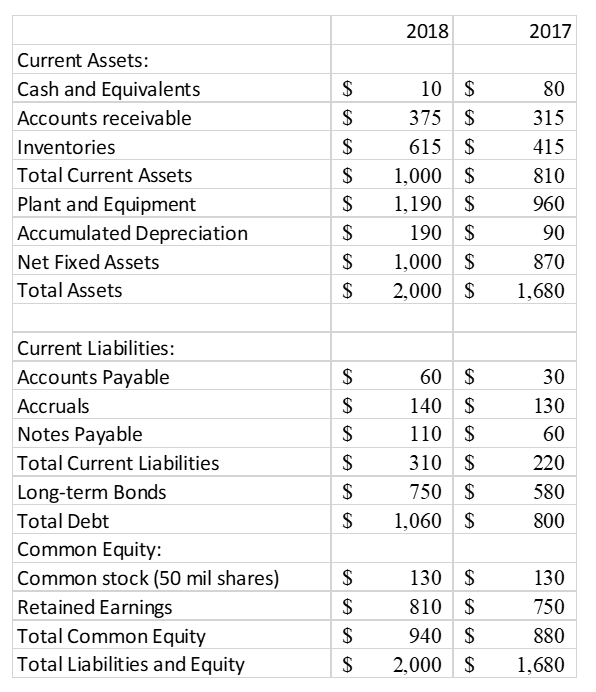
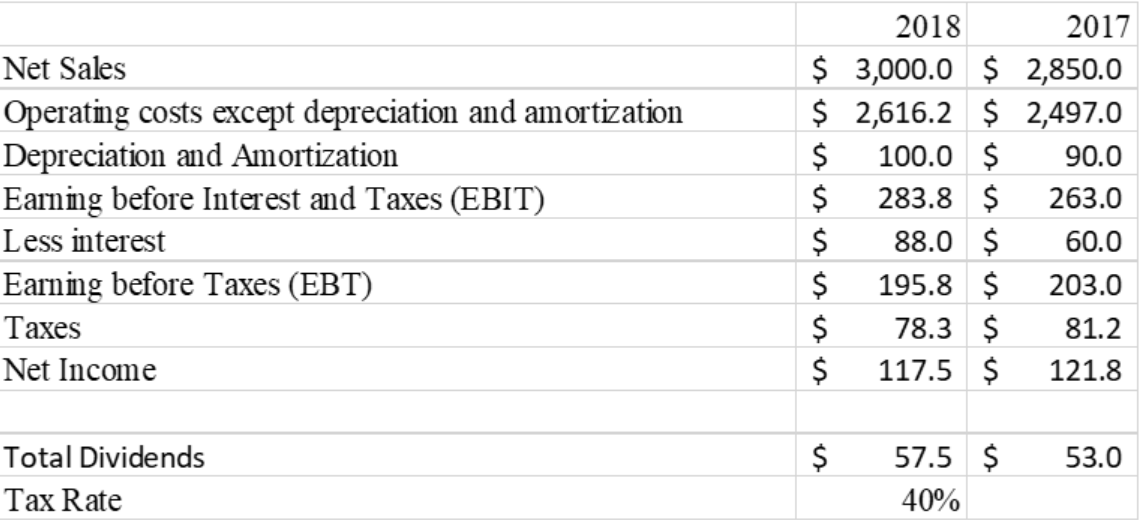

2018 2017 Current Assets: Cash and Equivalents $ 10 $ 80 Accounts receivable $ 375 $ 315 Inventories $ 615 $ 415 Total Current Assets $ 1,000 $ 810 Plant and Equipment $ 1,190 $ 960 Accumulated Depreciation $ 190 $ 90 Net Fixed Assets $ 1,000 $ 870 Total Assets $ 2,000 $ 1,680 Current Liabilities: Accounts Payable $ 60 $ 30 Accruals $ 140 $ 130 Notes Payable $ 110 $ 60 Total Current Liabilities $ 310 $ 220 Long-term Bonds $ 750 $ 580 Total Debt $ 1,060 $ 800 Common Equity: Common stock (50 mil shares) $ 130 $ 130 Retained Earnings $ 810 $ 750 Total Common Equity $ 940 $ 880 Total Liabilities and Equity $ 2,000 $ 1,680
Step by Step Solution
There are 3 Steps involved in it
Lets go through the financial statement creation and analysis in several steps This overview guides you to set up the financial statements in Excel an... View full answer

Get step-by-step solutions from verified subject matter experts
 Study Help