







Question: 1) Using a union, select the first number from the student id column from both the student and student course tables. For example, if the
1) Using a union, select the first number from the student id column from both the student and student course tables. For example, if the student ID is 123456 then you would select "1"
2) Using a union, select all the student ids from both the student and student course tables replacing any occurrence of "1" with "0" in your output.
3) Using a union, select all the student ids from both the student and student course tables displaying the first number of the student id followed by a dash then the first number of the student id again. For example, if the student Id is 134567 then the result would be 1-1.
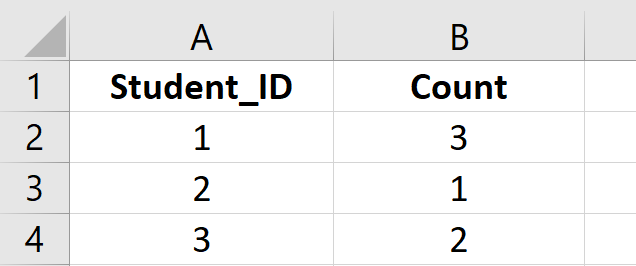
4) Using a union, select only the first number of the student id and the count of that number in the output from the student and student course tables. Example, If the student and student course tables had the following student ids (112, 1134, 178, 234, 356, 398) then the output would look like the following:
**NOTE: Please write code for Microsoft SQL
\begin{tabular}{|c|c|c|} \hline & A & B \\ \hline 1 & Student_ID & Count \\ \hline 2 & 1 & 3 \\ \hline 3 & 2 & 1 \\ \hline 4 & 3 & 2 \\ \hline \end{tabular}
Step by Step Solution
There are 3 Steps involved in it

Get step-by-step solutions from verified subject matter experts
 Study Help