







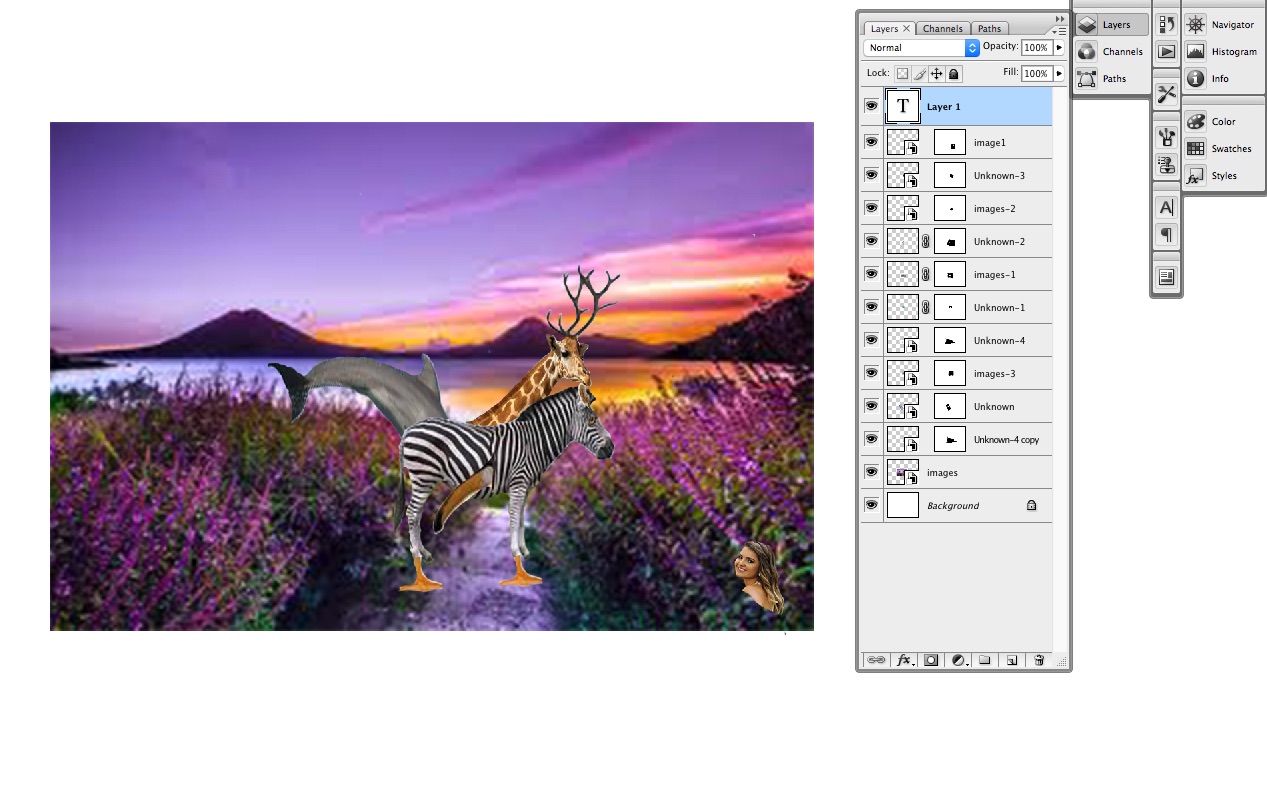
Question: 1 . Using Layer Images - 1 explain the different 4 icons shown from left to right. 2 . Name the layer that has the
Using Layer Images explain the different icons shown from left to right.
Name the layer that has the part of the image that is closest to the viewer.
What does the white box on the layers represent? Why is it not on the bottom layers?
Explain why the bottom layer has the icon of a lock Why don't any of the other layers have it
From left to right explain what the icons on the very bottom of the palette are?
Why does the Layer have a blue color and not the other layers?
Extra credit:
How do we know that this is a Photoshop file and not a JPG or TiFF?
What is the letter extension for a Photoshop file?
Step by Step Solution
There are 3 Steps involved in it
1 Expert Approved Answer
Step: 1 Unlock

Question Has Been Solved by an Expert!
Get step-by-step solutions from verified subject matter experts
Step: 2 Unlock
Step: 3 Unlock
 Study Help