







Question: 1. Using the csvread function, read the data contained in the provided .csv file into a variable. More information about the csvread function can be
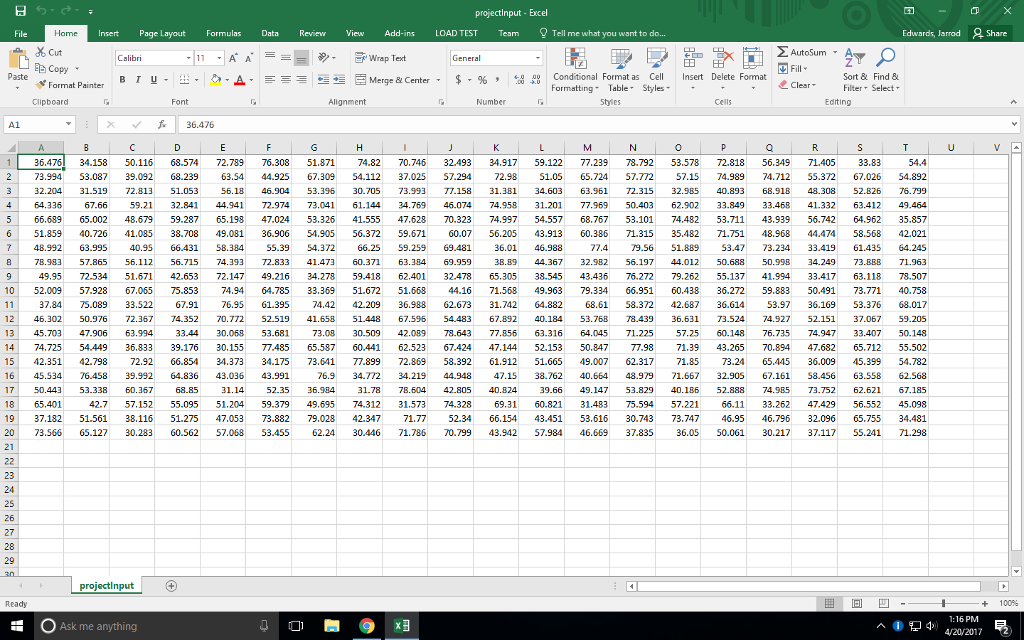
1. Using the csvread function, read the data contained in the provided .csv file into a variable. More information about the csvread function can be found here (http://www.mathworks.com/help/matlab/ref/csvread.html)
2. Save the variable into a projectDAT.dat file. Important note: round the values before saving the variable (i.e., the variable will have only integers).
3. Load the .dat file. (This step will create a variable, name projectDAT)
4. Create and include a function to take the projectDAT variable as a parameter. In this function, you will use loops to compute the sum the elements of each row in order to create column vector. Allocate the size of the column vector containing the sum of each row. The column vector will be the output of this function.
5. Create and include another function to take the projectDAT as a parameter. In this function, you will use loops to compute the sum the elements of each column in order to create row vector. Allocate the size of the row vector containing the sum of each column. The row vector will be the output of this function.
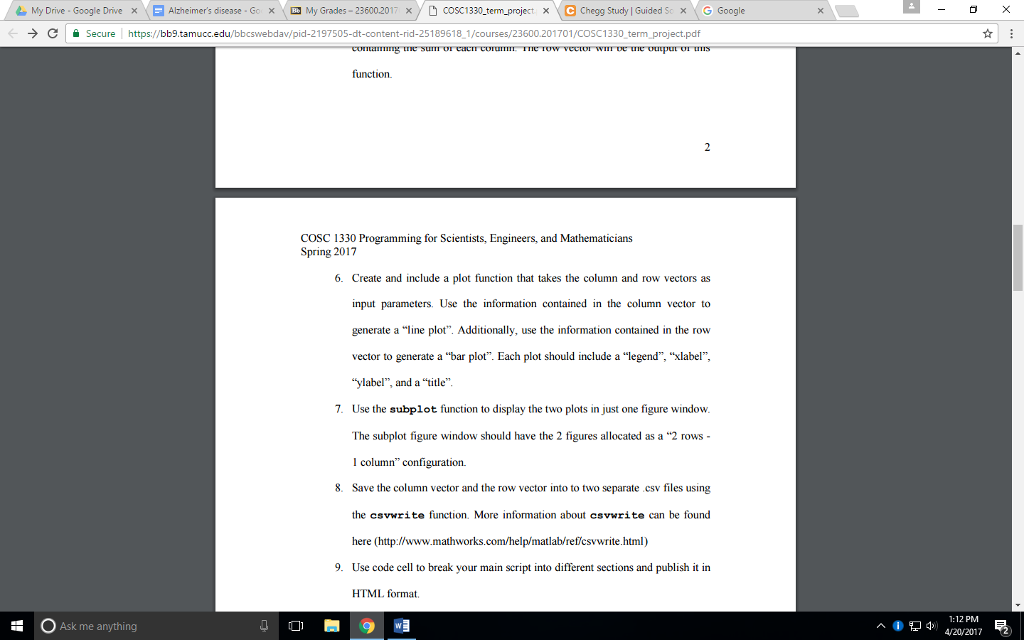
6. Create and include a plot function that takes the column and row vectors as input parameters. Use the information contained in the column vector to generate a line plot. Additionally, use the information contained in the row vector to generate a bar plot. Each plot should include a legend, xlabel, ylabel, and a title.
7. Use the subplot function to display the two plots in just one figure window. The subplot figure window should have the 2 figures allocated as a 2 rows - 1 column configuration.
8. Save the column vector and the row vector into to two separate .csv files using the csvwrite function. More information about csvwrite can be found here (http://www.mathworks.com/help/matlab/ref/csvwrite.html)
9. Use code cell to break your main script into different sections and publish it in HTML format.
USE MATLAB PLEASE!!!
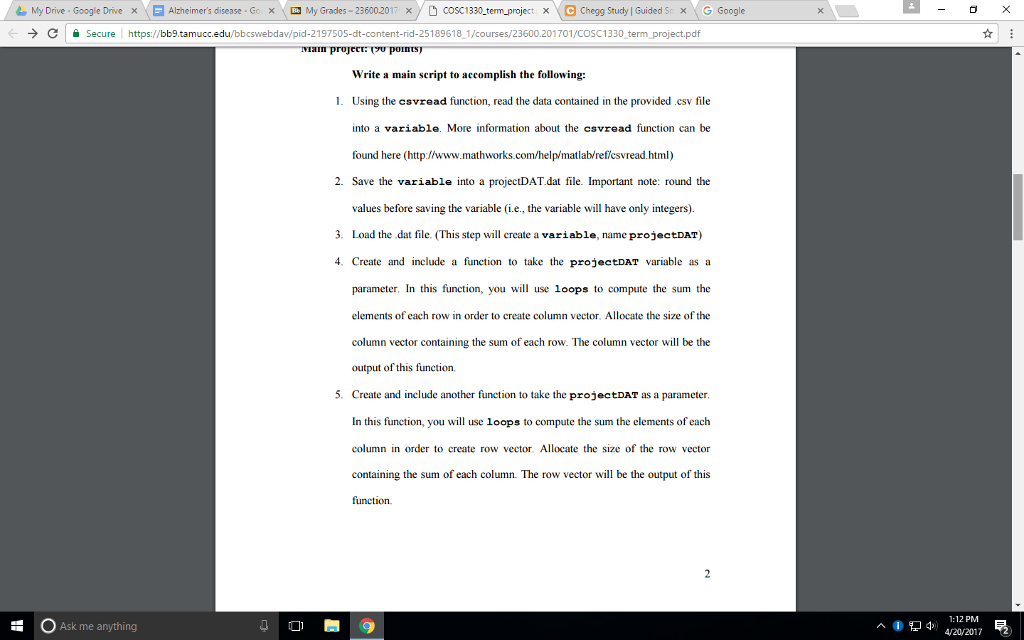
CSV file
My Google Drive X E Alzheimer's disease Go x My Grades 236002017 x COSC1330-term project x C Chegg Study l Guided Sc x G Google Secure http bb9.tamucc ed u/bbcswebdav/pid-2197505-dit-content-rid-25189618-1/courses/23600.201701/COSC 1330 term project. pdf Write a main script to accomplish the following: 1. Using the csvread function, read the data contained in the provided .csv file into a variable. More information about the csvread function can be found here (http://www.mathworks.com/help/matlablreflcsvread.html) 2. Save the variable into a projectDAT.dat file. Important note: round the values before saving the variable (i.e., the variable will have only integers). 3. Load the dat file. (This step will create a variable, name projectDAT) 4. Create and include a function to take the projectDAT variable as a parameter. In this function, you will use loops to compute the sum the elements of each row in order to create column vector. Allocate the size of the column vector containing the sum of each row. The column vector will be the output of this function. 5. Create and include another function to take the projectDAT as a parameter. In this function, you will use loops to compute the sum the elements of each column in order to create row vector. Allocate the size of the row vector containing the sum of each column. The row vector will be the output of this function. E Ask me anything 2 PM My Google Drive X E Alzheimer's disease Go x My Grades 236002017 x COSC1330-term project x C Chegg Study l Guided Sc x G Google Secure http bb9.tamucc ed u/bbcswebdav/pid-2197505-dit-content-rid-25189618-1/courses/23600.201701/COSC 1330 term project. pdf Write a main script to accomplish the following: 1. Using the csvread function, read the data contained in the provided .csv file into a variable. More information about the csvread function can be found here (http://www.mathworks.com/help/matlablreflcsvread.html) 2. Save the variable into a projectDAT.dat file. Important note: round the values before saving the variable (i.e., the variable will have only integers). 3. Load the dat file. (This step will create a variable, name projectDAT) 4. Create and include a function to take the projectDAT variable as a parameter. In this function, you will use loops to compute the sum the elements of each row in order to create column vector. Allocate the size of the column vector containing the sum of each row. The column vector will be the output of this function. 5. Create and include another function to take the projectDAT as a parameter. In this function, you will use loops to compute the sum the elements of each column in order to create row vector. Allocate the size of the row vector containing the sum of each column. The row vector will be the output of this function. E Ask me anything 2 PM
Step by Step Solution
There are 3 Steps involved in it

Get step-by-step solutions from verified subject matter experts
 Study Help