







Question: 1. Using the sqlite3 module Unsaved Changes 3 points possible Reset to Starter Code Write a Python function named build_database, that takes a single string
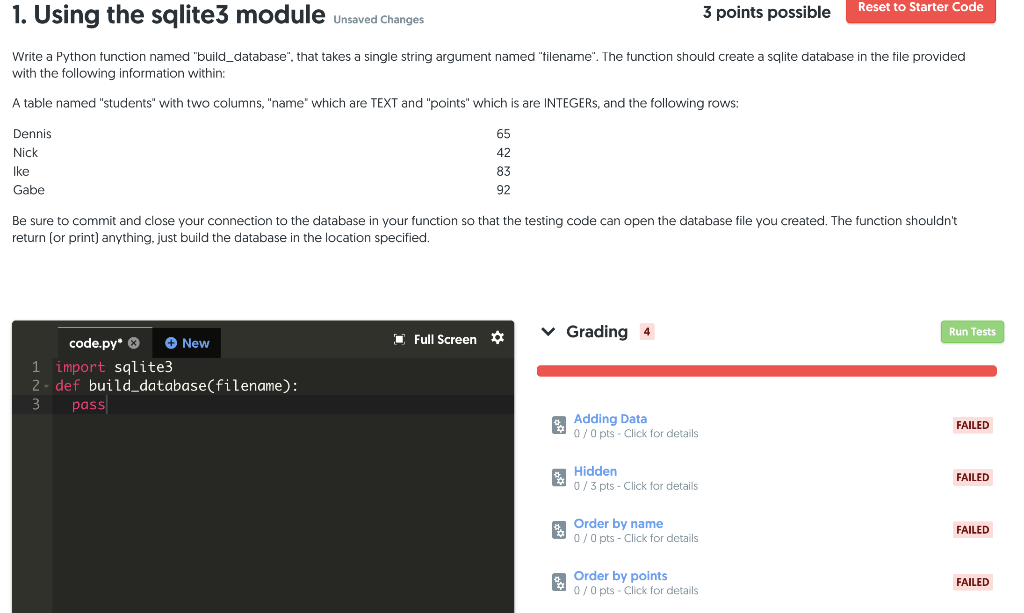
1. Using the sqlite3 module Unsaved Changes 3 points possible Reset to Starter Code Write a Python function named "build_database", that takes a single string argument named "filename". The function should create a sqlite database in the tile provided with the following information within: A table named "students" with two columns, "name" which are TEXT and "points" which is are INTEGERs, and the following rows: 42 Dennis Nick Ike Gabe Be sure to commit and close your connection to the database in your function so that the testing code can open the database file you created. The function shouldn't return (or print) anything, just build the database in the location specified. Run Tests 1 v Grading 4 Full Screen code.py* New 1 import sqlite3 2- def build_database(filename): 3 pass Adding Data 0 / 0 pts - Click for details FAILED 0 Hidden 0/3 pts - Click for details FAILED e Order by name 0/0 pts - Click for details FAILED e Order by points 0 0 / 0 pts - Click for details FAILED
Step by Step Solution
There are 3 Steps involved in it

Get step-by-step solutions from verified subject matter experts
 Study Help