







Question: 1. Using this completed instance diagram fill in the cardinality symbols for the ERD below. You will probably need to use a basic drawing tool
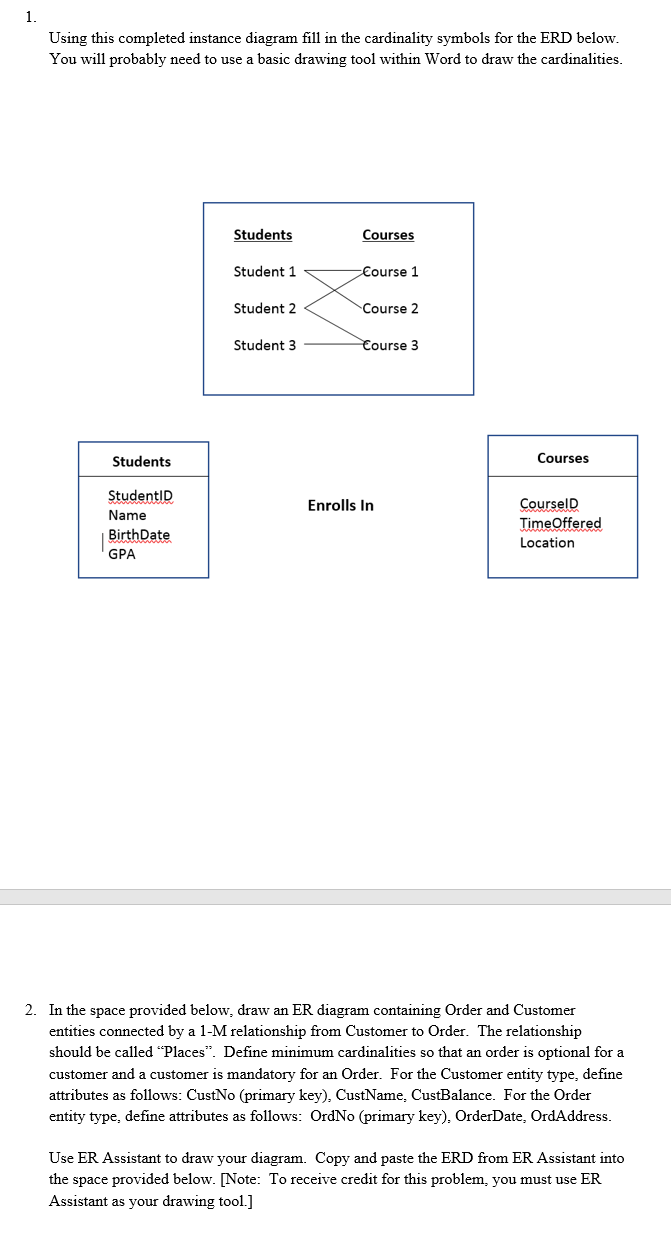
1. Using this completed instance diagram fill in the cardinality symbols for the ERD below. You will probably need to use a basic drawing tool within Word to draw the cardinalities. Students Courses Student 1 Course 1 Student 2 Course 2 Student 3 Course 3 Students Courses Enrolls In StudentID Name BirthDate GPA CourseID Time Offered Location 2. In the space provided below, draw an ER diagram containing Order and Customer entities connected by a 1-M relationship from Customer to Order. The relationship should be called "Places. Define minimum cardinalities so that an order is optional for a customer and a customer is mandatory for an Order. For the Customer entity type, define attributes as follows: CustNo (primary key), CustName. CustBalance. For the Order entity type, define attributes as follows: OrdNo (primary key). Order Date, OrdAddress. Use ER Assistant to draw your diagram. Copy and paste the ERD from ER Assistant into the space provided below. [Note: To receive credit for this problem, you must use ER Assistant as your drawing tool.]
Step by Step Solution
There are 3 Steps involved in it

Get step-by-step solutions from verified subject matter experts
 Study Help