







Question: 1) Videos Type I Using a Type I subquery, show which videos were watched during the first week of February if the video is over
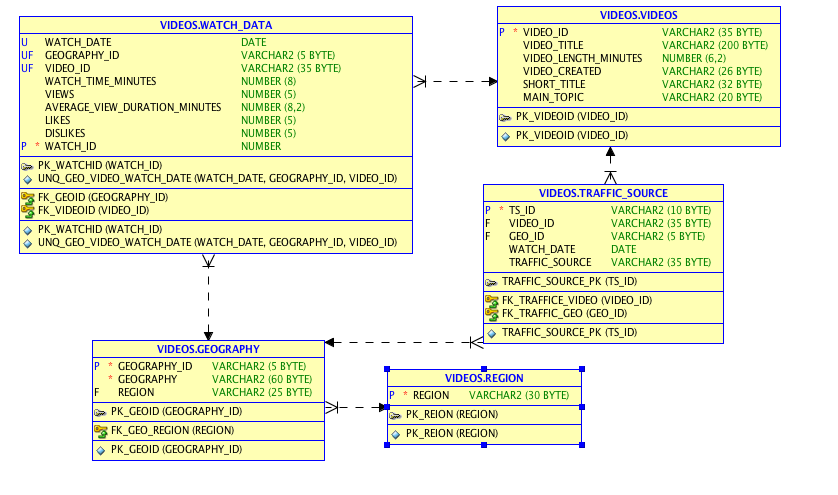
1) Videos
Type I
Using a Type I subquery, show which videos were watched during the
first week of February if the video is over 10 minutes in length.
Show the video's main topic, short title, and length. Sort by
main topic then title.
Think about which table(s) should be in the subquery to get the
list you need to compare against in the outer query. The subquery
contains useful data used by the outer query but does NOT include
fields shown in the outer query.
2) Videos
Type I
Using a Type I subquery, show which countries watched videos
in January of the current year. Get the current year from
sysdate; don't hardcode a year number.
Show the region, country and country code (geography_id). Sort
by region then country.
Think about which table(s) should be in the subquery to get the
list you need to compare against in the outer query. The subquery
contains useful data used by the outer query but does NOT include
fields shown in the outer query.
3) Videos
Type II
Use a Type II (correlated) subquery to solve the previous
problem.
VIDEOS.VIDEOS VIDEOS.WATCH DATA P VIDEOID VARCHAR2 (35 BYTE) VARCHAR2 (200 BYTE - U WATCH DATE DATE VARCHAR2 (5 BYTE) VARCHAR2 (35 BYTE) NUMBER (8) NUMBER (5) VIDEO TITLE VIDEO LENGTH_MINUTES NUMBER (6,2) VIDEO CREATED SHORT TITLE MAIN TOPIC UF GEOGRAPHY ID UF VIDEO ID VARCHAR2 (26 BYTE) VARCHAR2 (32 BYTE) VARCHAR2 (20 BYTE) WATCH TIME MINUTES VIEWS AVERAGE VIEW_DURATION MINUTES NUMBER (8,2) NUMBER (5) NUMBER (5) NUMBER PK_VIDEOID (VIDEO ID) PK-VIDEOID (VIDEO-ID) LIKES DISLIKES ? P WATCH ID PK_WATCHID (WATCH_ID) UNQ-GEO-VIDEO. WATCH-DATE (WATCH-DATE GEOGRAPHY-ID, VIDEO-ID) FK GEOID (GEOGRAPHY ID) FK_VIDEOID (VIDEO ID) PK-WATCH! D (WATCH-ID) UNQ-GEO-VIDEO. WATCH-DATE (WATCH-DATE GEOGRAPHY-ID, VIDEO-ID) ? VIDEOS TRAFFIC SOURCE VARCHAR2 (10 BYTE) VARCHAR2 (35 BYTE) VARCHAR2 (5 BYTE) DATE P TS ID F VIDEO ID ? ? F GEO ID WATCH DATE TRAFFIC_SOURCE VARCHAR2 (35 BYTE) TRAFFIC SOURCE PK (TS ID) FK_TRAFFICE VIDEO (VIDEO ID) ?FK-TRAFFIC-GEO (GEO-ID) ? TRAFFIC-SOURCE-PK(TS-ID) VIDEOS.GEOGRAPHY P GEOGRAPHY ID VARCHAR2 (S BYTE) VARCHAR2 (60 BYTE VIDEOS.REGION * GEOGRAPHY F REGION VARCHAR2 (25 BYTE) P REGION VARCHAR2 (30 BYTE PK_GEOID (GEOGRAPHY ID) FKGEOREGION (REGION) ? PKGEOID (GEOGRAPHY-ID) PK_ REION (REGION ? PK-REION (REGION)
Step by Step Solution
There are 3 Steps involved in it

Get step-by-step solutions from verified subject matter experts
 Study Help