







Question: 1. Weighted Average Calculation: Create a new spreadsheet, enter the column headers as indicated on the next page, and enter the following data for the
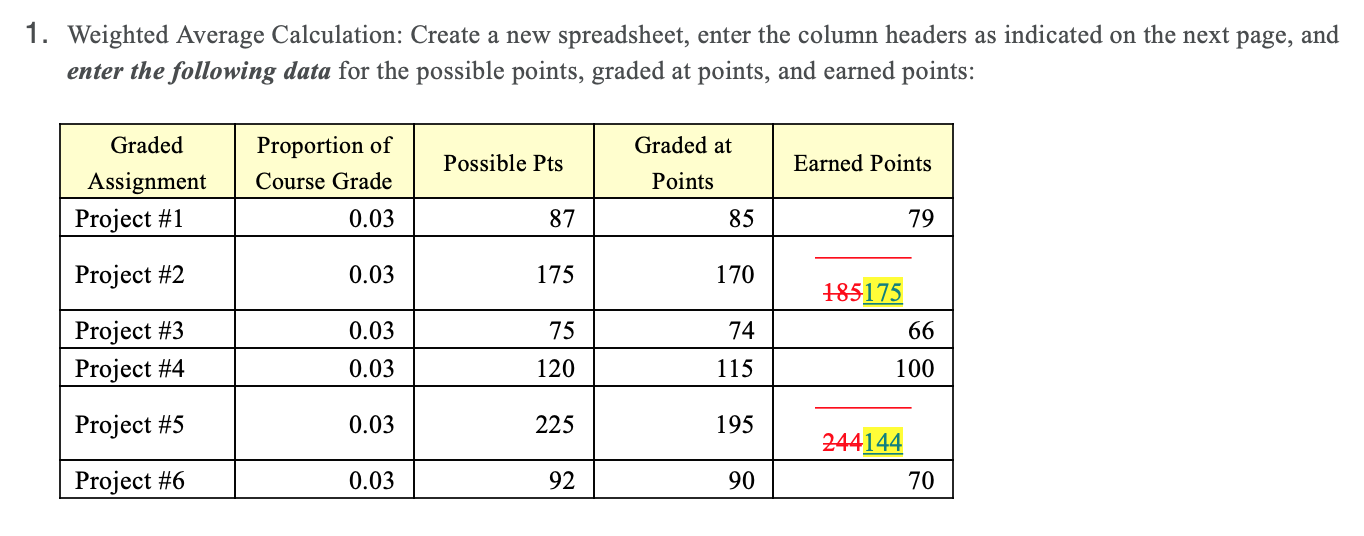
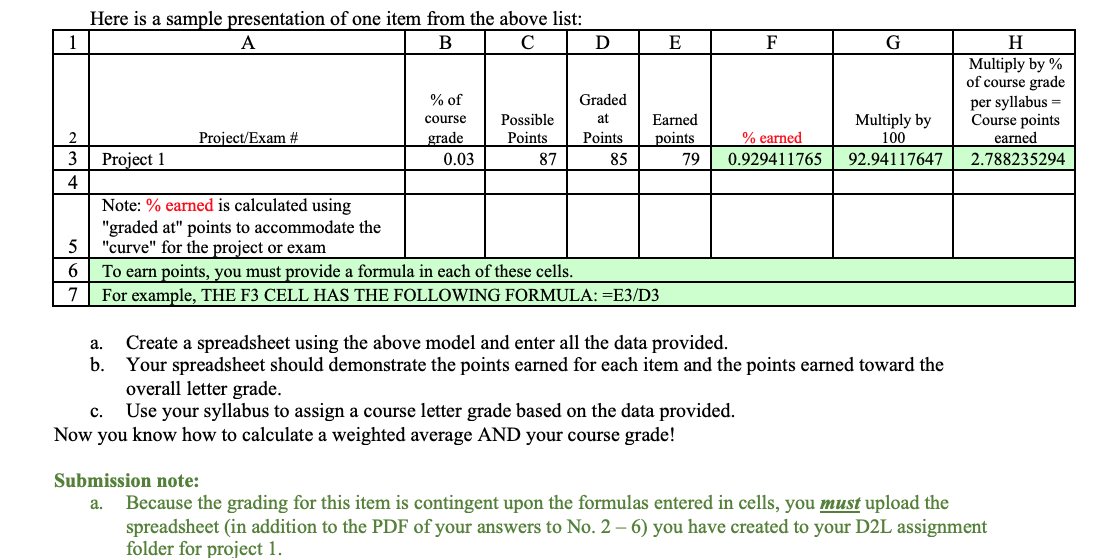
1. Weighted Average Calculation: Create a new spreadsheet, enter the column headers as indicated on the next page, and enter the following data for the possible points, graded at points, and earned points: Graded at Proportion of Course Grade Possible Pts Graded Assignment Project #1 Earned Points Points 0.03 87 85 79 Project #2 0.03 175 170 185175 0.03 75 74 66 Project #3 Project #4 0.03 120 115 100 Project #5 0.03 225 195 244144 70 Project #6 0.03 92 90 Here is a sample presentation of one item from the above list: B D E F G % of course grade 0.03 H Multiply by % of course grade per syllabus Course points earned 2.788235294 Graded at Points 85 Project/Exam # Possible Points 87 2 3 4 Earned points 79 % earned 0.929411765 Multiply by 100 92.94117647 Project 1 5 6 7 Note: % earned is calculated using "graded at" points to accommodate the "curve" for the project or exam To earn points, you must provide a formula in each of these cells. For example, THE F3 CELL HAS THE FOLLOWING FORMULA: =E3/D3 a. Create a spreadsheet using the above model and enter all the data provided. b. Your spreadsheet should demonstrate the points earned for each item and the points earned toward the overall letter grade. Use your syllabus to assign a course letter grade based on the data provided. Now you know how to calculate a weighted average AND your course grade! c. Submission note: a. Because the grading for this item is contingent upon the formulas entered in cells, you must upload the spreadsheet in addition to the PDF of your answers to No. 2-6) you have created to your D2L assignment folder for project 1
Step by Step Solution
There are 3 Steps involved in it
To create a spreadsheet for a weighted average calculation as described follow these steps Step 1 Se... View full answer

Get step-by-step solutions from verified subject matter experts
 Study Help