Question: 1. What do you need to submit? (minimal submitted files) You are required, but not limited, to turn in the following source files: Assignment6.java (Download
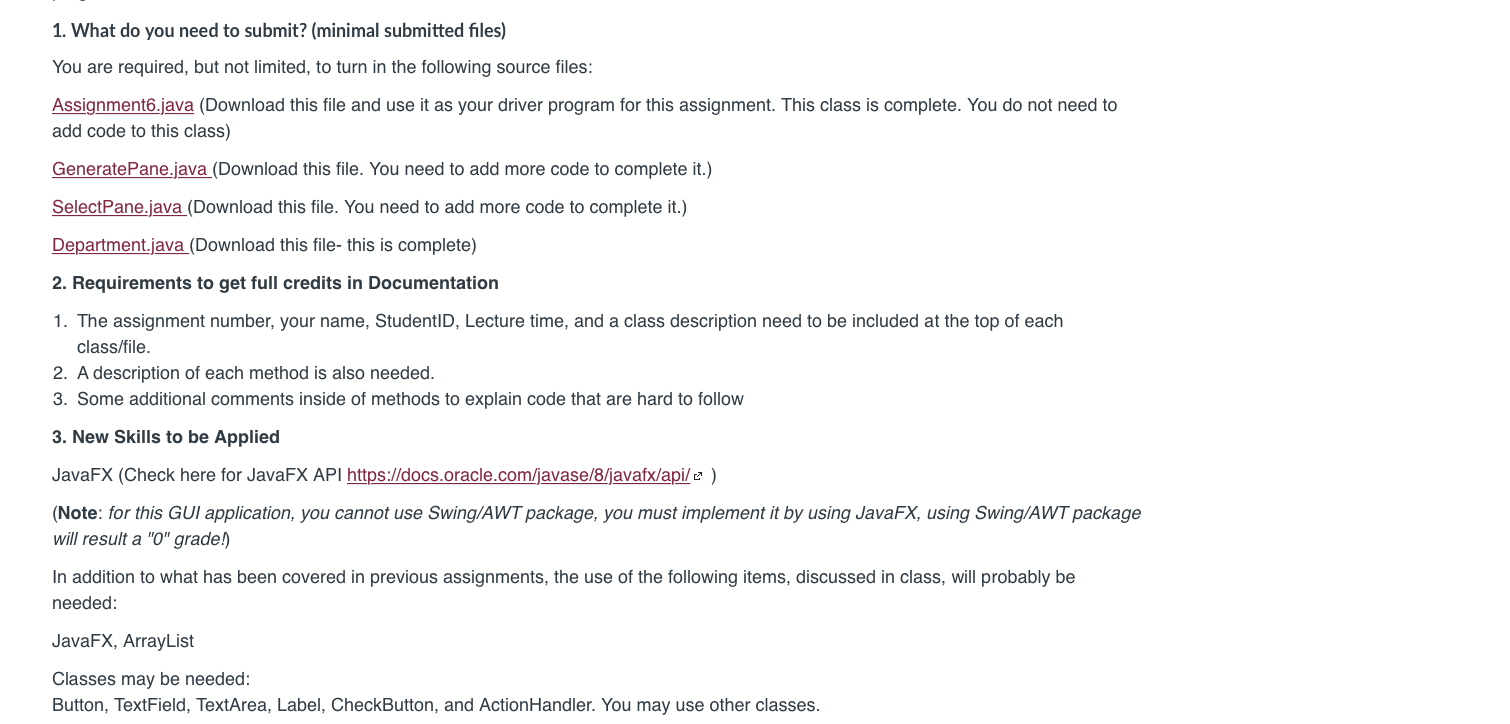
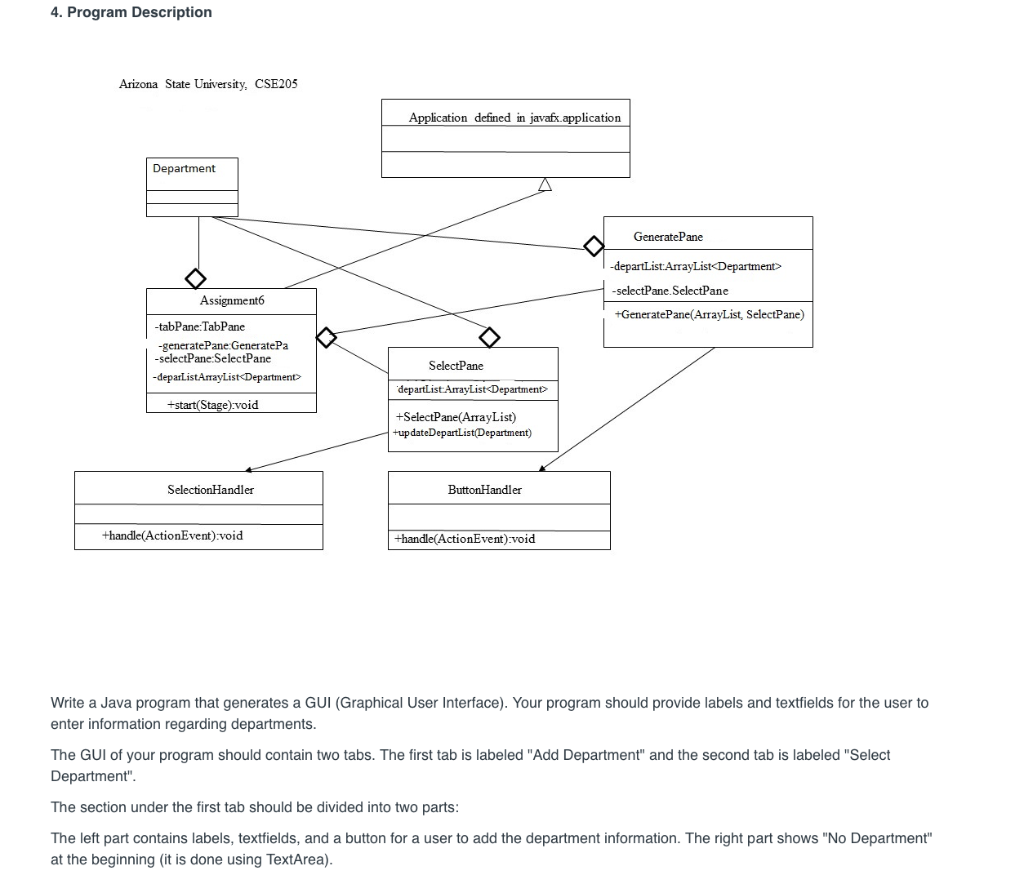
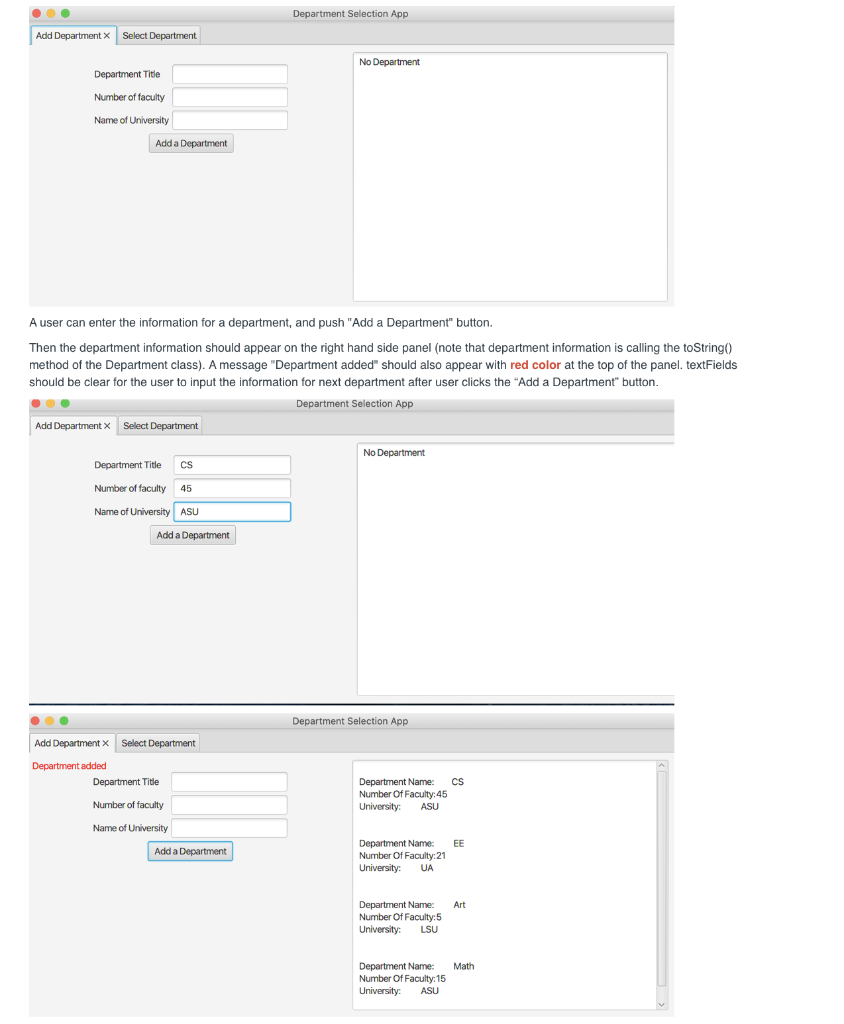
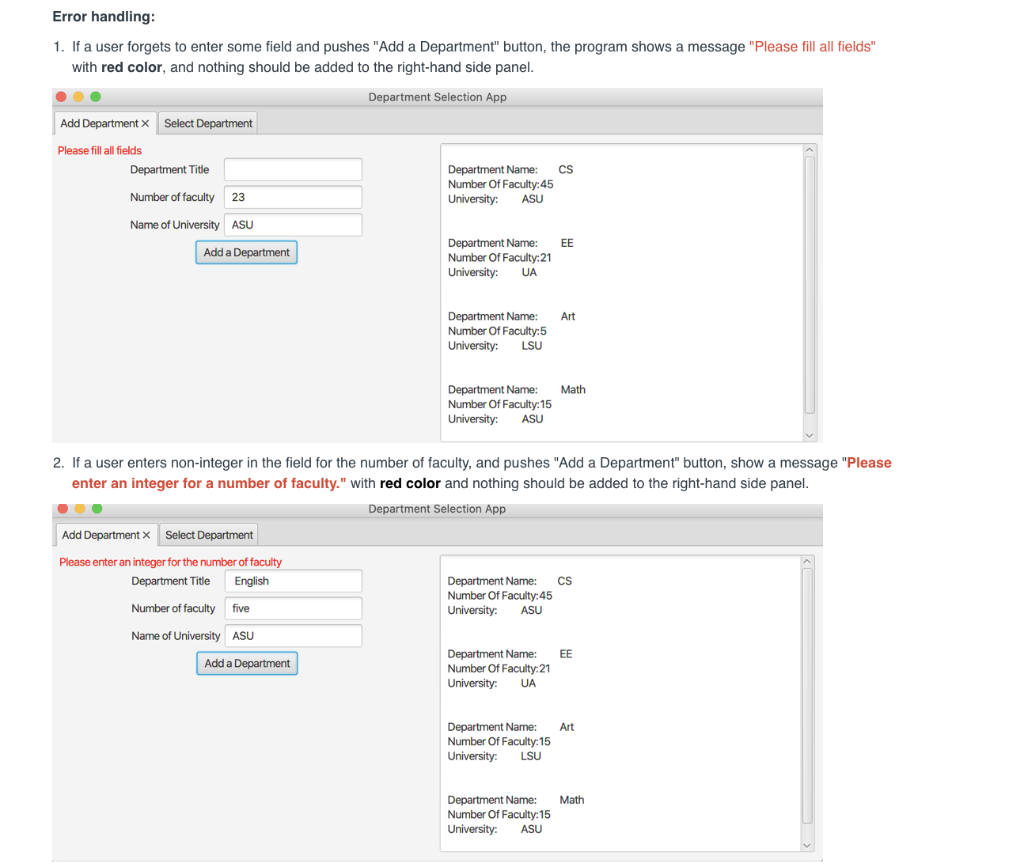
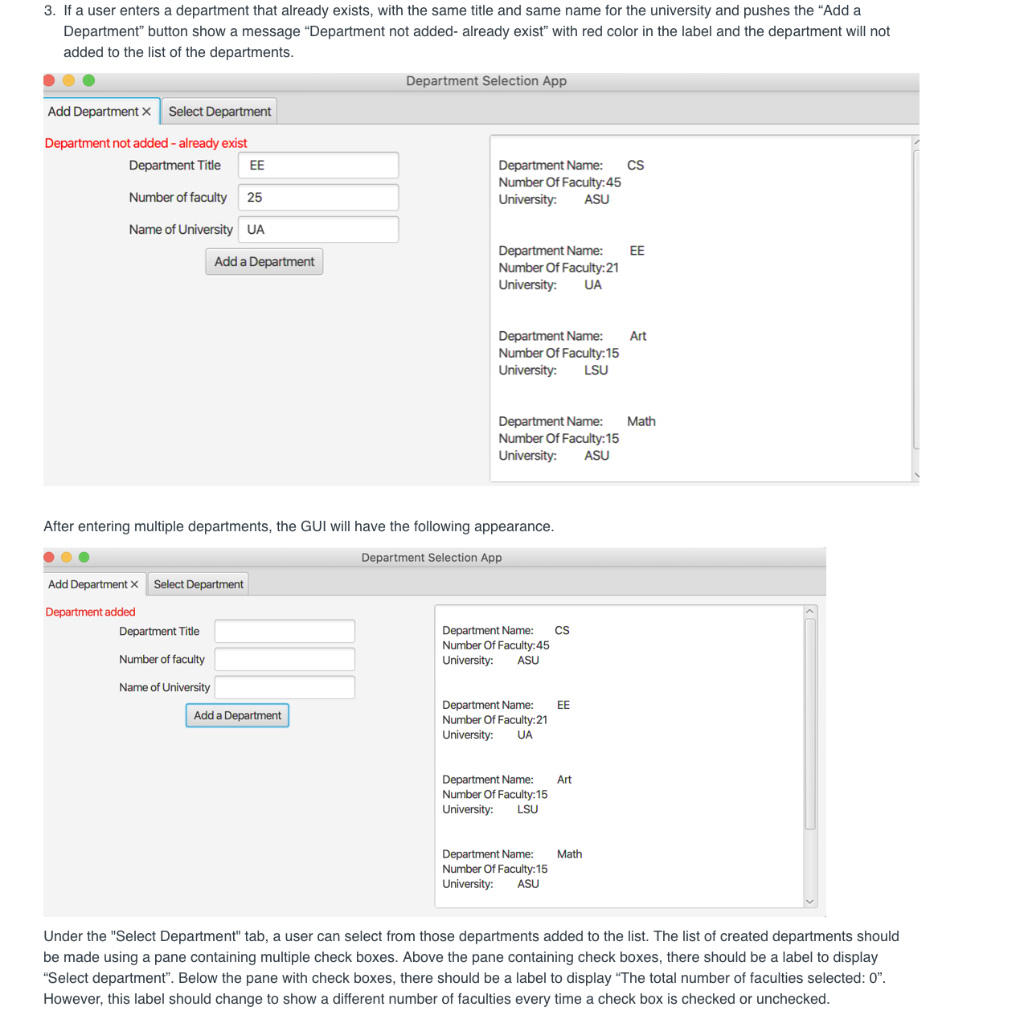
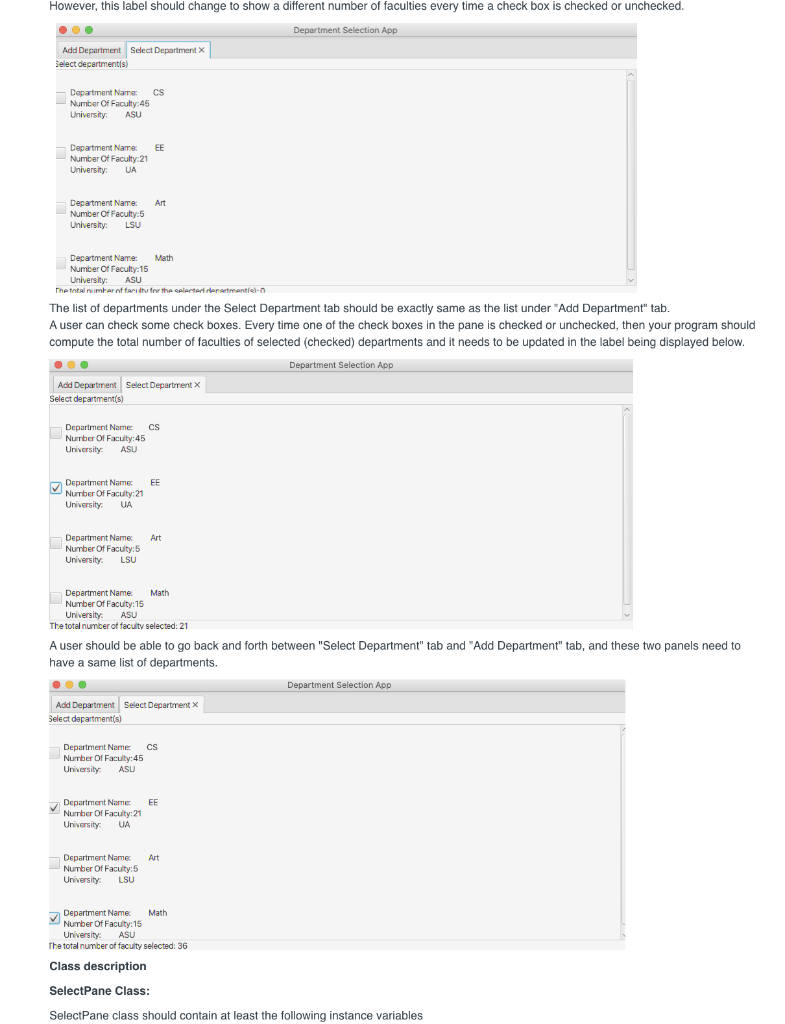
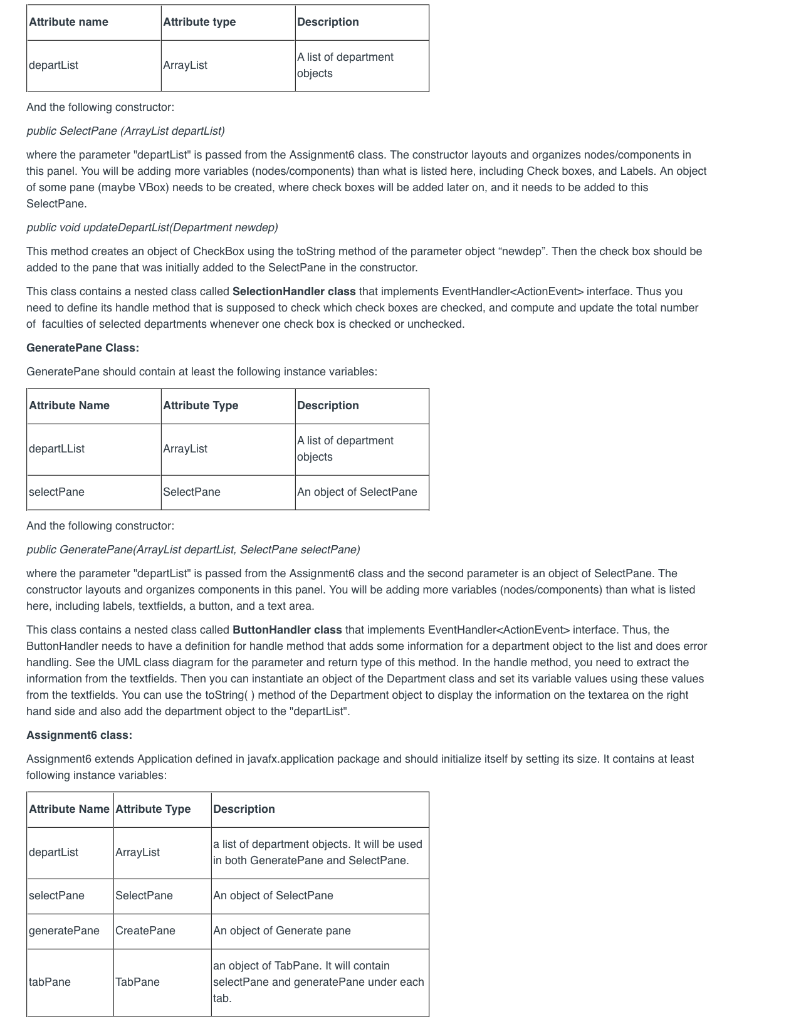
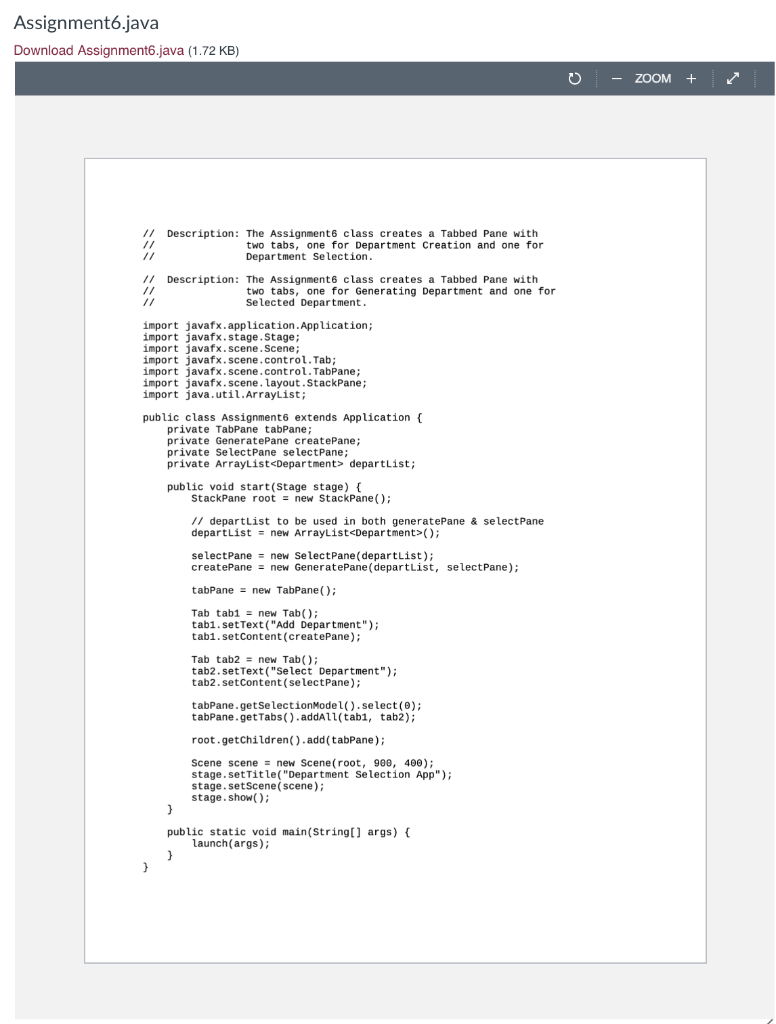
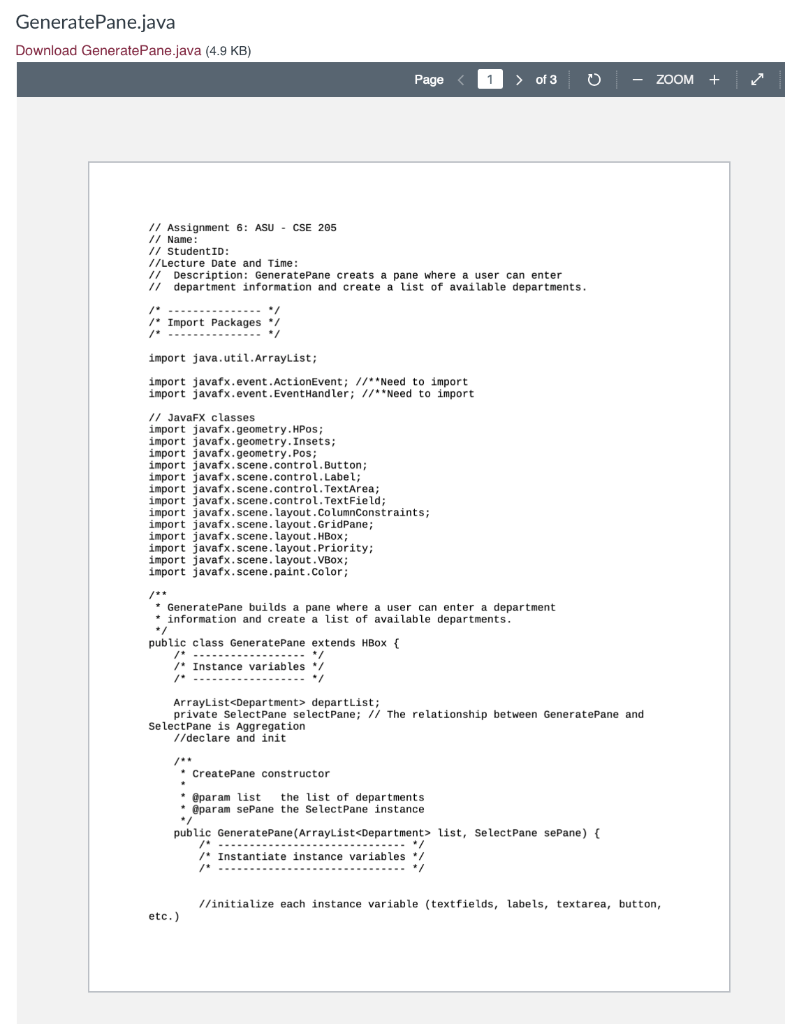
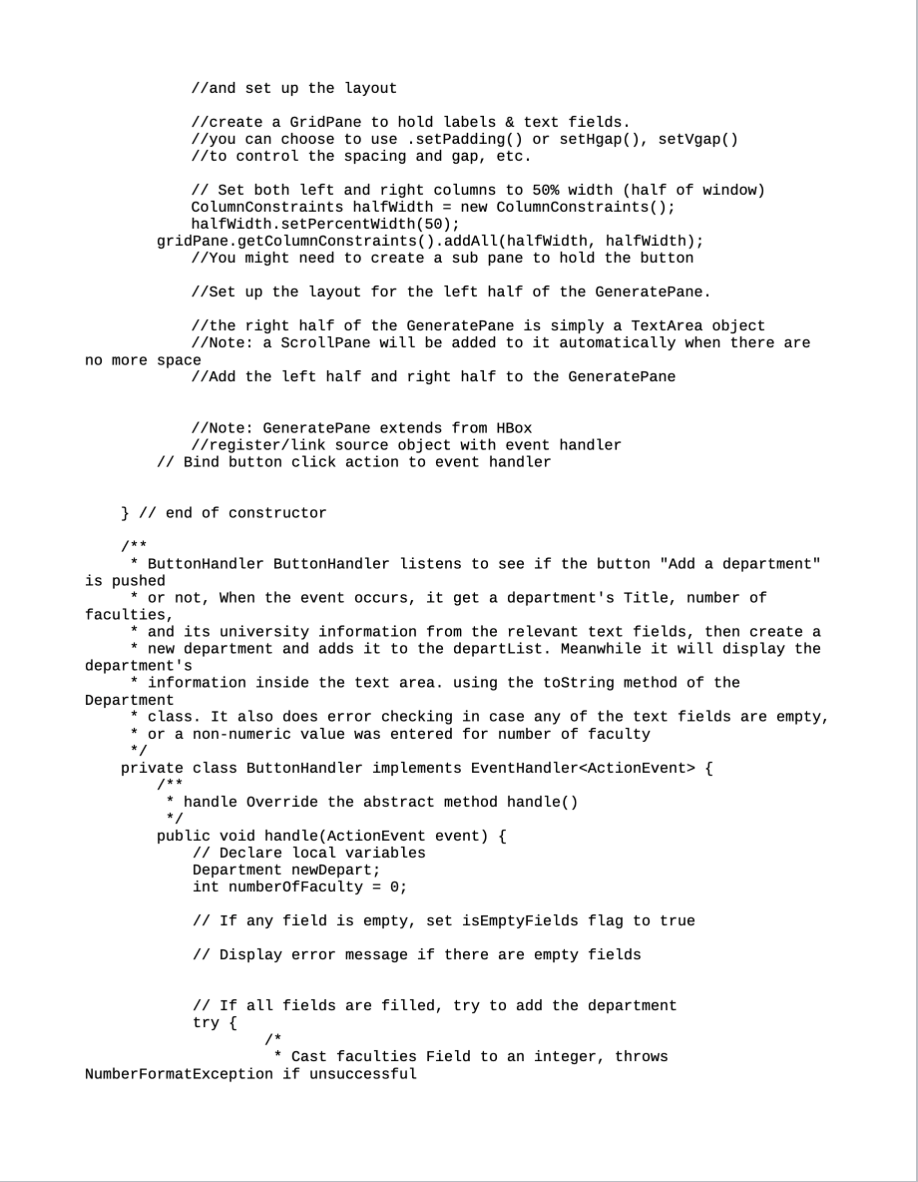
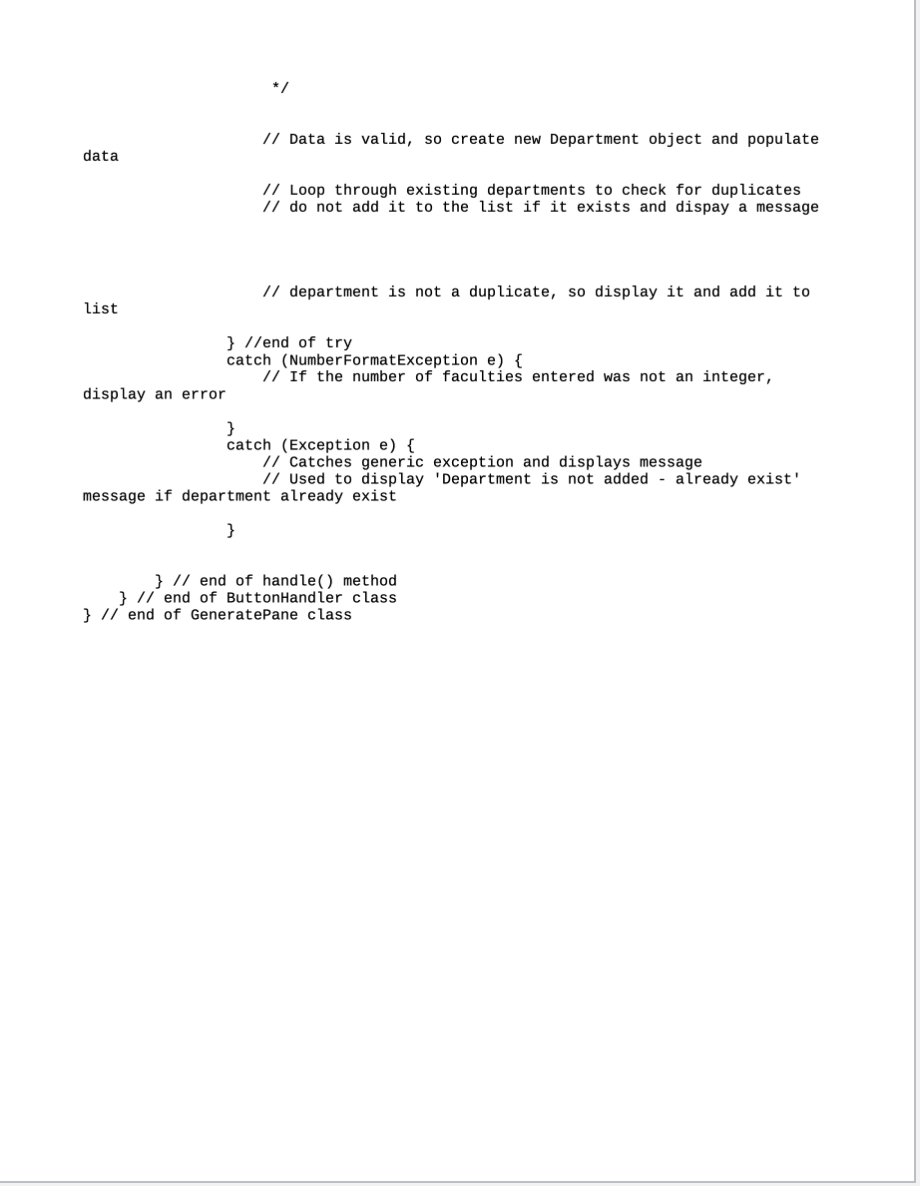
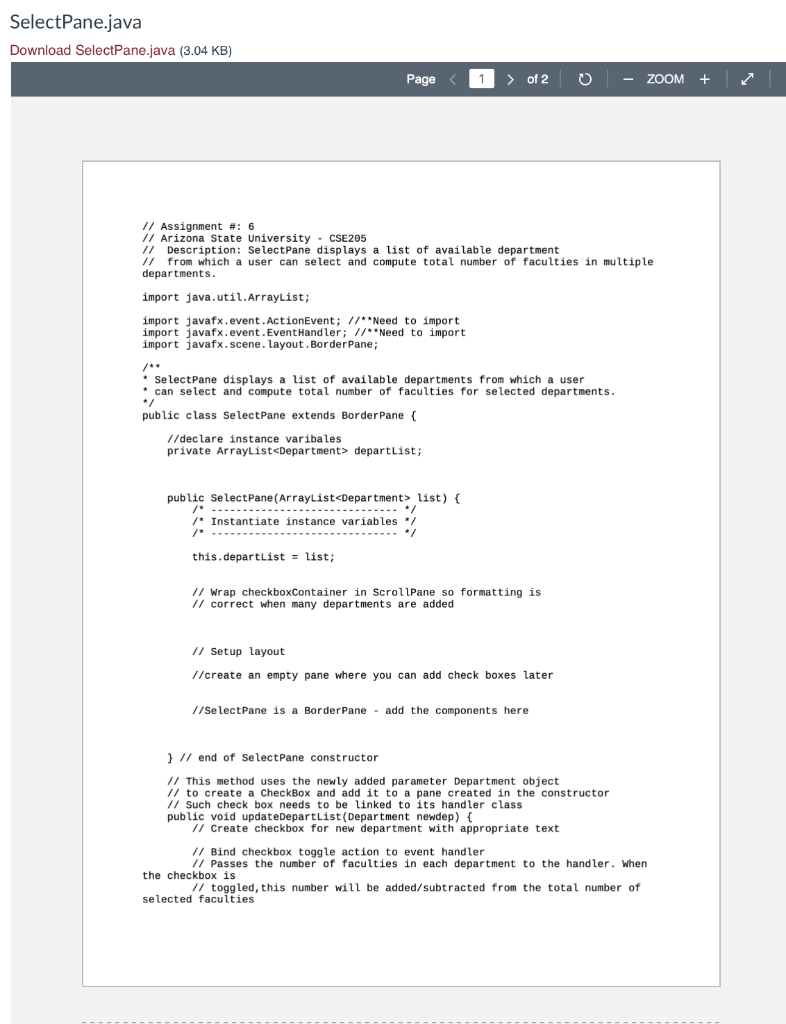
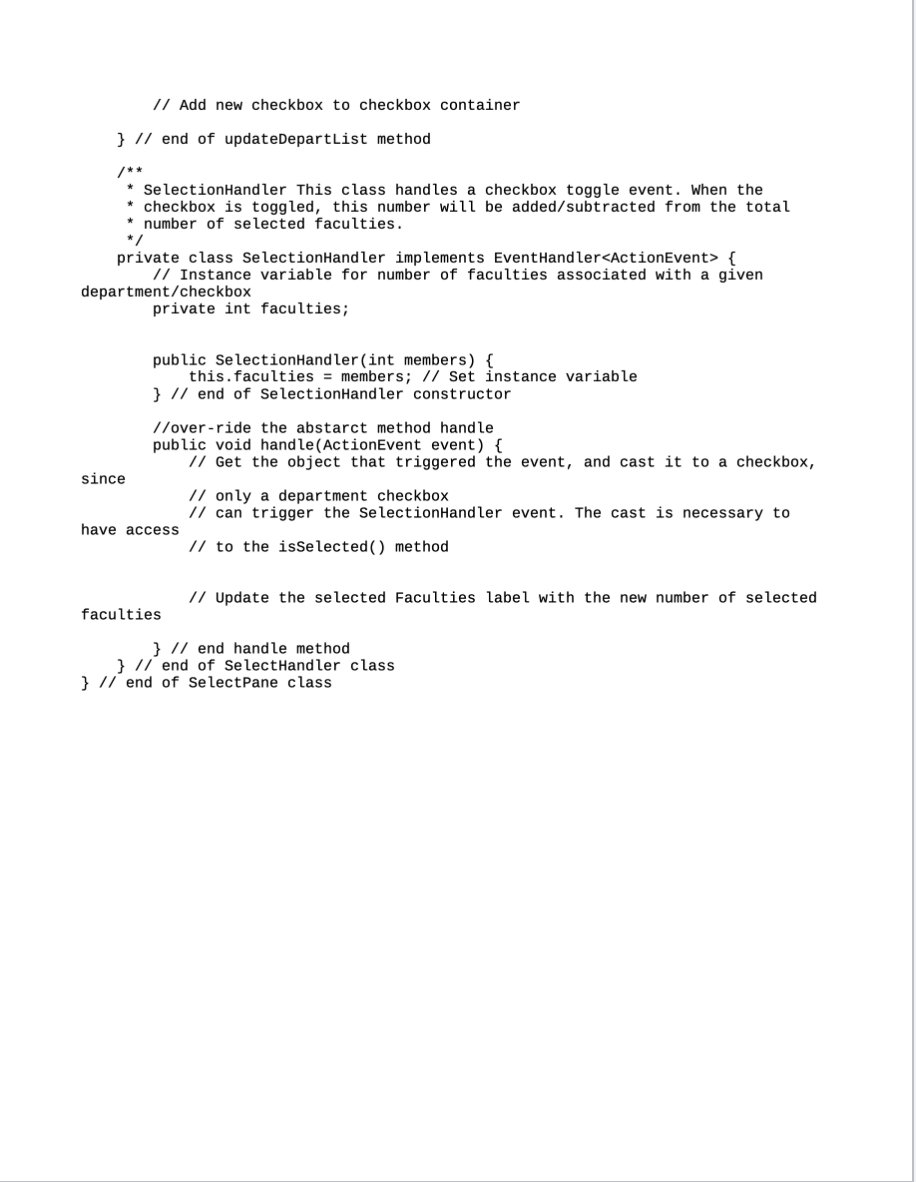
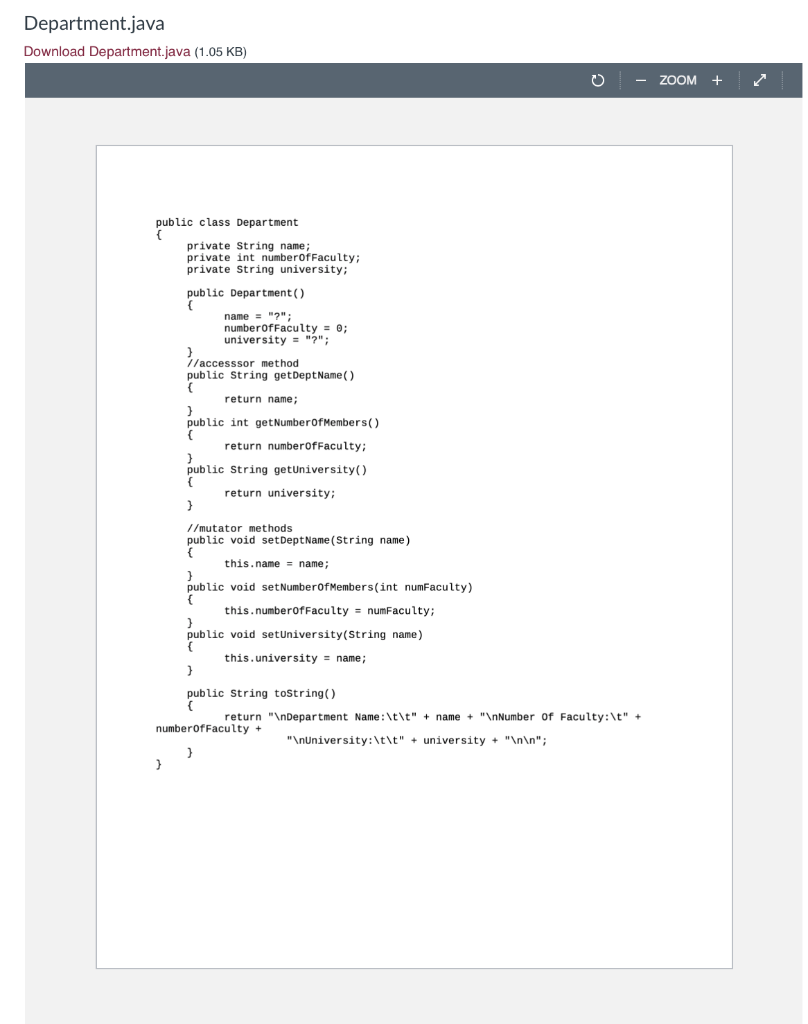
1. What do you need to submit? (minimal submitted files) You are required, but not limited, to turn in the following source files: Assignment6.java (Download this file and use it as your driver program for this assignment. This class is complete. You do not need to add code to this class) GeneratePane.java (Download this file. You need to add more code to complete it.) SelectPane.java (Download this file. You need to add more code to complete it.) Department.java (Download this file- this is complete) 2. Requirements to get full credits in Documentation 1. The assignment number, your name, StudentID, Lecture time, and a class description need to be included at the top of each class/file. 2. A description of each method is also needed. 3. Some additional comments inside of methods to explain code that are hard to follow 3. New Skills to be Applied JavaFX (Check here for JavaFX API https://docs.oracle.com/javase/8/javafx/api/e ) (Note: for this GUI application, you cannot use Swing/AWT package, you must implement it by using JavaFX, using Swing/AWT package will result a "O" grade!) In addition to what has been covered in previous assignments, the use of the following items, discussed in class, will probably be needed: JavaFX, ArrayList Classes may be needed: Button, TextField, TextArea, Label, CheckButton, and ActionHandler. You may use other classes. 4. Program Description Arizona State University, CSE205 Application defined in javafx application Department GeneratePane -departList:ArrayList departList; public void start(Stage stage) { StackPane root = new StackPane(); // departList to be used in both generatePane & select Pane departList = new ArrayList(); selectPane = new Select Pane( departList); createPane = new GeneratePane (departList, selectPane); tabPane = new TabPane(); Tab tab1 = new Tab(); tabi.setText("Add Department"); tab1.setContent(createPane); Tab tab2 = new Tab(); tab2.setText("Select Department"); tab2.setContent(selectPane); tabPane.getSelectionModel().select(); tabPane.getTabs() .addAll(tabi, tab2); root.getChildren().add(tabPane); Scene scene = new Scene(root, 900, 400); stage.setTitle("Department Selection App"); stage.setScene scene); stage.show(); } public static void main(String[] args) { launch(args); } 3 GeneratePane.java Download GeneratePane.java (4.9 KB) Page of 3 ZOOM + 1/ Assignment 6: ASU - CSE 205 // Name: // StudentID: //Lecture Date and Time: // Description: GeneratePane creats a pane where a user can enter 11 department information and create a list of available departments. /* -- */ /* Import Packages */ /* / import java.util.ArrayList; import javafx.event. ActionEvent; //**Need to import import javafx.event. EventHandler; //**Need to import // JavaFX classes import javafx.geometry. HPos; import javafx.geometry. Insets; import javafx.geometry.Pos; import javafx.scene.control. Button; import javafx.scene.control. Label; import javafx. scene.control. TextArea; import javafx.scene.control. TextField; import javafx.scene. Layout.ColumnConstraints; import javafx.scene. layout. GridPane; import javafx.scene. layout.HBox; import javafx.scene.layout.Priority; import javafx.scene. layout. VBox; import javafx.scene.paint.Color; * GeneratePane builds a pane where a user can enter a department * information and create a list of available departments. . public class GeneratePane extends HBox { /* ----------------- */ /* Instance variables / ArrayList departList; private Select Pane select Pane; // The relationship between GeneratePane and Select Pane is Aggregation //declare and init CreatePane constructor * @param list the list of departments * @param sePane the Select Pane instance . public GeneratePane(ArrayList list, Select Pane sePane) { " .............../ / Instantiate instance variables */ /* 1/initialize each instance variable (textfields, labels, textarea, button, etc.) 1/and set up the layout //create a GridPane to hold labels & text fields. //you can choose to use .setPadding() or setHgap(), setVgap() //to control the spacing and gap, etc. // Set both left and right columns to 50% width (half of window) ColumnConstraints halfwidth = new ColumnConstraints(); halfWidth.setPercentWidth(50); gridPane.getColumnConstraints().addAll(halfWidth, halfwidth); //You might need to create a sub pane to hold the button 1/Set up the layout for the left half of the GeneratePane. //the right half of the GeneratePane is simply a TextArea object 1/Note: a Scrollpane will be added to it automatically when there are no more space 1/Add the left half and right half to the GeneratePane //Note: GeneratePane extends from HBOX 1/register/link source object with event handler // Bind button click action to event handler } // end of constructor * ButtonHandler ButtonHandler listens to see if the button "Add a department" is pushed or not, when the event occurs, it get a department's Title, number of faculties, * and its university information from the relevant text fields, then create a * new department and adds it to the departList. Meanwhile it will display the department's * information inside the text area. using the toString method of the Department * class. It also does error checking in case any of the text fields are empty, or a non-numeric value was entered for number of faculty private class ButtonHandler implements EventHandler { * handle Override the abstract method handle() public void handle(ActionEvent event) { // Declare local variables Department newDepart; int numberOfFaculty = 0; // If any field is empty, set isEmptyFields flag to true // Display error message if there are empty fields // If all fields are filled, try to add the department try { * Cast faculties Field to an integer, throws Number FormatException if unsuccessful */ // Data is valid, so create new Department object and populate data // Loop through existing departments to check for duplicates 1/ do not add it to the list if it exists and dispay a message 1/ department is not a duplicate, so display it and add it to list } //end of try catch (Number FormatException e) { // If the number of faculties entered was not an integer, display an error } catch (Exception e) { 1/ Catches generic and isp message // Used to display Department is not added - already exist' message if department already exist } } // end of handle() method } 11 end of ButtonHandler class } 11 end of GeneratePane class SelectPane.java Download SelectPane.java (3.04 KB) Page of 2 ZOOM + // Assignment #: 6 // Arizona State University - CSE 205 11 Description: Select Pane displays a list of available department 11 from which a user can select and compute total number of faculties in multiple departments. import java.util.ArrayList; import javafx.event.ActionEvent; //**Need to import import javafx.event. EventHandler; //**Need to import import javafx.scene. layout. Border Pane; * Select Pane displays a list of available departments from which a user * can select and compute total number of faculties for selected departments. */ public class Select Pane extends Border Pane { //declare instance varibales private ArrayList departList; public Select Pane(ArrayList list) { /* --------...............* /* Instantiate instance variables */ */ this.departList = list; // Wrap checkboxContainer in Scrollpane so formatting is Il correct when many departments are added // Setup Layout 1/create an empty pane where you can add check boxes later 1/Select Pane is a Border Pane - add the components here } // end of Select Pane constructor // This method uses the newly added parameter Department object // to create a CheckBox and add it to a pane created in the constructor // Such check box needs to be linked to its handler class public void update DepartList(Department newdep) { // Create checkbox for new department with appropriate text // Bind checkbox toggle action to event handler // Passes the number of faculties in each department to the handler. When the checkbox is // toggled, this number will be added/subtracted from the total number of selected faculties // Add new checkbox to checkbox container } // end of updateDepartList method SelectionHandler This class handles a checkbox toggle event. When the * checkbox is toggled, this number will be added/subtracted from the total * number of selected faculties. */ private class SelectionHandler implements EventHandler { // Instance variable for number of faculties associated with a given department/checkbox private int faculties; public SelectionHandler(int members) { this.faculties = members; // Set instance variable } // end of SelectionHandler constructor 1/over-ride the abstarct method handle public void handle(ActionEvent event) { // Get the object that triggered the event, and cas it to a checkbox, since // only a department checkbox 1/ can trigger the SelectionHandler event. The cast is necessary to have access // to the isSelected() method // Update the selected Faculties label with the new number of selected faculties } // end handle method } // end of SelectHandler class } // end of SelectPane class Department.java Download Department.java (1.05 KB) ZOOM + public class Department private String name; private int number of Faculty; private String university; public Department() name = ""; number of Faculty = 0; university = "?"; / /accesssor method public String getDeptName() { return name; } public int get Number of Members() { return numberOfFaculty; } public String getUniversity() return university; } //mutator methods public void setDept Name (String name) this.name = name; } public void set NumberOfMembers(int numFaculty) { this.numberof Faculty = numFaculty; 3 public void setUniversity(String name) this.university = name; } public String toString() return " Department Name: \t\t" + name + " Number of Faculty:\t" + number of Faculty + "InUniversity: \t\t" + university + " "; 1. What do you need to submit? (minimal submitted files) You are required, but not limited, to turn in the following source files: Assignment6.java (Download this file and use it as your driver program for this assignment. This class is complete. You do not need to add code to this class) GeneratePane.java (Download this file. You need to add more code to complete it.) SelectPane.java (Download this file. You need to add more code to complete it.) Department.java (Download this file- this is complete) 2. Requirements to get full credits in Documentation 1. The assignment number, your name, StudentID, Lecture time, and a class description need to be included at the top of each class/file. 2. A description of each method is also needed. 3. Some additional comments inside of methods to explain code that are hard to follow 3. New Skills to be Applied JavaFX (Check here for JavaFX API https://docs.oracle.com/javase/8/javafx/api/e ) (Note: for this GUI application, you cannot use Swing/AWT package, you must implement it by using JavaFX, using Swing/AWT package will result a "O" grade!) In addition to what has been covered in previous assignments, the use of the following items, discussed in class, will probably be needed: JavaFX, ArrayList Classes may be needed: Button, TextField, TextArea, Label, CheckButton, and ActionHandler. You may use other classes. 4. Program Description Arizona State University, CSE205 Application defined in javafx application Department GeneratePane -departList:ArrayList departList; public void start(Stage stage) { StackPane root = new StackPane(); // departList to be used in both generatePane & select Pane departList = new ArrayList(); selectPane = new Select Pane( departList); createPane = new GeneratePane (departList, selectPane); tabPane = new TabPane(); Tab tab1 = new Tab(); tabi.setText("Add Department"); tab1.setContent(createPane); Tab tab2 = new Tab(); tab2.setText("Select Department"); tab2.setContent(selectPane); tabPane.getSelectionModel().select(); tabPane.getTabs() .addAll(tabi, tab2); root.getChildren().add(tabPane); Scene scene = new Scene(root, 900, 400); stage.setTitle("Department Selection App"); stage.setScene scene); stage.show(); } public static void main(String[] args) { launch(args); } 3 GeneratePane.java Download GeneratePane.java (4.9 KB) Page of 3 ZOOM + 1/ Assignment 6: ASU - CSE 205 // Name: // StudentID: //Lecture Date and Time: // Description: GeneratePane creats a pane where a user can enter 11 department information and create a list of available departments. /* -- */ /* Import Packages */ /* / import java.util.ArrayList; import javafx.event. ActionEvent; //**Need to import import javafx.event. EventHandler; //**Need to import // JavaFX classes import javafx.geometry. HPos; import javafx.geometry. Insets; import javafx.geometry.Pos; import javafx.scene.control. Button; import javafx.scene.control. Label; import javafx. scene.control. TextArea; import javafx.scene.control. TextField; import javafx.scene. Layout.ColumnConstraints; import javafx.scene. layout. GridPane; import javafx.scene. layout.HBox; import javafx.scene.layout.Priority; import javafx.scene. layout. VBox; import javafx.scene.paint.Color; * GeneratePane builds a pane where a user can enter a department * information and create a list of available departments. . public class GeneratePane extends HBox { /* ----------------- */ /* Instance variables / ArrayList departList; private Select Pane select Pane; // The relationship between GeneratePane and Select Pane is Aggregation //declare and init CreatePane constructor * @param list the list of departments * @param sePane the Select Pane instance . public GeneratePane(ArrayList list, Select Pane sePane) { " .............../ / Instantiate instance variables */ /* 1/initialize each instance variable (textfields, labels, textarea, button, etc.) 1/and set up the layout //create a GridPane to hold labels & text fields. //you can choose to use .setPadding() or setHgap(), setVgap() //to control the spacing and gap, etc. // Set both left and right columns to 50% width (half of window) ColumnConstraints halfwidth = new ColumnConstraints(); halfWidth.setPercentWidth(50); gridPane.getColumnConstraints().addAll(halfWidth, halfwidth); //You might need to create a sub pane to hold the button 1/Set up the layout for the left half of the GeneratePane. //the right half of the GeneratePane is simply a TextArea object 1/Note: a Scrollpane will be added to it automatically when there are no more space 1/Add the left half and right half to the GeneratePane //Note: GeneratePane extends from HBOX 1/register/link source object with event handler // Bind button click action to event handler } // end of constructor * ButtonHandler ButtonHandler listens to see if the button "Add a department" is pushed or not, when the event occurs, it get a department's Title, number of faculties, * and its university information from the relevant text fields, then create a * new department and adds it to the departList. Meanwhile it will display the department's * information inside the text area. using the toString method of the Department * class. It also does error checking in case any of the text fields are empty, or a non-numeric value was entered for number of faculty private class ButtonHandler implements EventHandler { * handle Override the abstract method handle() public void handle(ActionEvent event) { // Declare local variables Department newDepart; int numberOfFaculty = 0; // If any field is empty, set isEmptyFields flag to true // Display error message if there are empty fields // If all fields are filled, try to add the department try { * Cast faculties Field to an integer, throws Number FormatException if unsuccessful */ // Data is valid, so create new Department object and populate data // Loop through existing departments to check for duplicates 1/ do not add it to the list if it exists and dispay a message 1/ department is not a duplicate, so display it and add it to list } //end of try catch (Number FormatException e) { // If the number of faculties entered was not an integer, display an error } catch (Exception e) { 1/ Catches generic and isp message // Used to display Department is not added - already exist' message if department already exist } } // end of handle() method } 11 end of ButtonHandler class } 11 end of GeneratePane class SelectPane.java Download SelectPane.java (3.04 KB) Page of 2 ZOOM + // Assignment #: 6 // Arizona State University - CSE 205 11 Description: Select Pane displays a list of available department 11 from which a user can select and compute total number of faculties in multiple departments. import java.util.ArrayList; import javafx.event.ActionEvent; //**Need to import import javafx.event. EventHandler; //**Need to import import javafx.scene. layout. Border Pane; * Select Pane displays a list of available departments from which a user * can select and compute total number of faculties for selected departments. */ public class Select Pane extends Border Pane { //declare instance varibales private ArrayList departList; public Select Pane(ArrayList list) { /* --------...............* /* Instantiate instance variables */ */ this.departList = list; // Wrap checkboxContainer in Scrollpane so formatting is Il correct when many departments are added // Setup Layout 1/create an empty pane where you can add check boxes later 1/Select Pane is a Border Pane - add the components here } // end of Select Pane constructor // This method uses the newly added parameter Department object // to create a CheckBox and add it to a pane created in the constructor // Such check box needs to be linked to its handler class public void update DepartList(Department newdep) { // Create checkbox for new department with appropriate text // Bind checkbox toggle action to event handler // Passes the number of faculties in each department to the handler. When the checkbox is // toggled, this number will be added/subtracted from the total number of selected faculties // Add new checkbox to checkbox container } // end of updateDepartList method SelectionHandler This class handles a checkbox toggle event. When the * checkbox is toggled, this number will be added/subtracted from the total * number of selected faculties. */ private class SelectionHandler implements EventHandler { // Instance variable for number of faculties associated with a given department/checkbox private int faculties; public SelectionHandler(int members) { this.faculties = members; // Set instance variable } // end of SelectionHandler constructor 1/over-ride the abstarct method handle public void handle(ActionEvent event) { // Get the object that triggered the event, and cas it to a checkbox, since // only a department checkbox 1/ can trigger the SelectionHandler event. The cast is necessary to have access // to the isSelected() method // Update the selected Faculties label with the new number of selected faculties } // end handle method } // end of SelectHandler class } // end of SelectPane class Department.java Download Department.java (1.05 KB) ZOOM + public class Department private String name; private int number of Faculty; private String university; public Department() name = ""; number of Faculty = 0; university = "?"; / /accesssor method public String getDeptName() { return name; } public int get Number of Members() { return numberOfFaculty; } public String getUniversity() return university; } //mutator methods public void setDept Name (String name) this.name = name; } public void set NumberOfMembers(int numFaculty) { this.numberof Faculty = numFaculty; 3 public void setUniversity(String name) this.university = name; } public String toString() return " Department Name: \t\t" + name + " Number of Faculty:\t" + number of Faculty + "InUniversity: \t\t" + university +









 Study Help