







Question: 1. Write a SQL statement that selects from Products table the following information product_name The product_name column list_price The list price column The two columns
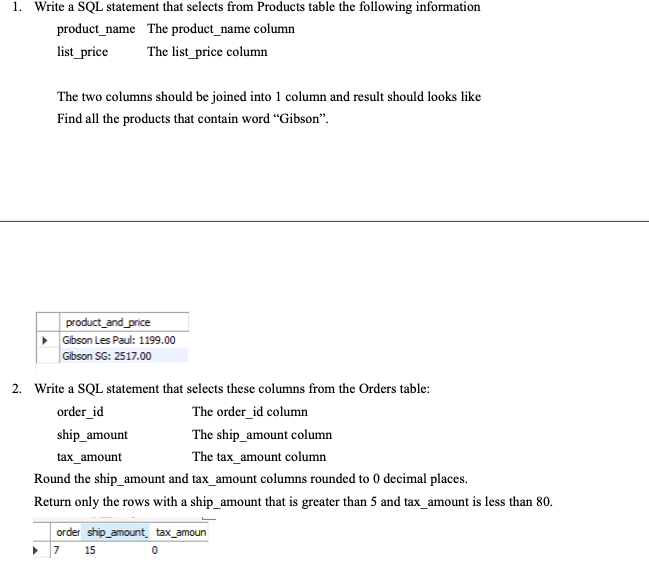
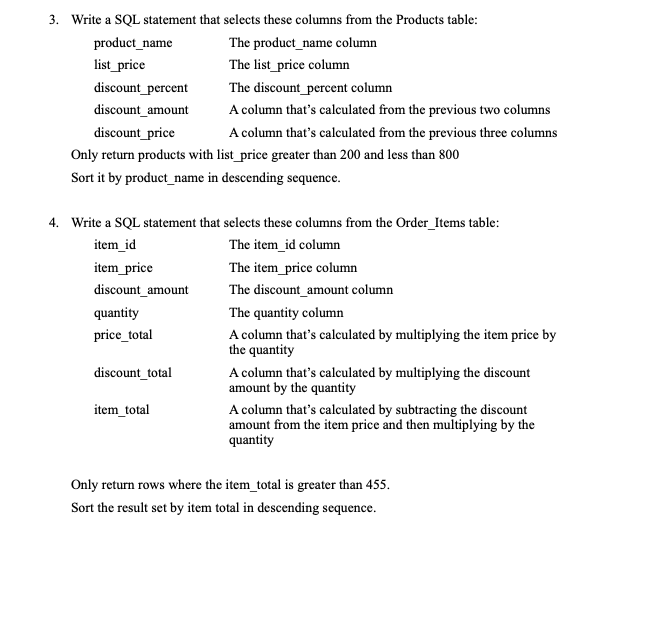
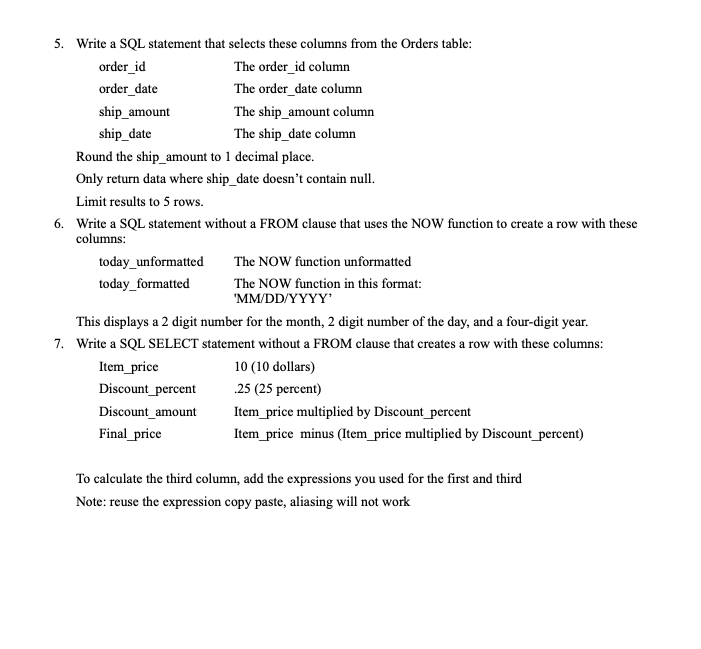
1. Write a SQL statement that selects from Products table the following information product_name The product_name column list_price The list price column The two columns should be joined into 1 column and result should looks like Find all the products that contain word "Gibson. product_and_price Gibson Les Paul: 1199.00 Gibson SG: 2517.00 2. Write a SQL statement that selects these columns from the Orders table: order_id The order_id column ship_amount The ship_amount column tax_amount The tax amount column Round the ship_amount and tax_amount columns rounded to 0 decimal places. Return only the rows with a ship_amount that is greater than 5 and tax_amount is less than 80. order ship_amount_tax_amoun 7 15 0 3. Write a SQL statement that selects these columns from the Products table: product_name The product_name column list_price The list price column discount_percent The discount_percent column discount_amount A column that's calculated from the previous two columns discount_price A column that's calculated from the previous three columns Only return products with list price greater than 200 and less than 800 Sort it by product_name in descending sequence. 4. Write a SQL statement that selects these columns from the Order_Items table: item_id The item_id column item_price The item_price column discount_amount The discount_amount column quantity The quantity column price_total A column that's calculated by multiplying the item price by the quantity discount_total A column that's calculated by multiplying the discount amount by the quantity item_total A column that's calculated by subtracting the discount amount from the item price and then multiplying by the quantity Only return rows where the item_total is greater than 455. Sort the result set by item total in descending sequence. 5. Write a SQL statement that selects these columns from the Orders table: order_id The order_id column order_date The order_date column ship_amount The ship_amount column ship_date The ship date column Round the ship amount to 1 decimal place. Only return data where ship_date doesn't contain null. Limit results to 5 rows. 6. Write a SQL statement without a FROM clause that uses the NOW function to create a row with these columns: today_unformatted The NOW function unformatted today_formatted The NOW function in this format: "MM/DD/YYYY This displays a 2 digit number for the month, 2 digit number of the day, and a four-digit year. 7. Write a SQL SELECT statement without a FROM clause that creates a row with these columns: Item_price 10 (10 dollars) Discount_percent 25 (25 percent) Discount_amount Item_price multiplied by Discount_percent Final_price Item_price minus (Item_price multiplied by Discount_percent) To calculate the third column, add the expressions you used for the first and third Note: reuse the expression copy paste, aliasing will not work
Step by Step Solution
There are 3 Steps involved in it

Get step-by-step solutions from verified subject matter experts
 Study Help