







Question: --============================================ /* 1. Write a SQL statement that uses a sub_query. The sub-query should find the employee_ids of managers. The outer query should list all
--============================================ /* 1. Write a SQL statement that uses a sub_query. The sub-query should find the employee_ids of managers. The outer query should list all employee details about the Managers only. Sort results by manager last name and first name. */ /* 2. Write a SQL statement that uses a sub_query. The sub-query should find the employee_id of Kevin Mourgos. The outer query should list all employee details of the employees who work for (are managed by) Mr. Mourgos. Sort your results by the employees' last and first names. */ /* 3. Write a SQL statement that uses a sub_query. The sub-query should find the the average current salary of all employees at the company. The outer query should list all employee details of employees who make less that the average salary. Sort your results by the employees' last and first names. */ /* 4. Write a SQL statement that uses a sub_query. The sub-query should return the distinct Job_IDs of Employees who make less than the average salary - see previous question. The outer query should return the job details on these jobs. Sort the results by Job Title. */ /* 5. Write a SQL statement that uses a sub_query. The sub-query should return the Order Numbers of all orders that have at least one Order Item Amount > $25.00. Order Item Amount = quantity * price NOTE: Unit Price is NULL in HOL_ORDER_ITEMS so you will need to JOIN to HOL_BOOKS to get Book_Price. The outer query should display the Customer_IDs of the Customers associated with these Order Numbers. If a customer has more than one order, their customer_ID should only occur once; no duplicate customers. Sort your results by Customer_ID.
*/ /* 6. VERY DIFFICULT Write a SQL statement that uses a sub-query. The sub-query should be the entire query from Q5 - except the ORDER BY Clause. The outer query should return the following: Customer_ID Customer Last Name Customer First Name Customer Email Customer Address: Street City State/Province Postal Code Country Name (not Country ID) Region Name (not Region ID) Sort the results by customer last name and first name. */
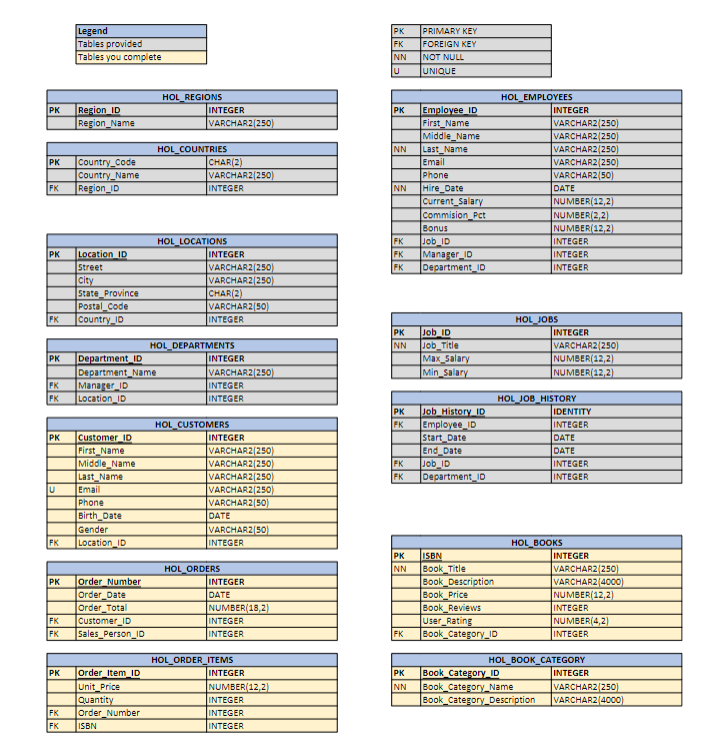
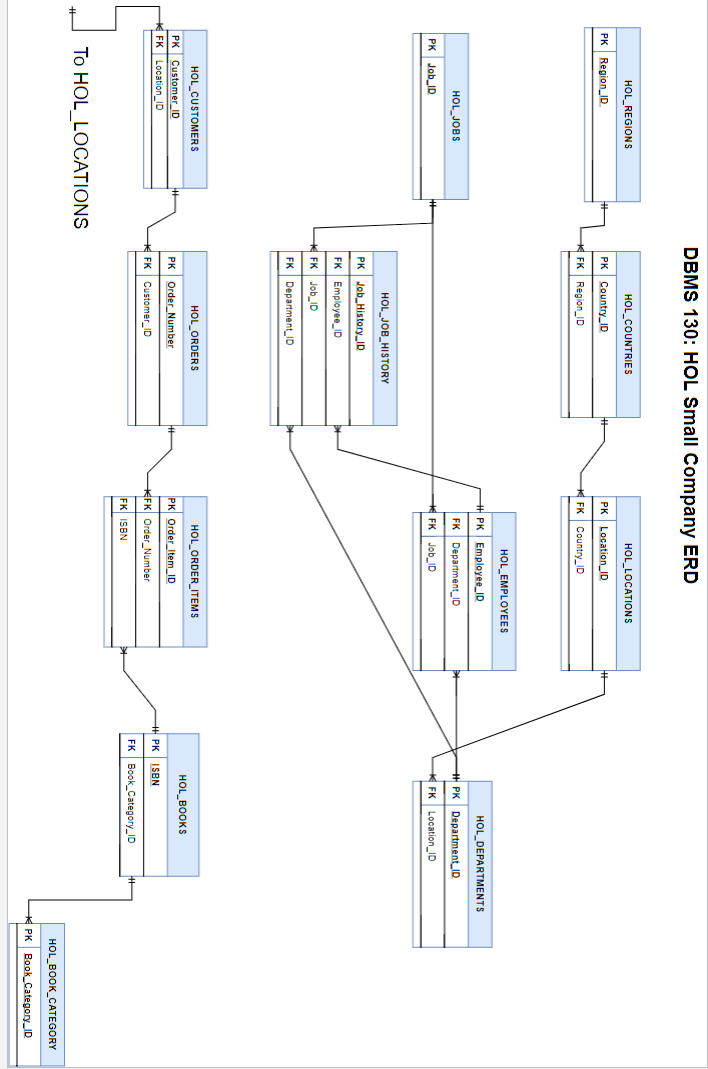
\begin{tabular}{|l|} \hline Legend \\ \hline Tables provided \\ \hline Tables you complete \\ \hline \end{tabular} \begin{tabular}{|l|l|} \hline PK & PRIMARY KEY \\ \hline FK & FOREIGN KEY \\ \hline NN & NOT NULL \\ \hlineU & UNIQUE \\ \hline \end{tabular} \begin{tabular}{|l|l|l|} \hline \multicolumn{2}{|c|}{ HOL_EMPLOYEES } \\ \hline PK & Employee_ID & INTEGER \\ \hline & First_Name & VARCHAR2 (250) \\ \hline & Middle_Name & VARCHAR2 (250) \\ \hline NN & Last_Name & VARCHAR2 [250) \\ \hline & Email & VARCHAR2 (250) \\ \hline & Phone & VARCHAR2 (50) \\ \hline NN & Hire_Date & DATE \\ \hline & Current_Salary & NUMBER (12,2] \\ \hline & Commision_Pct & NUMBER (2,2] \\ \hline & Bonus & NUMBER (12,2] \\ \hline FK & Job_ID & INTEGER \\ \hline FK & Manager_ID & INTEGER \\ \hline FK & Department_ID & INTEGER \\ \hline \end{tabular} \begin{tabular}{|l|l|l|} \hline \multicolumn{2}{|c|}{ HOL_LOCATIONS } \\ \hline PK & Location ID & INTEGER \\ \hline & 5treet & VARCHAR2[250] \\ \hline & city & VARCHAR2[250] \\ \hline & 5tate_Frovince & CHAR(2) \\ \hline & Postal_Code & VARCHAR.2[50] \\ \hline FK & Country_10 & INTEGER \\ \hline \end{tabular} \begin{tabular}{|l|l|l|} \hline \multicolumn{2}{|c|}{ HOL_DEPARTMENTS } \\ \hline PK & Department_ID & INTEGER \\ \hline & Department_Name & VARCHAR2[250] \\ \hline FK & Manafer_ID & INTEGER \\ \hline FK & Location_ID & INTEGER \\ \hline \end{tabular} \begin{tabular}{|l|l|l|} \hline \multicolumn{3}{|c|}{ HOL_JOBS } \\ \hline PK & Job_ID & INTEGER \\ \hline NN & Job_Title & VARCHAR2 (250) \\ \hline & Max_5alary & NUMEER (12,2) \\ \hline & Min_Salary & NUMEER (12,2) \\ \hline \end{tabular} \begin{tabular}{|l|l|l|} \hline \multicolumn{2}{|c|}{ HOL_CUSTOMERS } \\ \hline PK & Customer_ID & INTEGER \\ \hline & First_Name & VARCHAR2[250) \\ \hline & Middle_Name & VARCHAR2[250) \\ \hline & Last_Name & VARCHAR2[250) \\ \hline U & Email & VARCHAR2[250) \\ \hline & Phone & VARCHAR2[50) \\ \hline & Birth_Date & DATE \\ \hline & Gender & VARCHAR2[50] \\ \hline FK & Location_ID & INTEGER \\ \hline \end{tabular} \begin{tabular}{|l|l|l|} \hline \multicolumn{2}{|c|}{ HOL_JOB_HISTORY } \\ \hline PK & Job_History_ID & IDENTITY \\ \hline FK & Employee_ID & INTEGER \\ \hline & Start_Date & DATE \\ \hline & End_Date & DATE \\ \hline FK & Job_ID & INTEGER \\ \hline FK & Department_ID & INTEGER \\ \hline \end{tabular} \begin{tabular}{|l|l|l|} \hline \multicolumn{2}{|c|}{ HOL_ORDERS } \\ \hline PK & Order_Number & INTEGER \\ \hline & Order_Date & DATE \\ \hline & Order_Total & NUMBER (18,2) \\ \hline FK & Customer_ID & INTEGER \\ \hline FK & 5ales_Person_ID & INTEGER \\ \hline \end{tabular} \begin{tabular}{|l|l|l|} \hline \multicolumn{2}{|c|}{ HOL_BOOKS } \\ \hline PK & 1SBN & INTEGER \\ \hline NN & Book_Title & VARCHAR2 (250) \\ \hline & Book_Description & VARCHAR2 (4000) \\ \hline & Book_Price & NUMBER (12,2) \\ \hline & Book_Reviews & INTEGER \\ \hline & User_Rating & NUMBER(4,2) \\ \hline FK & Book_Category_ID & INTEGER \\ \hline \end{tabular} \begin{tabular}{|l|l|l|} \hline \multicolumn{2}{|c|}{ HOL_ORDER_ITEMS } \\ \hline PK & Order_Item_ID & INTEGER \\ \hline & Unit_Price & NUMBER(12,2) \\ \hline & Quantity & INTEGER \\ \hline FK & Order_Number & INTEGER \\ \hline FK & ISBN & INTEGER \\ \hline \end{tabular} \begin{tabular}{|l|l|l|} \hline \multicolumn{3}{|c|}{ HOL_BOOK_CATEGORY } \\ \hline PK & Book_Category_ID & INTEGER \\ \hline NN & Book_Category_Name & VARCHAR2 (250) \\ \hline & Book_Category_Description & VARCHAR2 (4000) \\ \hline \end{tabular} DRMS 13n: HOI Small Cnmnany FRD
Step by Step Solution
There are 3 Steps involved in it

Get step-by-step solutions from verified subject matter experts
 Study Help