







Question: 1 - Write and debug the code given below. LDR R 2 , = 0 0 0 1 E 8 4 8 0 ; LDR
Write and debug the code given below.
LDR R;
LDR ROxFFEEDDC;
STR RR;
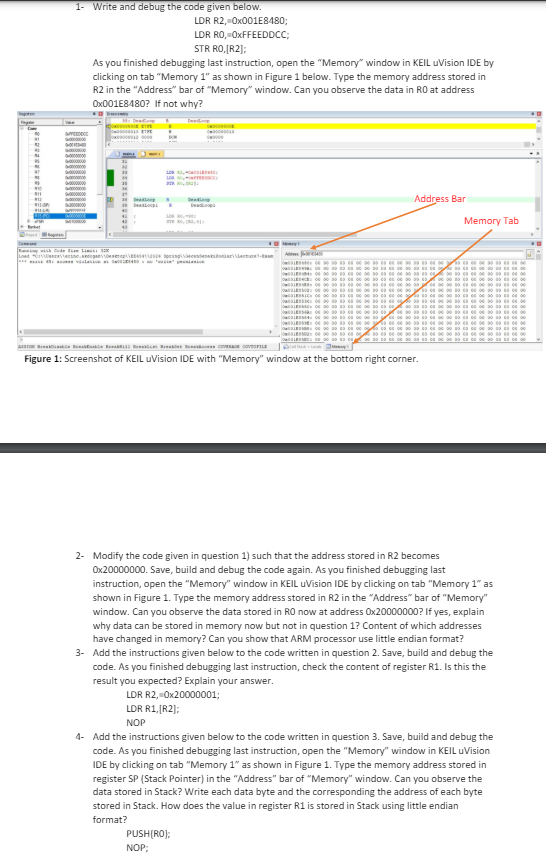
As you finished debugging last instruction, open the "Memory" window in KEIL uVision IDE by
clicking on tab "Memory as shown in Figure below. Type the memory address stored in
R in the "Address" bar of "Memory" window. Can you observe the data in R at address
OxE If not why?
Figure : Screenshot of KEIL uVision IDE with "Memory" window at the bottom right corner.
Modify the code given in question such that the address stored in R becomes
x Save, build and debug the code again. As you finished debugging last
instruction, open the "Memory" window in KEIL uVision IDE by clicking on tab "Memory as
shown in Figure Type the memory address stored in R in the "Address" bar of "Memory"
window. Can you observe the data stored in R now at address If yes, explain
why data can be stored in memory now but not in question Content of which addresses
have changed in memory? Can you show that ARM processor use little endian format?
Add the instructions given below to the code written in question Save, build and debug the
code. As you finished debugging last instruction, check the content of register R Is this the
result you expected? Explain your answer.
LDR R ;
LDR RR;
NOP
Add the instructions given below to the code written in question Save, build and debug the
code. As you finished debugging last instruction, open the "Memory" window in KEIL uVision
IDE by clicking on tab "Memory as shown in Figure Type the memory address stored in
register SP Stack Pointer in the "Address" bar of "Memory" window. Can you observe the
data stored in Stack? Write each data byte and the corresponding the address of each byte
stored in Stack. How does the value in register R is stored in Stack using little endian
format?
PUSH;
NOP;
Step by Step Solution
There are 3 Steps involved in it
1 Expert Approved Answer
Step: 1 Unlock

Question Has Been Solved by an Expert!
Get step-by-step solutions from verified subject matter experts
Step: 2 Unlock
Step: 3 Unlock
 Study Help