







Question: 1. Write Python code using tkinter to produce the following GUI. Use the pack layout for this. Hello 131 Class When we enlarge the window,
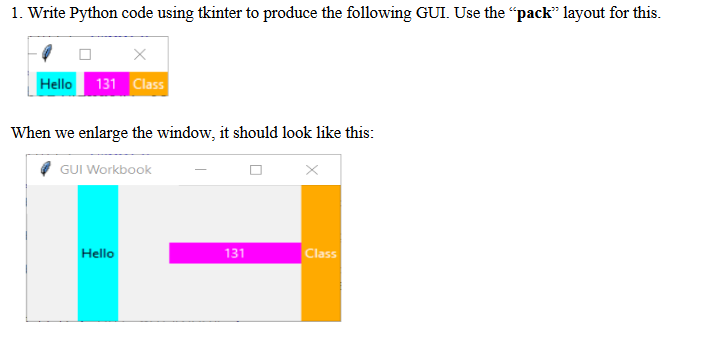
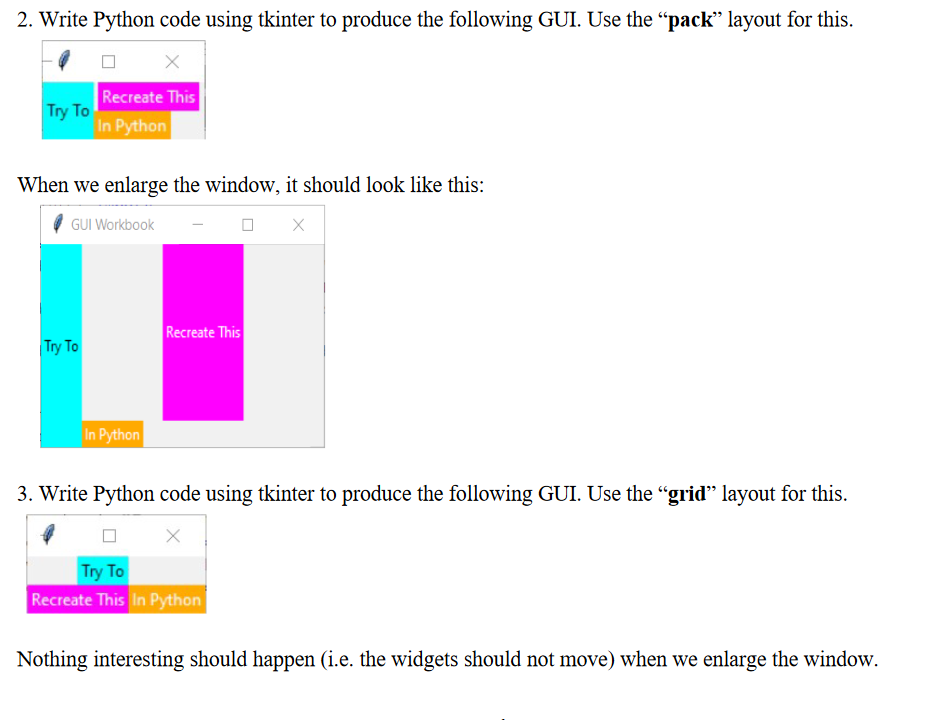
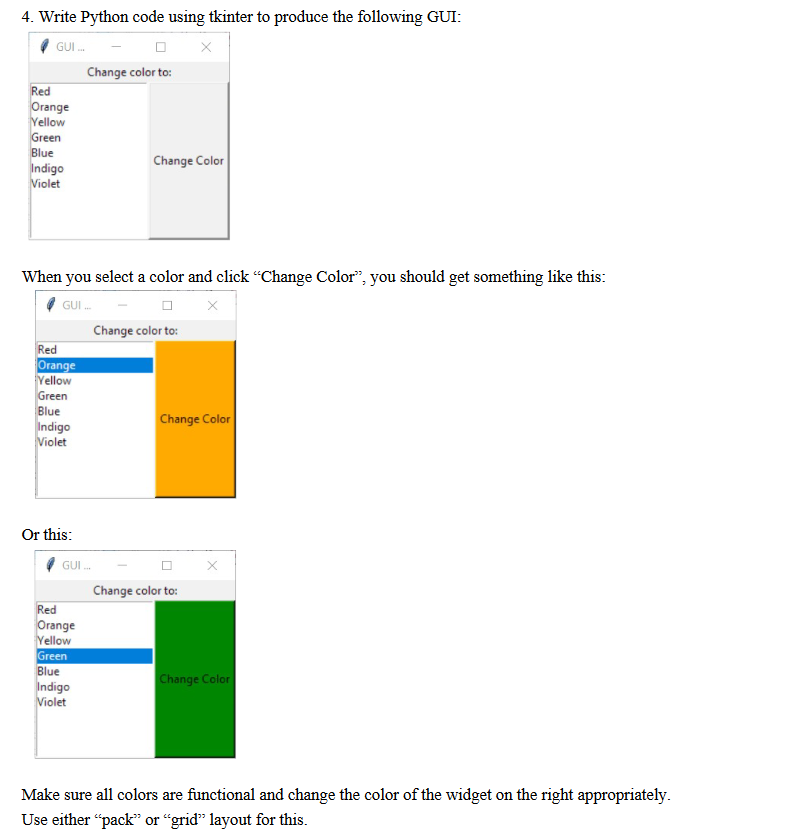
1. Write Python code using tkinter to produce the following GUI. Use the pack layout for this. Hello 131 Class When we enlarge the window, it should look like this: GUI Workbook Hello 131 Class 2. Write Python code using tkinter to produce the following GUI. Use the pack layout for this. Recreate This In Python Try To When we enlarge the window, it should look like this: GUI Workbook Recreate This Try To In Python 3. Write Python code using tkinter to produce the following GUI. Use the "grid layout for this. Try To Recreate This In Python Nothing interesting should happen (i.e. the widgets should not move) when we enlarge the window. 4. Write Python code using tkinter to produce the following GUI: GUI... Change color to: Red Orange Yellow Green Blue Indigo Change Color Violet When you select a color and click Change Color, you should get something like this: GUI. Change color to: Red Orange Yellow Green Blue Change Color Indigo Violet Or this: GUI... Change color to: Red Orange Yellow Green Blue Indigo Change Color Violet Make sure all colors are functional and change the color of the widget on the right appropriately. Use either pack or grid layout for this. 1. Write Python code using tkinter to produce the following GUI. Use the pack layout for this. Hello 131 Class When we enlarge the window, it should look like this: GUI Workbook Hello 131 Class 2. Write Python code using tkinter to produce the following GUI. Use the pack layout for this. Recreate This In Python Try To When we enlarge the window, it should look like this: GUI Workbook Recreate This Try To In Python 3. Write Python code using tkinter to produce the following GUI. Use the "grid layout for this. Try To Recreate This In Python Nothing interesting should happen (i.e. the widgets should not move) when we enlarge the window. 4. Write Python code using tkinter to produce the following GUI: GUI... Change color to: Red Orange Yellow Green Blue Indigo Change Color Violet When you select a color and click Change Color, you should get something like this: GUI. Change color to: Red Orange Yellow Green Blue Change Color Indigo Violet Or this: GUI... Change color to: Red Orange Yellow Green Blue Indigo Change Color Violet Make sure all colors are functional and change the color of the widget on the right appropriately. Use either pack or grid layout for this
Step by Step Solution
There are 3 Steps involved in it

Get step-by-step solutions from verified subject matter experts
 Study Help