







Question: 1- Write the code according to the data tables on matlab 2- write the similar code for Poisson's ratio i. e 3-write another code to
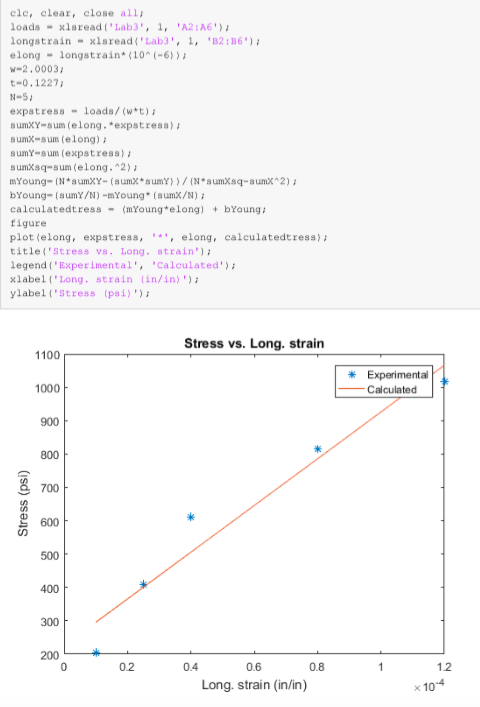
1- Write the code according to the data tables on matlab 2- write the similar code for Poisson's ratio i. e 3-write another code to draw a plot of absolute values of lateral strain vs. longitudinal strain.
*Area = w x t = 0.283
*Stress = P/A = 176.7
*Yongs Modulus = 0.11
*Poissons Ratio = 0.2407
also, I attached sample code below
RAW DATA:
| Specimen Type | AL 6061 T-6 |
| Initial Width (w) | 1.991 in |
| Initial Thickness (t) | 0.142 in |
| Preload | 25 lbs |
|
Sr. No |
LOAD | Strain Long
| Strain Lateral
| ||
| 1 | 1 | ||||
| | 50 | 20 | -6 | ||
| 2. | 100 | 39 | -13 | ||
| 3. | 150 | 59 | -19 | ||
| 4. | 200 | 79 | -26 | ||
| 5. | 250 | 160 | -33 |
clc, clear, close all loads-xlaread('Lab3', 1, 'A2:A6' longstrain- xlsread('Lab3',1, '82:86) elong- longstrain*(10"(-6); W-2.0003 t-0.1227 N-Si expstress loads/(w+t) sumXY-sum (elong.*expstress) sumx-sum(elong) ; sumY-sum (expstress) sumXsq-sum (elong-2) bYoung- (sumY/N)-mYoung (sumX/N) calculatedtress(mYoung elong) bYoung tigure plot (elong, expstress,'elong, calculatedtress) title('Stress vs. Long strain') legend ('Exper imental' Calculated') xlabel'Long.strain (in/in)) ylabel('stress [psi,"); Stress vs. Long. strain 1100 Experimental Calculated 1000 900 800 700 600 500 400 300 200 0 02 0.4 0.6 0.8 1.2 Long. strain (in/in) 104 clc, clear, close all loads-xlaread('Lab3', 1, 'A2:A6' longstrain- xlsread('Lab3',1, '82:86) elong- longstrain*(10"(-6); W-2.0003 t-0.1227 N-Si expstress loads/(w+t) sumXY-sum (elong.*expstress) sumx-sum(elong) ; sumY-sum (expstress) sumXsq-sum (elong-2) bYoung- (sumY/N)-mYoung (sumX/N) calculatedtress(mYoung elong) bYoung tigure plot (elong, expstress,'elong, calculatedtress) title('Stress vs. Long strain') legend ('Exper imental' Calculated') xlabel'Long.strain (in/in)) ylabel('stress [psi,"); Stress vs. Long. strain 1100 Experimental Calculated 1000 900 800 700 600 500 400 300 200 0 02 0.4 0.6 0.8 1.2 Long. strain (in/in) 104
Step by Step Solution
There are 3 Steps involved in it

Get step-by-step solutions from verified subject matter experts
 Study Help