







Question: 1) Write the network addresses for the provided IP address/subnet mask (First Chart): 2) Using the IP address and subnet mask shown, write the host
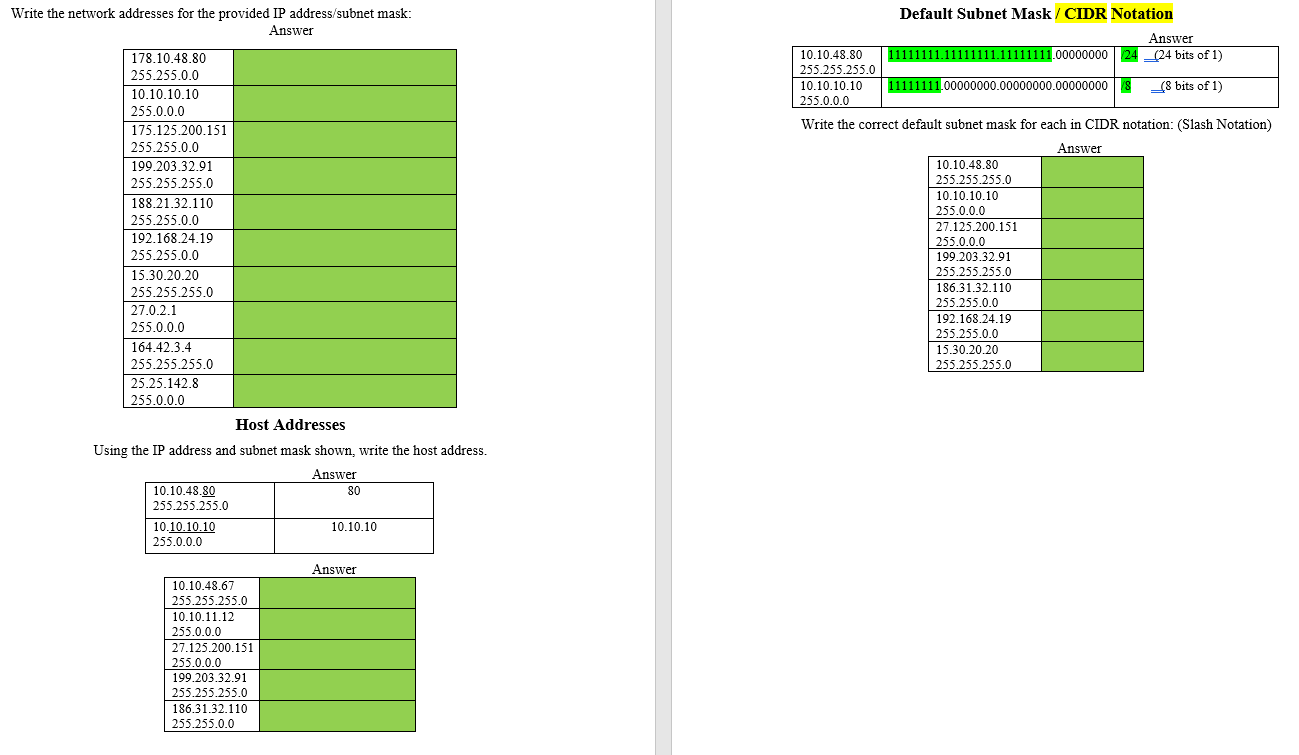 1) Write the network addresses for the provided IP address/subnet mask (First Chart): 2) Using the IP address and subnet mask shown, write the host address (Second Chart):
3) Write the correct default subnet mask for each in CIDR notation(Slash Notation, Third Chart):
Write the network addresses for the provided IP address/subnet mask: Answer Default Subnet Mask / CIDR Notation Answer 11111111.11111111.11111111.0000000024 _(24 bits of 1) 10.10.48.80 255.255.255.0 10.10.10.10 255.0.0.0 11111111.00000000-00000000.000000008 _(8 bits of 1) 178.10.48.80 255.255.0.0 10.10.10.10 255.0.0.0 175.125.200.151 255.255.0.0 199 203.32.91 255.255.255.0 188.21.32.110 255.255.0.0 192.168.24.19 255.255.0.0 15.30.20.20 255.255.255.0 27.0.2.1 255.0.0.0 164.42.3.4 255.255.255.0 25.25.142.8 255.0.0.0 Host Addresses Using the IP address and subnet mask shown, write the host address. Answer 10.10.48.80 80 255.255.255.0 10.10.10.10 10.10.10 255.0.0.0 Write the correct default subnet mask for each in CIDR notation: (Slash Notation) Answer 10.10.48.80 255.255.255.0 10.10.10.10 255.0.0.0 27.125.200.151 255.0.0.0 199.203.32.91 255.255.255.0 186.31.32.110 255.255.0.0 192.168.24.19 255.255.0.0 15.30.20.20 255.255.255.0 Answer 10.10.48.67 255.255.255.0 10.10.11.12 255.0.0.0 27.125.200.151 255.0.0.0 199.203.32.91 255.255.255.0 186.31.32.110 255.255.0.0
Step by Step Solution
There are 3 Steps involved in it

Get step-by-step solutions from verified subject matter experts
 Study Help