







Question: 1. Write the program described below. Submit the single Java file (i.e., .java text file) that contains your program: a. Please submit only a single

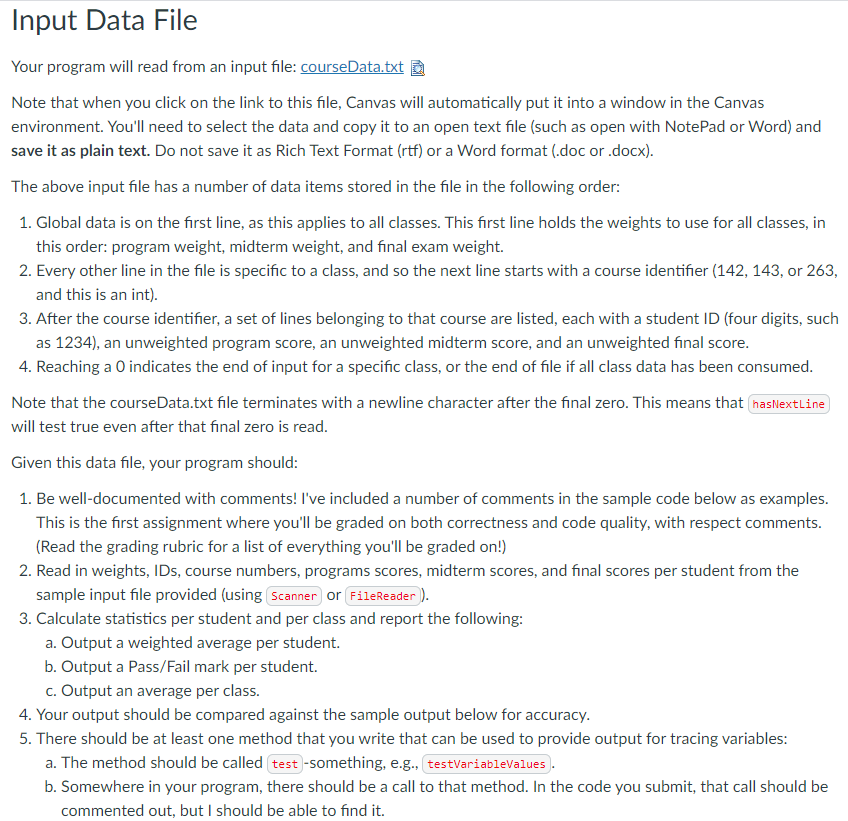
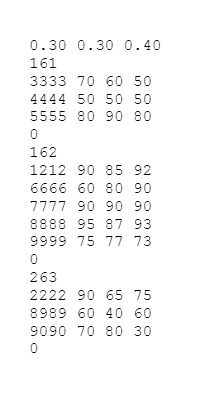
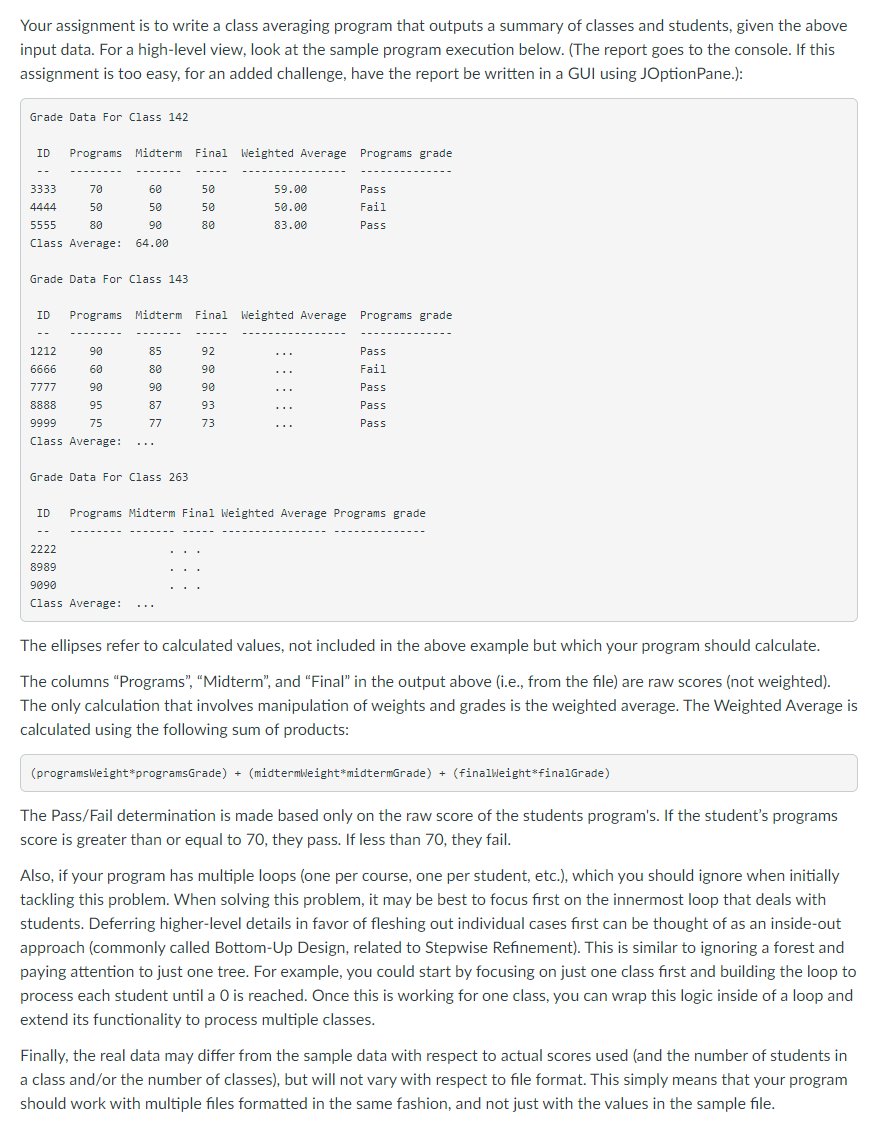
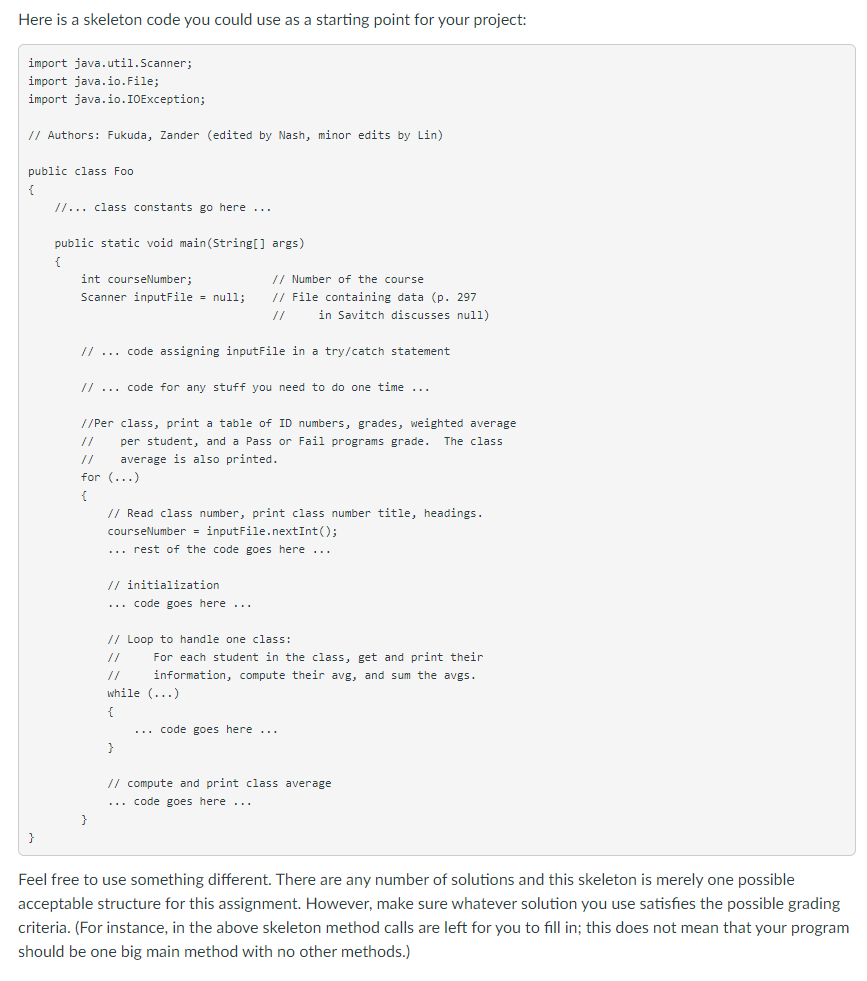
1. Write the program described below. Submit the single Java file (i.e., ".java" text file) that contains your program: a. Please submit only a single Java file via Canvas. Do not email your instructor your work. b. Name your Java file HW_Loops_Files.java. You must name your file this way. c. Note that by requiring you name your Java file HW_Loops_Files.java, it means that the public class that is in that file has to be named HW_Loops_Files. Input Data File Your program will read from an input file: courseData.txt D Note that when you click on the link to this file, Canvas will automatically put it into a window in the Canvas environment. You'll need to select the data and copy it to an open text file (such as open with NotePad or Word) and save it as plain text. Do not save it as Rich Text Format (rtf) or a Word format (.doc or .docx). The above input file has a number of data items stored in the file in the following order: 1. Global data is on the first line, as this applies to all classes. This first line holds the weights to use for all classes, in this order: program weight, midterm weight, and final exam weight. 2. Every other line in the file is specific to a class, and so the next line starts with a course identifier (142, 143, or 263, and this is an int). 3. After the course identifier, a set of lines belonging to that course are listed, each with a student ID (four digits, such as 1234), an unweighted program score, an unweighted midterm score, and an unweighted final score. 4. Reaching a O indicates the end of input for a specific class, or the end of file if all class data has been consumed. Note that the courseData.txt file terminates with a newline character after the final zero. This means that hasNextLine will test true even after that final zero is read. Given this data file, your program should: 1. Be well-documented with comments! I've included a number of comments in the sample code below as examples. This is the first assignment where you'll be graded on both correctness and code quality, with respect comments. (Read the grading rubric for a list of everything you'll be graded on!) 2. Read in weights, IDs, course numbers, programs scores, midterm scores, and final scores per student from the sample input file provided (using Scanner or FileReader). 3. Calculate statistics per student and per class and report the following: a. Output a weighted average per student. b. Output a Pass/Fail mark per student. c. Output an average per class. 4. Your output should be compared against the sample output below for accuracy. 5. There should be at least one method that you write that can be used to provide output for tracing variables: a. The method should be called test -something, e.g., testVariableValues. b. Somewhere in your program, there should be a call to that method. In the code you submit, that call should be commented out, but I should be able to find it. 0.30 0.30 0.40 161 3333 70 60 50 4444 50 50 50 5555 80 90 80 0 162 1212 90 85 92 6666 60 80 90 7777 90 90 90 8888 95 87 93 9999 75 77 73 0 263 2222 90 65 75 8989 60 40 60 9090 70 80 30 0 Your assignment is to write a class averaging program that outputs a summary of classes and students, given the above input data. For a high-level view, look at the sample program execution below. (The report goes to the console. If this assignment is too easy, for an added challenge, have the report be written in a GUI using JOptionPane.): Grade Data For Class 142 ID Programs Midterm Final Weighted Average Programs grade Pass 3333 70 60 4444 50 50 5555 80 90 Class Average: 64.00 50 50 80 59.00 50.00 83.00 Fail Pass Grade Data For Class 143 ID Programs Midterm Final Weighted Average Programs grade 90 85 Pass 92 90 60 1212 6666 7777 8888 9999 80 90 90 90 Fail Pass Pass Pass 87 95 75 93 73 77 Class Average: Grade Data For Class 263 ID Programs Midterm Final Weighted Average Programs grade 2222 8989 9090 Class Average: The ellipses refer to calculated values, not included in the above example but which your program should calculate. The columns "Programs", "Midterm", and "Final" in the output above (i.e., from the file) are raw scores (not weighted). The only calculation that involves manipulation of weights and grades is the weighted average. The Weighted Average is calculated using the following sum of products: (programsWeight*programsGrade) + (midtermweight*midtermGrade) + (finalweight*finalGrade) The Pass/Fail determination is made based only on the raw score of the students program's. If the student's programs score is greater than or equal to 70, they pass. If less than 70, they fail. Also, if your program has multiple loops (one per course, one per student, etc.), which you should ignore when initially tackling this problem. When solving this problem, it may be best to focus first on the innermost loop that deals with students. Deferring higher-level details in favor of fleshing out individual cases first can be thought of as an inside-out approach (commonly called Bottom-Up Design, related to Stepwise Refinement). This is similar to ignoring a forest and paying attention to just one tree. For example, you could start by focusing on just one class first and building the loop to process each student until a 0 is reached. Once this is working for one class, you can wrap this logic inside of a loop and extend its functionality to process multiple classes. Finally, the real data may differ from the sample data with respect to actual scores used (and the number of students in a class and/or the number of classes), but will not vary with respect to file format. This simply means that your program should work with multiple files formatted in the same fashion, and not just with the values in the sample file. Here is a skeleton code you could use as a starting point for your project: import java.util.Scanner; import java.io.File; import java.io.IOException; // Authors: Fukuda, Zander (edited by Nash, minor edits by Lin) public class Foo { //... class constants go here ... public static void main(String[] args) { int courseNumber; // Number of the course Scanner inputFile = null; // File containing data (p. 297 in Savitch discusses null) // ... code assigning inputFile in a try/catch statement // ... code for any stuff you need to do one time ... //Per class, print a table of ID numbers, grades, weighted average per student, and a Pass or Fail programs grade. The class average is also printed. for (...) { // Read class number, print class number title, headings. courseNumber = inputFile.nextInt(); ... rest of the code goes here ... // initialization ... code goes here ... // Loop to handle one class: For each student in the class, get and print their 11 information, compute their avg, and sum the avgs. while (...) ... code goes here ... } // compute and print class average ... code goes here ... } } Feel free to use something different. There are any number of solutions and this skeleton is merely one possible acceptable structure for this assignment. However, make sure whatever solution you use satisfies the possible grading criteria. (For instance, in the above skeleton method calls are left for you to fill in; this does not mean that your program should be one big main method with no other methods.)
Step by Step Solution
There are 3 Steps involved in it

Get step-by-step solutions from verified subject matter experts
 Study Help