







Question: 1. You can use an IF Function to calculate Regular pay and Overtime pay. Overtime is any hours above 40.| You can easily add the
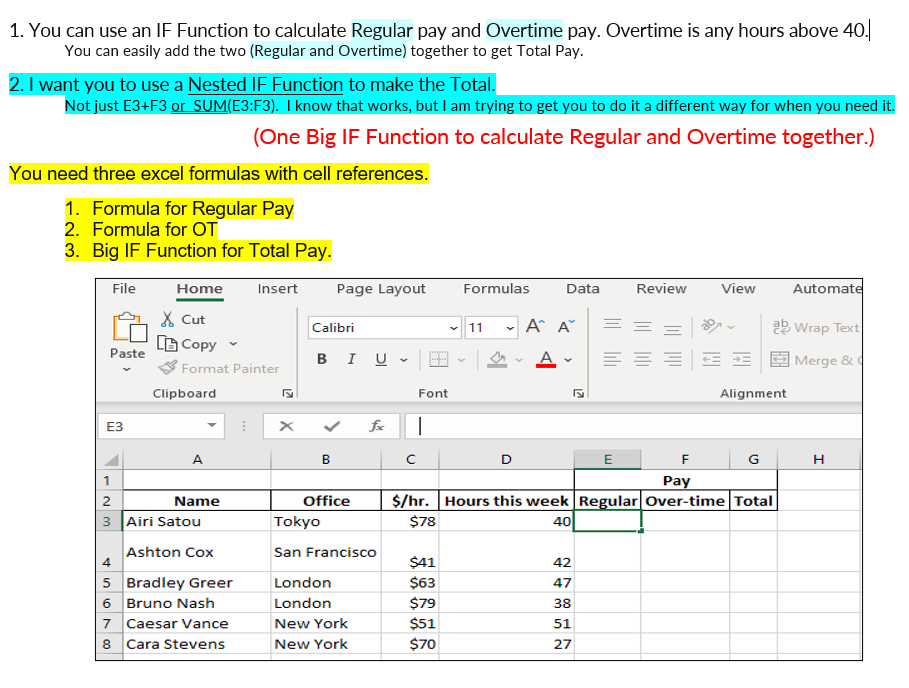
1. You can use an IF Function to calculate Regular pay and Overtime pay. Overtime is any hours above 40.| You can easily add the two (Regular and Overtime) together to get Total Pay. 2. I want you to use a Nested IF Function to make the Total. Not just E3+F3 or SUM(E3:F3). I know that works, but I am trying to get you to do it a different way for when you need it. (One Big IF Function to calculate Regular and Overtime together.) You need three excel formulas with cell references. 1. Formula for Regular Pay 2. Formula for OT 3. Big IF Function for Total Pay. 1. You can use an IF Function to calculate Regular pay and Overtime pay. Overtime is any hours above 40.| You can easily add the two (Regular and Overtime) together to get Total Pay. 2. I want you to use a Nested IF Function to make the Total. Not just E3+F3 or SUM(E3:F3). I know that works, but I am trying to get you to do it a different way for when you need it. (One Big IF Function to calculate Regular and Overtime together.) You need three excel formulas with cell references. 1. Formula for Regular Pay 2. Formula for OT 3. Big IF Function for Total Pay
Step by Step Solution
There are 3 Steps involved in it

Get step-by-step solutions from verified subject matter experts
 Study Help