





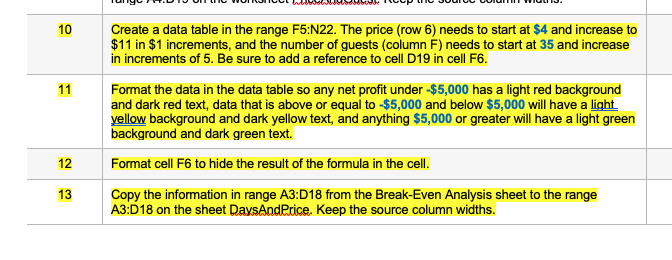
Question: 10 11 Create a data table in the range F5:N22. The price (row 6) needs to start at $4 and increase to $11 in $1

10 11 Create a data table in the range F5:N22.10 11 Create a data table in the range F5:N22.10 11 Create a data table in the range F5:N22.

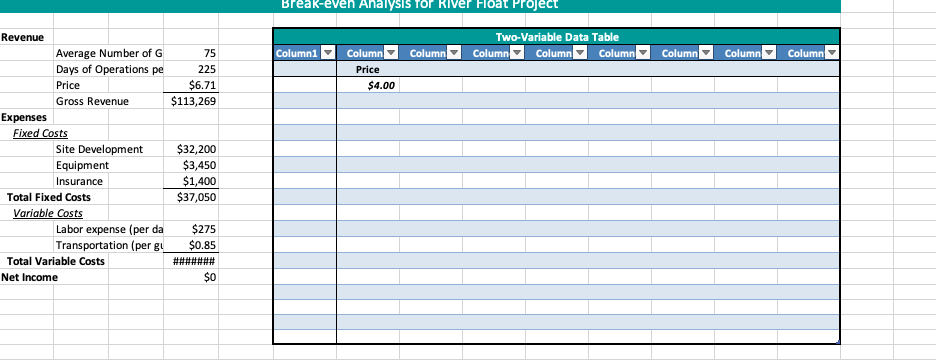
10 11 Create a data table in the range F5:N22. The price (row 6) needs to start at $4 and increase to $11 in $1 increments, and the number of guests (column F) needs to start at 35 and increase in increments of 5. Be sure to add a reference to cell D19 in cell F6. Format the data in the data table so any net profit under $5,000 has a light red background and dark red text, data that is above or equal to $5,000 and below $5,000 will have a light. yellow background and dark yellow text, and anything $5,000 or greater will have a light green background and dark green text. Format cell F6 to hide the result of the formula in the cell. Copy the information in range A3:018 from the Break-Even Analysis sheet to the range A3:D18 on the sheet DaysAndPrice. Keep the source column widths. | 14 N Add a scroll bar to the right of the inserted cells in column F that will change the days of operations per year between the values of 225 and 275 one day at a time. Enter the text Days of Operations in cell F4 and center the text. Add a scroll bar to the right or below of the first scroll bar in column I that will change the price between the values of $4 and $11 by $1 increments. Enter the text Price in cell 14. 15 2. Break-even Analysis for River Float Project Two-Variable Data Table Column Column Column Columni Column Column Column Column Column Price $4.00 Revenue Average Number of G 75 Days of Operations pe 225 Price $6.71 Gross Revenue $113,269 Expenses Fixed Costs Site Development $32,200 Equipment $3,450 Insurance $1,400 Total Fixed Costs $37,050 Variable costs Labor expense (per da $275 Transportation (per gy $0.85 Total Variable Costs ####### Net Income $0
Step by Step Solution

There are 3 Steps involved in it

1 Expert Approved Answer
Step: 1 Unlock blur-text-image

Question Has Been Solved by an Expert!

Get step-by-step solutions from verified subject matter experts

Step: 2 Unlock
Step: 3 Unlock

Students Have Also Explored These Related General Management Questions!