







Question: 10. Build a Simple Calculator Program, write pseudo code, and create a flowchart. Write a program that takes 2 numbers as input and performs the
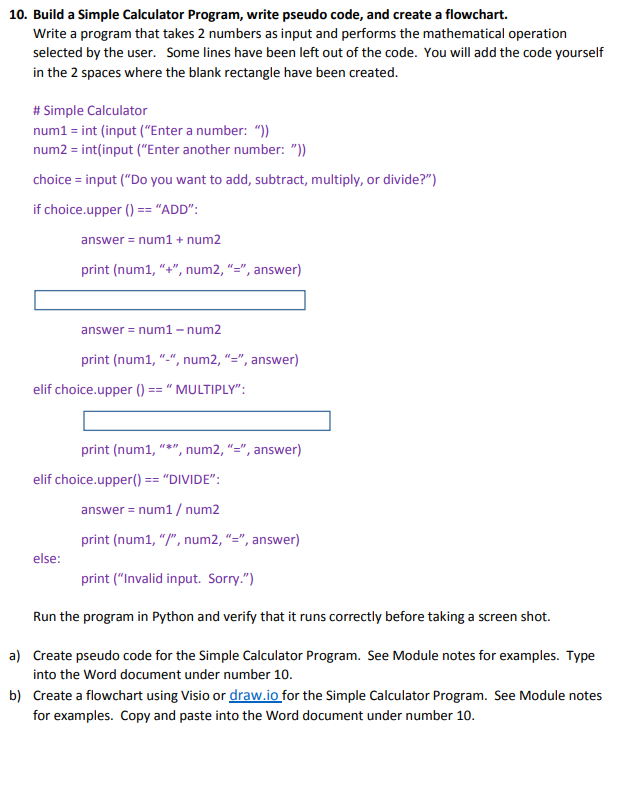
10. Build a Simple Calculator Program, write pseudo code, and create a flowchart. Write a program that takes 2 numbers as input and performs the mathematical operation selected by the user. Some lines have been left out of the code. You will add the code yourself in the 2 spaces where the blank rectangle have been created. \# Simple Calculator num1 = int (input ( "Enter a number: ")) num2 = int(input ("Enter another number: ")) choice = input ("Do you want to add, subtract, multiply, or divide?") if choice.upper ()== "ADD": answer = num 1+ num 2 print (num1, " +, num2, " =", answer) answer = num 1 num 2 print (num1, " ", num2, " = ", answer) elif choice.upper () == " MULTIPLY": print (num1, " "*", num2, " =", answer) elif choice.upper ()== "DIVIDE": answer = num 1/ num 2 print (num1, "/ / ", num2, " = ", answer) else: print ("Invalid input. Sorry.") Run the program in Python and verify that it runs correctly before taking a screen shot. a) Create pseudo code for the Simple Calculator Program. See Module notes for examples. Type into the Word document under number 10. b) Create a flowchart using Visio or draw.io for the Simple Calculator Program. See Module notes for examples. Copy and paste into the Word document under number 10
Step by Step Solution
There are 3 Steps involved in it

Get step-by-step solutions from verified subject matter experts
 Study Help