



Question: 1.0 Introduction MP3 BlastBox is a media player application for .mp3 format audio tracks. A picture to guide the creation of the graphical user interface
1.0 Introduction MP3 BlastBox is a media player application for .mp3 format audio tracks.
A picture to guide the creation of the graphical user interface for the application is shown in Figure 1.
From this starting point, develop the MP3 BlastBox application. The development tasks to be undertaken are itemised in section
2.0. Figure 1: MP3 BlastBox suggested interface design 2.0
a)MP3 BlastBox Features Create a user interface for the MP3 Blast Box application similar to that shown in Figure 1. (10 marks)
b)At application startup, the list of available tracks should be populated from a music directory adjacent to where the application is located. This directory should only have music files in .mp3 format. It is not necessary to implement filtering. (10 marks)
c)When the Add button is clicked, a track selected in the available list is added to the selected tracks list. The button should not be enabled unless a track is selected in the available list. (10 marks)
d) Implement removal of a single track and removal of all tracks from the selected tracks list. (10 marks)
e)Manage the enabling and disabling of buttons to support correct use of the application. For example, if the selected tracks list is empty, all buttons should be disabled. If a track is selected in the available tracks list, the Add Track button is once again enabled. Clicking on a track in the list of selected tracks enables the Play button etc. (10 marks)
f)When the Play button is clicked, the highlighted track from the list of selected tracks is played. It is not necessary to play the entire list. Also implement the Stop and Pause buttons. (10 marks) Add a slider to control volume. Bind the control to the media player's volume. (10 marks)
g)Create a simple icon for the application and add it. Customize the styling and colouring of the application to enhance its appeal to users. (10 marks)
h)Provide play position feedback. This can be in numeric form using a label, for example, or in the form of a slider or both. If using a slider, it is not necessary to support seek operations to allow the user to move playing to a new position in the track. (20 marks)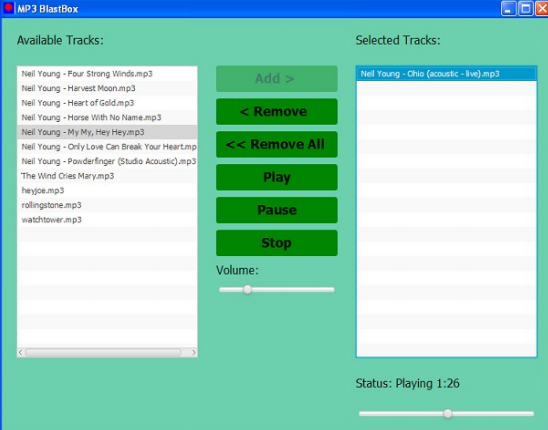
MP3 BlastBox . Available Tracks: Selected Tracks: Add > Neil Young - Chio (acoustic - Ive).mp3 Neil Young - Chio (acoustic - Ive).mp3
Step by Step Solution
There are 3 Steps involved in it

Get step-by-step solutions from verified subject matter experts