







Question: 11:26 76 Back Multiply.docx (1) Switch To Light Mode Multiplication Table: You are to write one and only one formula in cell B2, and
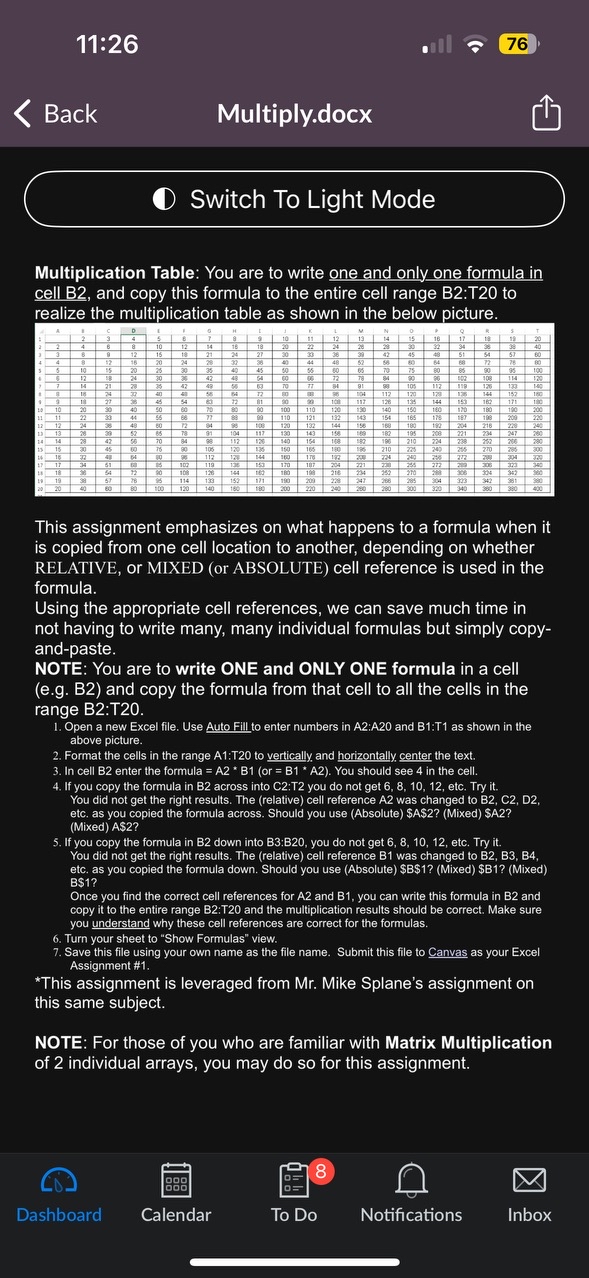
11:26\ 76\ Back\ Multiply.docx\ (1) Switch To Light Mode\ Multiplication Table: You are to write one and only one formula in cell B2, and copy this formula to the entire cell range B2:T20 to realize the multiplication table as shown in the below picture.\ This assignment emphasizes on what happens to a formula when it is copied from one cell location to another, depending on whether RELATIVE, or MIXED (or ABSOLUTE) cell reference is used in the formula.\ Using the appropriate cell references, we can save much time in not having to write many, many individual formulas but simply copyand-paste.\ NOTE: You are to write ONE and ONLY ONE formula in a cell (e.g. B2) and copy the formula from that cell to all the cells in the range B2:T20.\ Open a new Excel file. Use Auto Fill to enter numbers in A2:A20 and B1:T1 as shown in the above picture.\ Format the cells in the range A1:T20 to vertically, and horizontally center the text.\ In cell B2 enter the formula
=A2*
B1(or
=B1^(**)A2). You should see 4 in the cell.\ If you copy the formula in B2 across into C2:T2 you do not get
6,8,10,12, etc. Try it. You did not get the right results. The (relative) cell reference A2 was changed to B2, C2, D2, etc. as you copied the formula across. Should you use (Absolute) $A$2? (Mixed) $A2? (Mixed) As2?\ If you copy the formula in B2 down into B3:B20, you do not get
6,8,10, 12, etc. Try it. You did not get the right results. The (relative) cell reference B1 was changed to B2, B3, B4, etc. as you copied the formula down. Should you use (Absolute) $B$1? (Mixed) $B1? (Mixed) B$1?\ Once you find the correct cell references for A2 and B1, you can write this formula in B2 and copy it to the entire range B2:T20 and the multiplication results should be correct. Make sure you understand why these cell references are correct for the formulas.\ Turn your sheet to "Show Formulas" view.\ Save this file using your own name as the file name. Submit this file to Canvas as your Excel Assignment #1.\ *This assignment is leveraged from Mr. Mike Splane's assignment on this same subject.\ NOTE: For those of you who are familiar with Matrix Multiplication of 2 individual arrays, you may do so for this assignment.\ Dashboard\ Calendar\ To Do\ Notifications\ Inbox
Step by Step Solution
There are 3 Steps involved in it

Get step-by-step solutions from verified subject matter experts
 Study Help