







Question: 1.17 LAB: Add methods to a class C++ The Rectangle class is provided in the template. First run the program to see what it does.
1.17 LAB: Add methods to a class C++
The Rectangle class is provided in the template. First run the program to see what it does. You will need two numbers for input.
(1) Add a calculatePerimeter() method to the class. calculatePerimeter() has no parameters and returns the perimeter of the rectangle. Add the method header to the class and implement the method. (3 pts)
(2) In main(), call the new method and display the results: (2 pts)

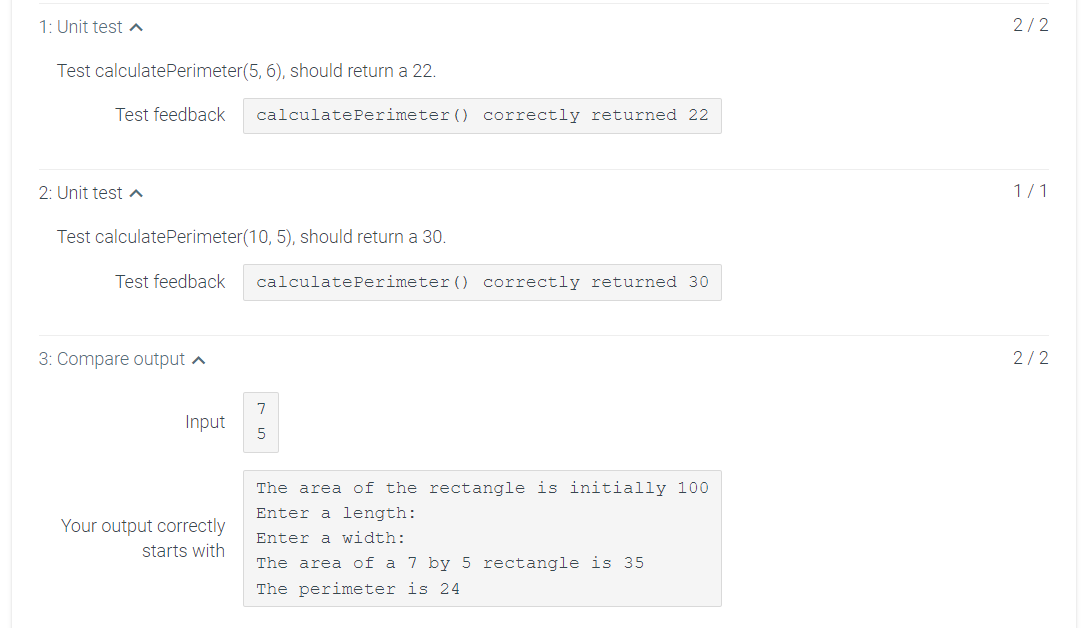
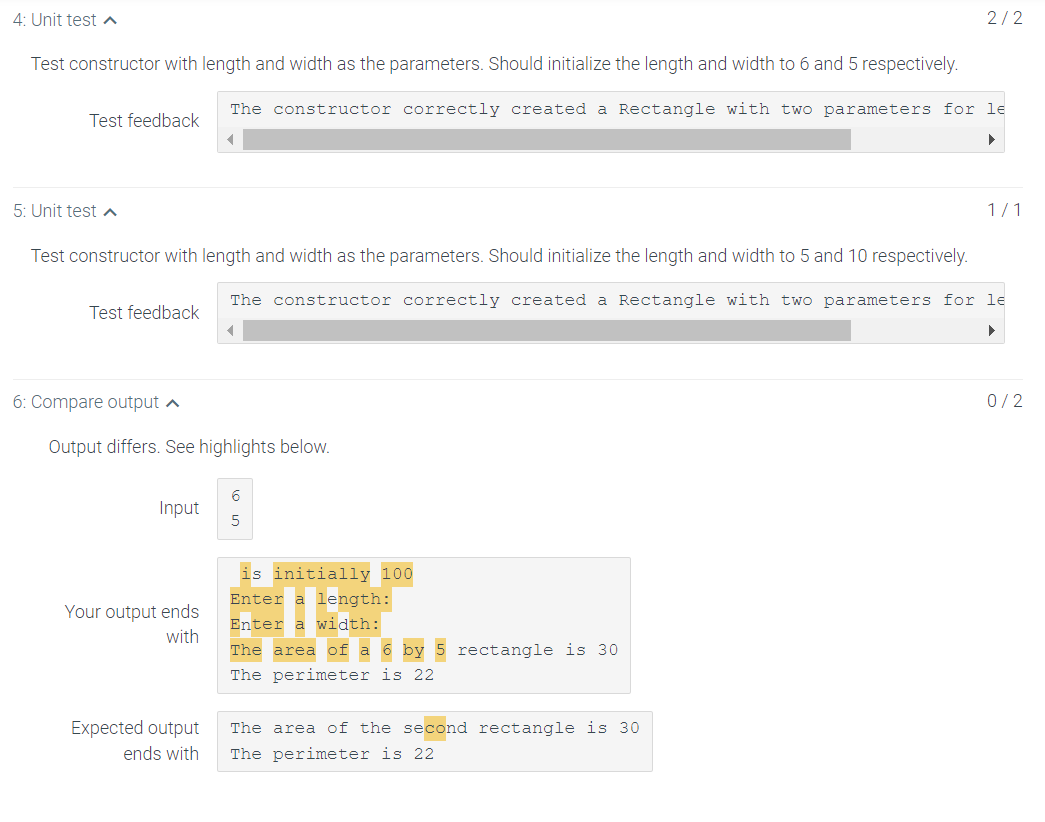
Rectangle.h class Rectangle { private: int length; int width; public: Rectangle(); void setLength(int); void setWidth(int); int getLength(); int getWidth(); int calculateArea(); int calculatePerimeter(); }; Rectangle.cpp #include "Rectangle.h" /************************ The default constructor sets the length and the width to both be 10 **************************/ Rectangle::Rectangle() { length = 10; width = 10; } /************************ setLength receives an int that is assigned to length **************************/ void Rectangle::setLength(int l) { length = l; } /************************ setWidth receives an int that is assigned to width **************************/ void Rectangle::setWidth(int w) { width = w; } /************************ getLenght returns the length **************************/ int Rectangle::getLength() { return length; } /************************ getWidht returns the width **************************/ int Rectangle::getWidth() { return width; } /************************ calcualteArea returns the length times the width **************************/ int Rectangle::calculateArea() { return length * width; } int Rectangle::calculatePerimeter(){ return 2 * (length + width); } RectangleDemo.cpp ****Can't not do anything**** #include #include "Rectangle.h" using namespace std; int main() { int length, width; Rectangle r; cout > length; cout > width; r.setLength(length); r.setWidth(width); cout 1.17 LAB: Add methods to a class The Rectangle class is provided in the template. First run the program to see what it does. You will need two numbers for input. (1) Add a calculate Perimeter method to the class. calculate Perimeter() has no parameters and returns the perimeter of the rectangle. Add the method header to the class and implement the method. (3 pts) (2) In main(), call the new method and display the results: (2 pts) Ex: The area of the rectangle is initially 100 Enter a length: 7 Enter a width: 5 The area of a 7 by 5 rectangle is 35 The perimeter is 24 (3) Add an overloaded constructor that will accept and set the length and width of a rectangle. (3 pts) (4) In main(), after the code that displays r1's perimeter: create a new Rectangle object using the new constructor (passing in two values of your choosing). Call the calculate Perimeter and calculate Area() methods for the new Rectangle in cout statements. (2 pts) Ex. (10 and 7 are passed to the constructor) The area of the second rectangle is 70 The perimeter is 34 1: Unit test A 2/2 Test calculate Perimeter(5, 6), should return a 22. Test feedback calculate Perimeter() correctly returned 22 2: Unit test A 1/1 Test calculate Perimeter(10,5), should return a 30. Test feedback calculatePerimeter() correctly returned 30 3: Compare output 2/2 7 Input 5 Your output correctly starts with The area of the rectangle is initially 100 Enter a length: Enter a width: The area of a 7 by 5 rectangle is 35 The perimeter is 24 4. Unit test A 2/2 Test constructor with length and width as the parameters. Should initialize the length and width to 6 and 5 respectively. The constructor correctly created a Rectangle with two parameters for le Test feedback 5: Unit testa 1/1 Test constructor with length and width as the parameters. Should initialize the length and width to 5 and 10 respectively. The constructor correctly created a Rectangle with two parameters for le Test feedback 6: Compare output ^ 0/2 Output differs. See highlights below. 6 Input 5 Your output ends with is initially 100 Enter a length: Enter a width: The area of a 6 by The perimeter is 22 rectangle is 30 Expected output ends with The area of the second rectangle is 30 The perimeter is 22 Step by Step Solution
There are 3 Steps involved in it
1 Expert Approved Answer
Step: 1 Unlock

Question Has Been Solved by an Expert!
Get step-by-step solutions from verified subject matter experts
Step: 2 Unlock
Step: 3 Unlock
 Study Help