







Question: 1/3 Using the Open CV and Python, develop a simple video processing software. The software should include the following items (Figure 1): 1. An interface
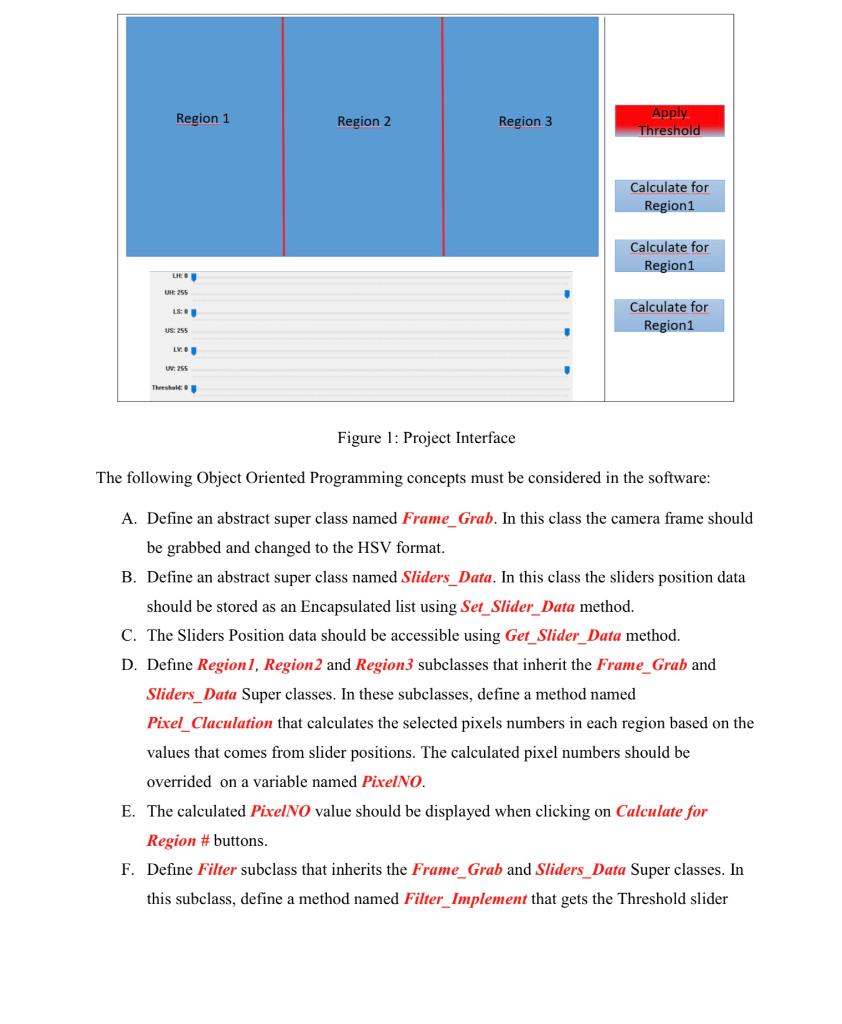
1/3 Using the Open CV and Python, develop a simple video processing software. The software should include the following items (Figure 1): 1. An interface should be designed for capturing video from web cam (Blue Window). 2. The captured video window should be divided to three regions as shown in the Figure 1. 3. Seven sliders should be added to the interface. Six sliders for HSV channels upper and lower values and one slider for threshold value. 4. Four buttons should be added to the interface. Three for calculating the number of selected pixels in the three regions. One button for applying the THRESH_TRUNC filter. Hint: use the slider position as th_val. (_, th3=cv.threshold (img, th_val, 255, cv.THRESH_TRUNC). By pushing Calculate for Region # buttons the number of selected pixels in each region should be calculated and by pushing the Apply Threshold button, the filter should be applied based on the slider position. Region 1 Region 2 Region 3 Apply Threshold Calculate for Region1 Calculate for Region1 LR UR 255 18 Calculate for Region1 US: 255 LV UV 255 These Figure 1: Project Interface The following Object Oriented Programming concepts must be considered in the software: A. Define an abstract super class named Frame_Grab. In this class the camera frame should be grabbed and changed to the HSV format. B. Define an abstract super class named Sliders_Data. In this class the sliders position data should be stored as an Encapsulated list using Set_Slider_Data method. C. The Sliders Position data should be accessible using Get_Slider_Data method. D. Define Regionl, Region 2 and Region3 subclasses that inherit the Frame_Grab and Sliders_Data Super classes. In these subclasses, define a method named Pixel_Claculation that calculates the selected pixels numbers in each region based on the values that comes from slider positions. The calculated pixel numbers should be overrided on a variable named PixelNO. E. The calculated PixelNO value should be displayed when clicking on Calculate for Region #buttons. F. Define Filter subclass that inherits the Frame_Grab and Sliders_Data Super classes. In this subclass, define a method named Filter_Implement that gets the Threshold slider
Step by Step Solution
There are 3 Steps involved in it

Get step-by-step solutions from verified subject matter experts
 Study Help