







Question: 13. Which type of connector does a network interface card use? .DIN PS-2 RJ-11 . RJ-45 14. A router has a valid operating system and
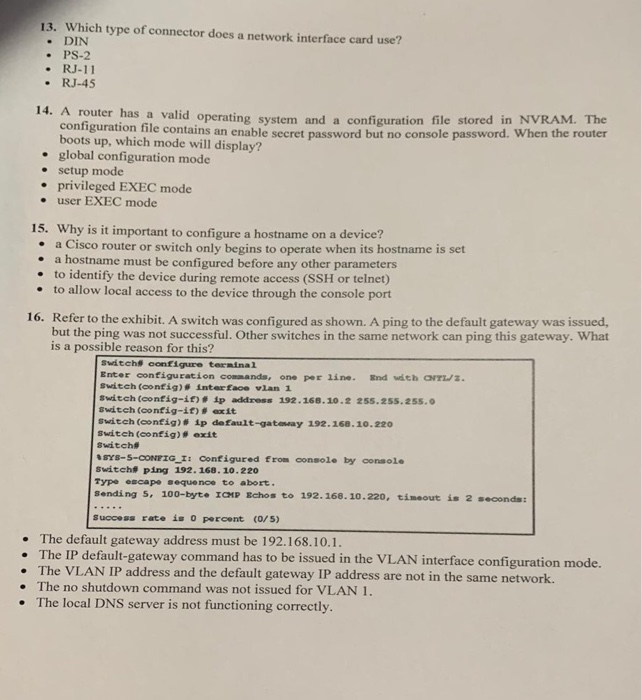
13. Which type of connector does a network interface card use? .DIN PS-2 RJ-11 . RJ-45 14. A router has a valid operating system and a configuration file stored in NVRAM. The configuration file contains an enable secret password but no console password. When the router boots up, which mode will display? . global configuration mode e setup mode . privileged EXEC mode . user EXEC mode 15. Why is it important to configure a hostname on a device? e a Cisco router or switch only begins to operate when its hostname is set e a hostname must be configured before any other parameters . to identify the device during e to allow local access remote access (SSH or telnet) to the device through the console port Refer to the exhibit. A switch was configured as shown. A ping to the default gateway was issued, but th 16. e ping was not successful. Other switches in the same network can ping this gateway. What is a possible reason for this? Switchs configure terninal Enter configuration commands, one per line. End with a Switch (config) inter face vlan 1 Switch (config-if) # 4p address 192. 168. 10-2 255.255. 255.0 switch (config-it)exit switch (oonfig) ip default-gateway 192.168.10.220 Switch (config) exit Switch SYs-s-cONEIG I: Configured from console by console Switcht ping 192. 168.10.220 Type escape seque noe to abort sending 5, 100-byt. ICHp gchos to 192.168.10.220, tneout s 2 seconds: Success rate is 0 percent (O/5) . The default gateway address must be 192.168.10.1 . The IP default-gateway command has to be issued in the VLAN interface configuration mode. The VLAN IP address and the default gateway IP address are not in the same network. The local DNS server is not functioning correctly . The no shutdown command was not issued for VLAN 1
Step by Step Solution
There are 3 Steps involved in it

Get step-by-step solutions from verified subject matter experts
 Study Help