







Question: 13.1 Introduction Runtime errors occur while a program is running if the environment detects an operation that is impossible to carry out. For example, if
- 13.1 Introduction Runtime errors occur while a program is running if the environment detects an operation that is impossible to carry out. For example, if you access an array using an index out of bounds, your program will get a runtime error with an ArrayIndexOutOfBoundsException. To read data from a file, you need to create a Scanner object using new Scanner(new File(filename)) (see Listing 9.6). If the file does not exist, your program will get a runtime error with a FileNotFoundException. In Java, runtime errors are caused by exceptions. An exception is an object that represents an error or a condition that prevents execution from proceeding normally. If the exception is not handled, the program will terminate abnormally. How can you handle the exception so that the program can continue to run or else terminate gracefully? This is the subject we introduce in this chapter.
14.9 2,Owing to performance considerations, primitive data types are not used as objects in Java. Because of the overhead of processing objects, the language%u2019s performance would be adversely affected if primitive data types were treated as objects. However, many Java methods require the use of objects as arguments. For example, the add(object) method in the ArrayList class adds an object to an ArrayList. Java offers a convenient way to incorporate, or wrap, a primitive data type into an object (e.g., wrapping int into the Integer class, and wrapping double into the Double class). The corresponding class is called a wrapper class. By using a wrapper object instead of a primitive data type variable, you can take advantage of generic programming.
why wrapper class?
Java provides Boolean, Character, Double, Float, Byte, Short, Integer, and Long wrapper classes for primitive data types. These classes are grouped in the java.lang package. Their inheritance hierarchy is shown in Figure 14.8.
------------------------------------------------------------------------------------------------------------
17.1 Introduction
A graphical user interface (GUI) makes a system user friendly and easy to use. Creating a GUI requires creativity and knowledge of how GUI components work. Since the GUI components in Java are very flexible and versatile, you can create a wide assortment of useful user interfaces.
GUI
Many Java IDEs provide tools for visually designing and developing GUI interfaces. This enables you to rapidly assemble the elements of a user interface (UI) for a Java application or applet with minimum coding. Tools, however, cannot do everything. You have to modify the programs they produce. Consequently, before you begin to use the visual tools, you must understand the basic concepts of Java GUI programming.
Previous chapters briefly introduced several GUI components. This chapter introduces the frequently used GUI components in detail (see Figure 17.1). (Since this chapter introduces no new concepts, instructors may assign it for students to study on their own.)
Figure 19.13 The program copies a file.
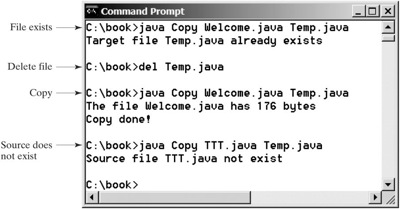
To copy the contents from a source to a target file, it is appropriate to use a binary input stream to read bytes from the source file and a binary output stream to send bytes to the target file, regardless of the contents of the file. The source file and the target file are specified from the command line. Create an InputFileStream for the source file and an OutputFileStream for the target file. Use the read() method to read a byte from the input stream, and then use the write(b) method to write the byte to the output stream. Use BufferedInputStream and BufferedOutputStream to improve the performance. Listing 19.4 gives the solution to the problem.
File exists Delete file Copy Source does not exist Command Prompt C:\book>java Copy Welcome.java Temp.java Target file Temp. java already exists C:\book>del Temp.java C:\book>java Copy Welcome.java Temp.java The file Welcome. java has 176 bytes Copy done! C:\book>java Copy TTT.java Temp.java Source file TTT. java not exist C: \book> x
Step by Step Solution
There are 3 Steps involved in it

Get step-by-step solutions from verified subject matter experts
 Study Help