







Question: 14. Create the Slice We called the variable slice because that is what we need to do now. Ultimately, the value you will be returning
14. Create the Slice
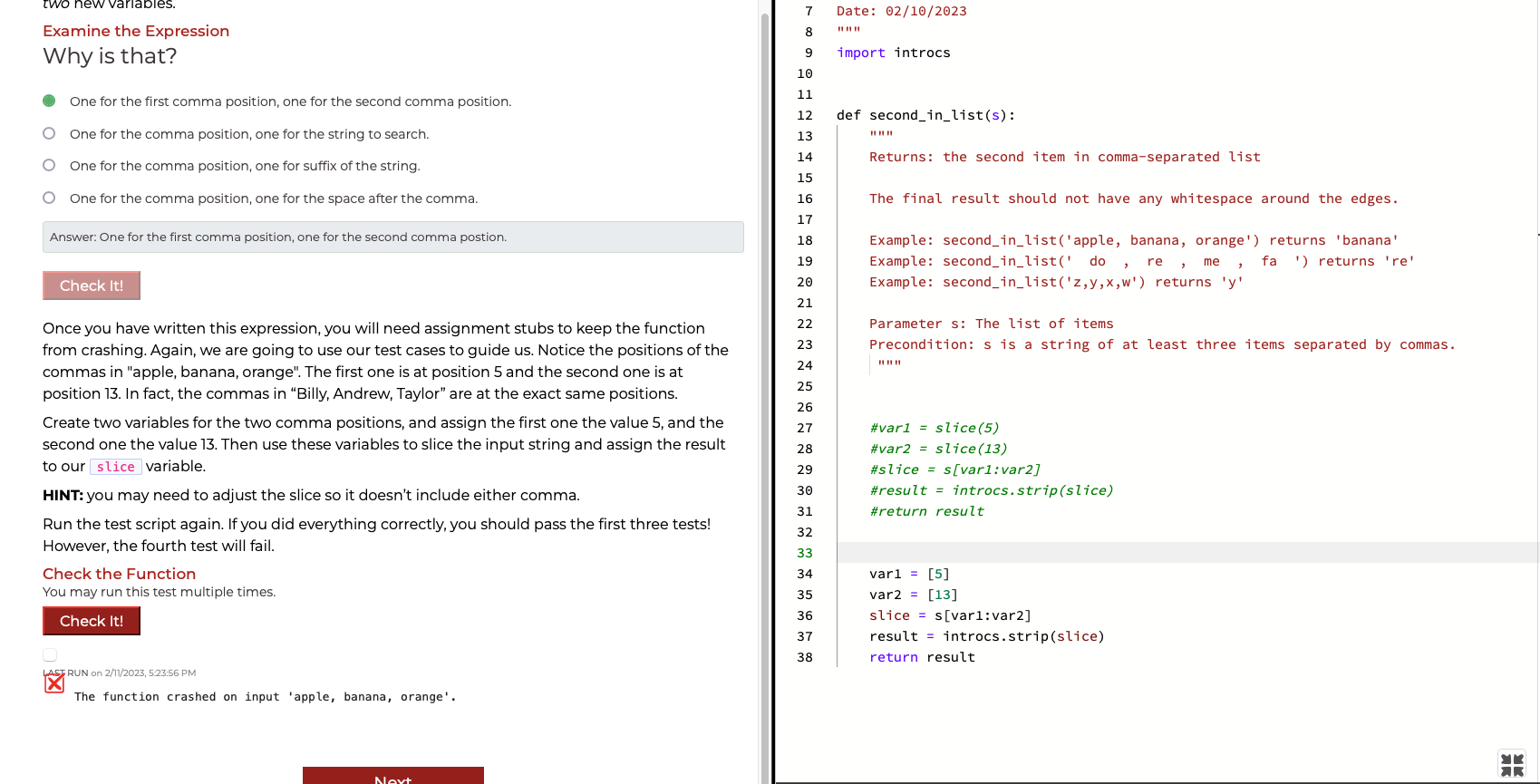
We called the variable slice because that is what we need to do now. Ultimately, the value you will be returning will be cut from the original string s. Once you slice properly, the function should not work just on the string "apple, banana, orange", but also on the string "Billy, Andrew, Taylor". You should replace the right hand side of the assignment stub for slice with an expression slicing s.
This step is a little more complicated. Think about how we are slicing. We are slicing from one comma to another (not including the commas). As a result, this expression is going to require twonew variables.
Examine the Expression
Why is that?
One for the first comma position, one for the second comma position.
One for the comma position, one for the string to search.
One for the comma position, one for suffix of the string.
One for the comma position, one for the space after the comma.
Answer: One for the first comma position, one for the second comma postion.
Check It!
Once you have written this expression, you will need assignment stubs to keep the function from crashing. Again, we are going to use our test cases to guide us. Notice the positions of the commas in "apple, banana, orange". The first one is at position 5 and the second one is at position 13. In fact, the commas in Billy, Andrew, Taylor are at the exact same positions.
Create two variables for the two comma positions, and assign the first one the value 5, and the second one the value 13. Then use these variables to slice the input string and assign the result to our slice variable.
HINT: you may need to adjust the slice so it doesnt include either comma.
Run the test script again. If you did everything correctly, you should pass the first three tests! However, the fourth test will fail.
Examine the Expression Why is that? One for the first comma position, one for the second comma position. One for the comma position, one for the string to search. One for the comma position, one for suffix of the string. One for the comma position, one for the space after the comma. The final result should not have any whitespace around the edges. Answer: One for the first comma position, one for the second comma postion. Once you have written this expression, you will need assignment stubs to keep the function from crashing. Again, we are going to use our test cases to guide us. Notice the positions of the commas in "apple, banana, orange". The first one is at position 5 and the second one is at position 13. In fact, the commas in "Billy, Andrew, Taylor" are at the exact same positions. Create two variables for the two comma positions, and assign the first one the value 5 , and the second one the value 13. Then use these variables to slice the input string and assign the result to our variable. HINT: you may need to adjust the slice so it doesn't include either comma. Run the test script again. If you did everything correctly, you should pass the first three tests! However, the fourth test will fail. Check the Function You may run this test multiple times. var1=[5] var 2=[13] slice =s[var1:var2] result = introcs.strip ( slice ) return result The function crashed on input 'apple, banana, orange
Step by Step Solution
There are 3 Steps involved in it

Get step-by-step solutions from verified subject matter experts
 Study Help