







Question: 18. (Microsoft Visual Basic) assume that lstBox is as shown below. Determine the contents of the text box after the code is executed. 7. Text
18. (Microsoft Visual Basic)
assume that lstBox is as shown below. Determine the contents of the text box after the code is executed.
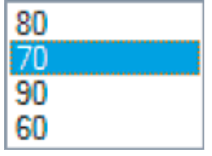
7. Text = CStr(lstBox.Items(0)) 8. Text = lstBox.Text 9. Text = CStr(lstBox.Items(lstBox.SelectedIndex)) 10. Text = CStr(lstBox.SelectedIndex) 11. Dim num As Integer = 0 For n As Integer = 0 To (lstBox.Items.Count 1) num += CInt(lstBox.Items(n)) Next Text = CStr(num) 12 Dim min As Double = 100 Dim x As Double For n As Integer = 0 To (lstBox.Items.Count 1) x = CDbl( lstBox.Items(n) ) If x
(Microsoft Visual Basic)
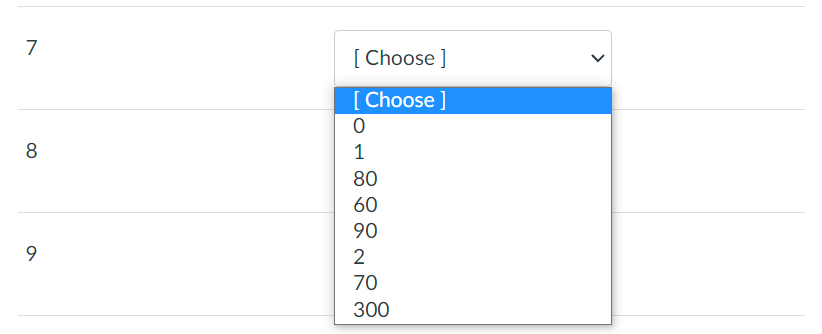
\begin{tabular}{|l|} 80 \\ 70 \\ 90 \\ 60 \\ \hline \end{tabular} \begin{tabular}{|l|l|} \hline 7 & {[ Choose ] } \\ \hline & {[ Choose ] } \\ \hline & 0 \\ & 1 \\ & 80 \\ 9 & 60 \\ & 90 \\ & 2 \\ 70 \\ 300 \\ \hline \end{tabular}
Step by Step Solution
There are 3 Steps involved in it
1 Expert Approved Answer
Step: 1 Unlock

Question Has Been Solved by an Expert!
Get step-by-step solutions from verified subject matter experts
Step: 2 Unlock
Step: 3 Unlock
 Study Help