







Question: 19. Exercise 6.3.35 (Microsoft Visual Basic) GRADES Alter Example 3 in the section 6.3 (List Boxes and Loops) so that the btnCalculate_Click event procedure calculates
19. Exercise 6.3.35 (Microsoft Visual Basic)
GRADES
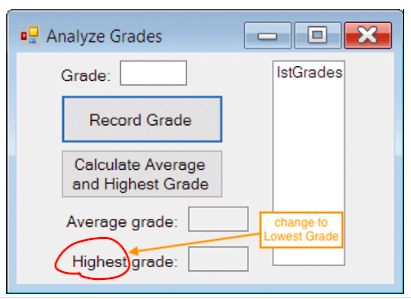
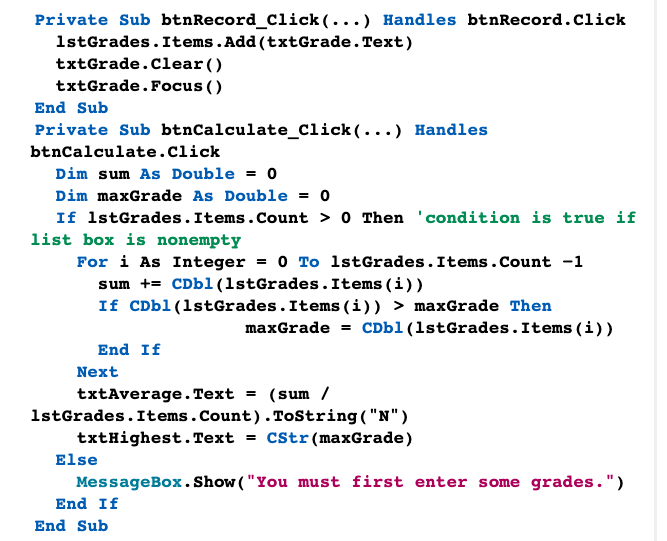
Alter Example 3 in the section 6.3 (List Boxes and Loops) so that the btnCalculate_Click event procedure calculates the lowest grade instead of the highest grade.
Example code for calculating Highest grade
(Microsoft Visual Basic)
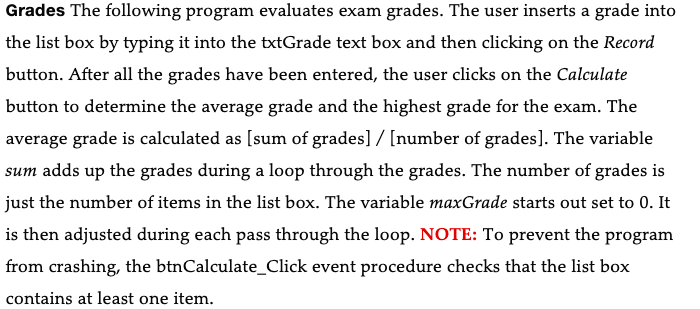
Grades The following program evaluates exam grades. The user inserts a grade into the list box by typing it into the txtGrade text box and then clicking on the Record button. After all the grades have been entered, the user clicks on the Calculate button to determine the average grade and the highest grade for the exam. The average grade is calculated as [sum of grades] / [number of grades]. The variable sum adds up the grades during a loop through the grades. The number of grades is just the number of items in the list box. The variable maxGrade starts out set to 0. It is then adjusted during each pass through the loop. NOTE: To prevent the program from crashing, the btnCalculate_Click event procedure checks that the list box contains at least one item. Analyze Grades Grade: IstGrades Record Grade Calculate Average and Highest Grade Average grade: Highest grade
Step by Step Solution
There are 3 Steps involved in it

Get step-by-step solutions from verified subject matter experts
 Study Help