







Question: 1-Instructions Chapter 06 Mini Project Solid Footing 15e 2- Excel Sheets Instructions: You will be recording the March 2023 transactions for OverPriced Jeans, Inc. (OPJ).
1-Instructions Chapter 06 Mini Project Solid Footing 15e
2- Excel Sheets
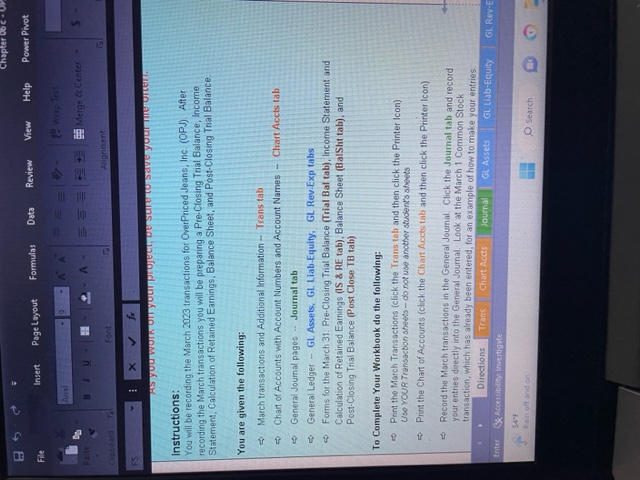
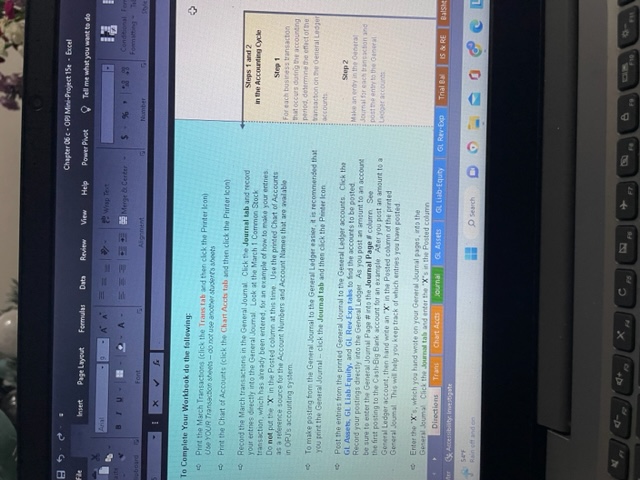
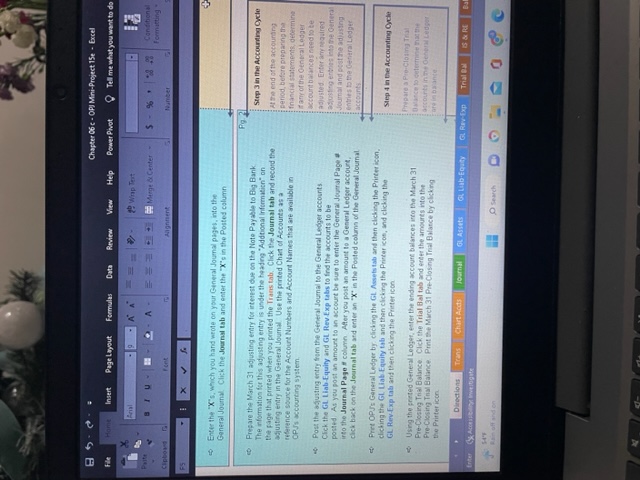
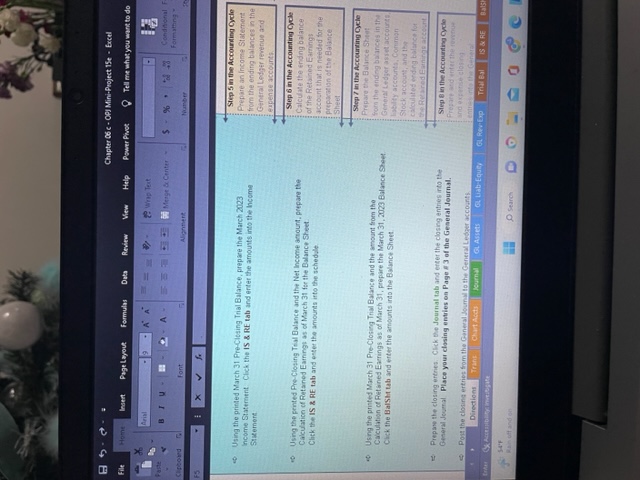
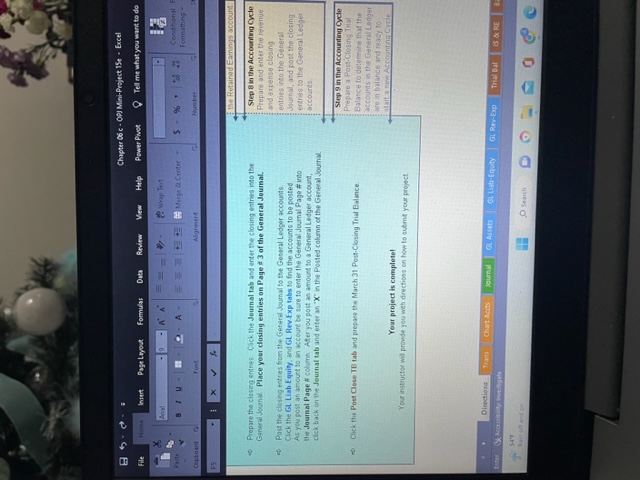
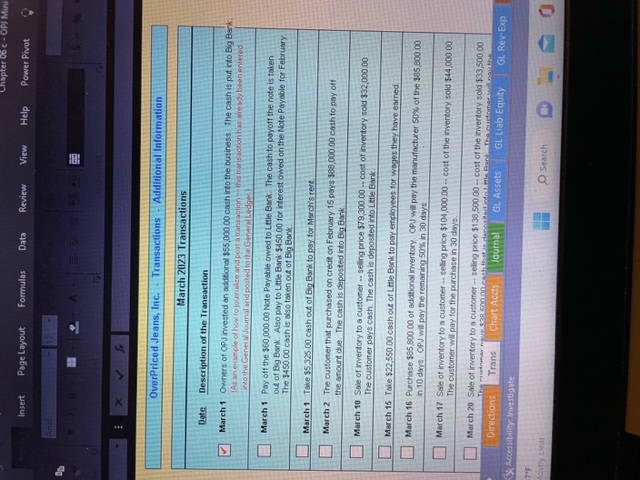
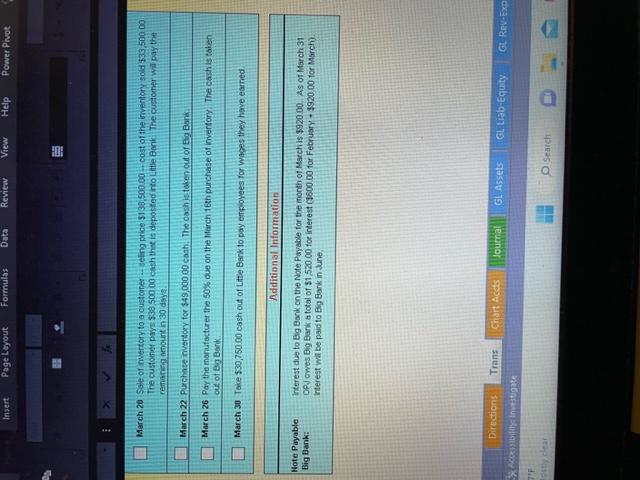
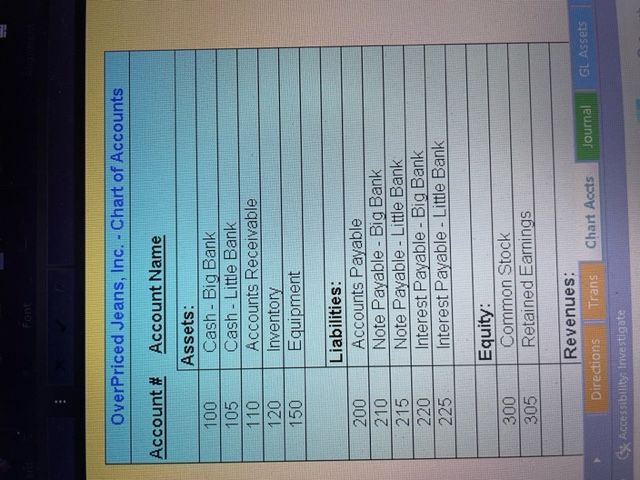
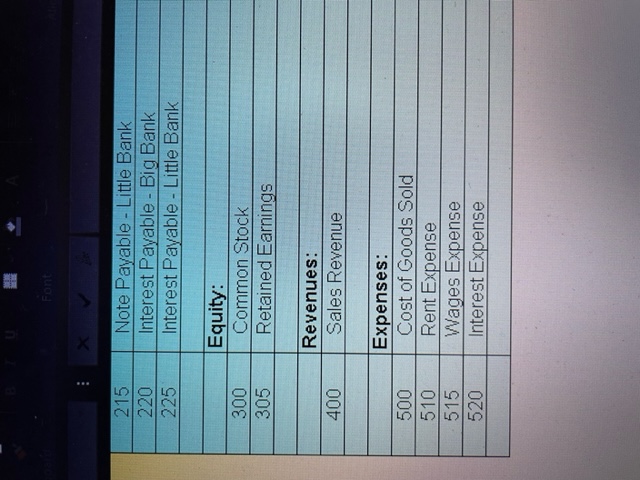
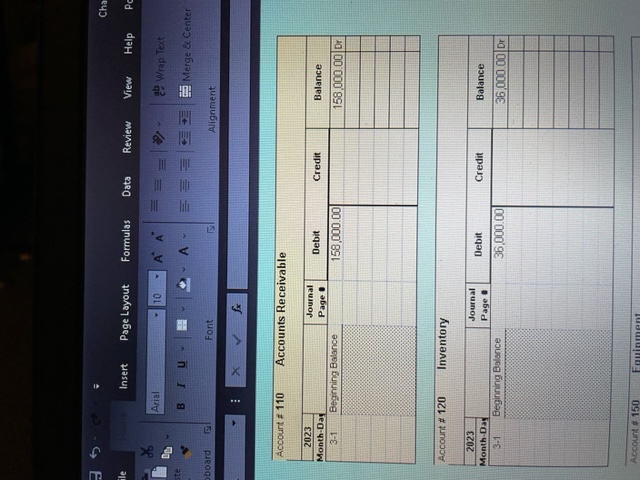
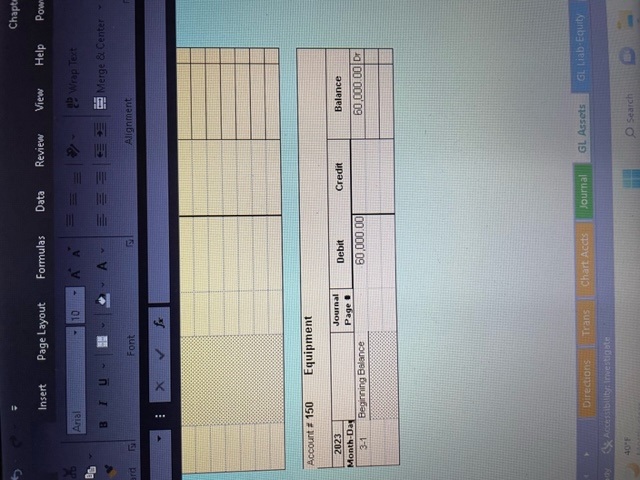
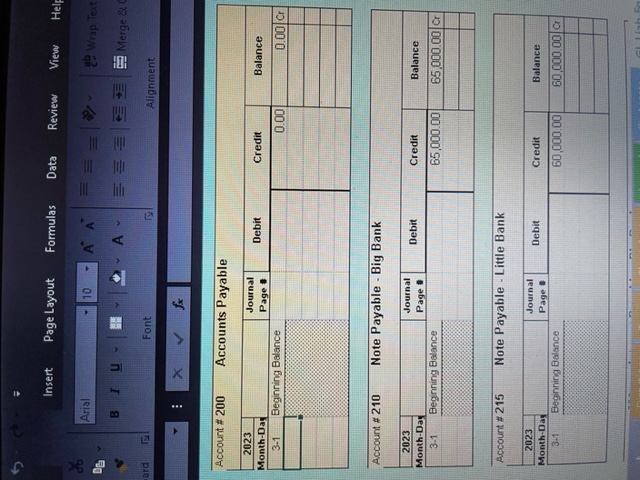
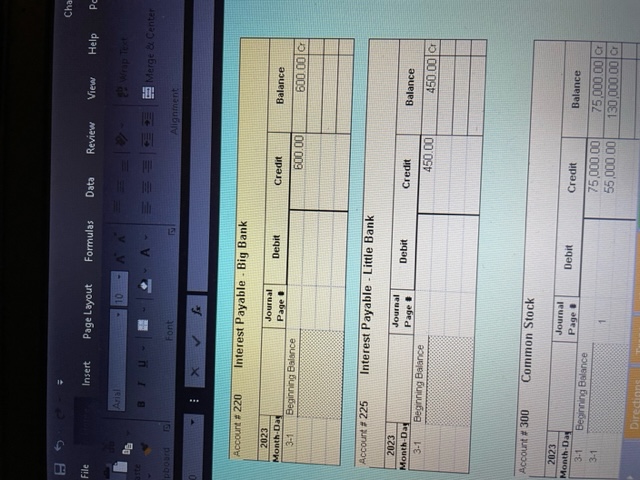
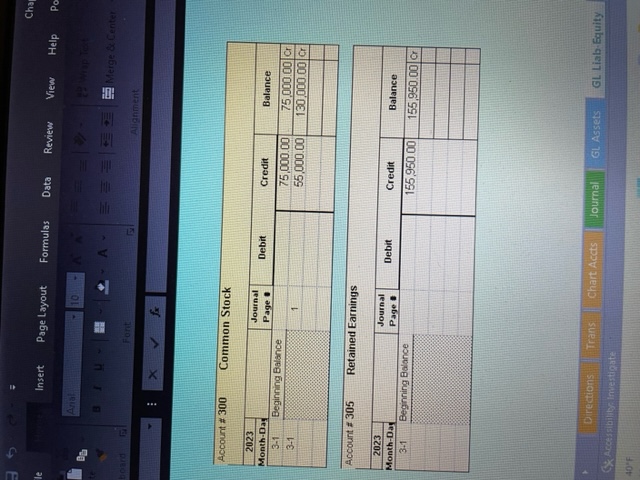
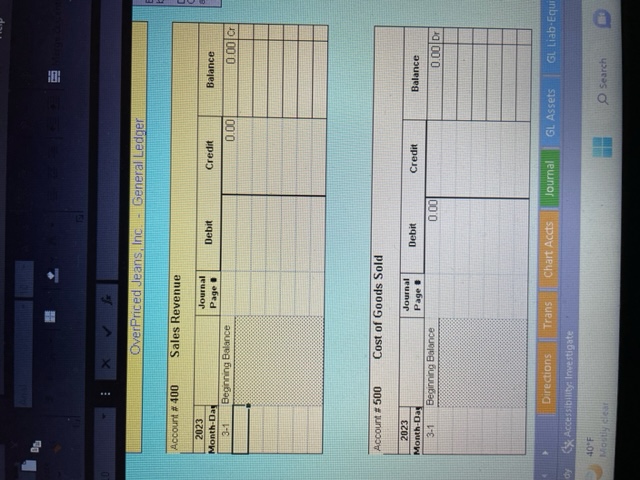
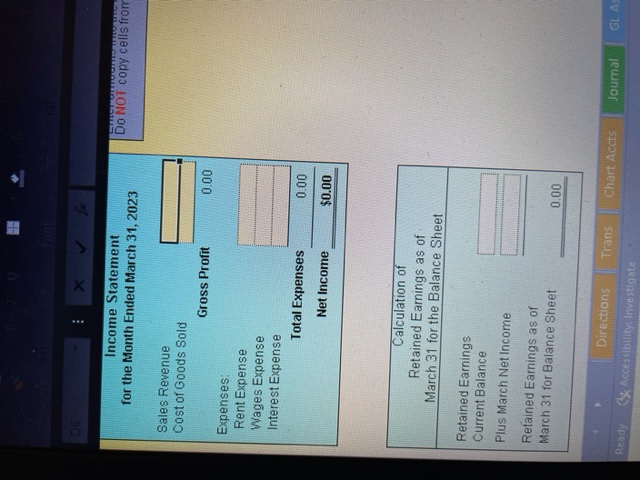
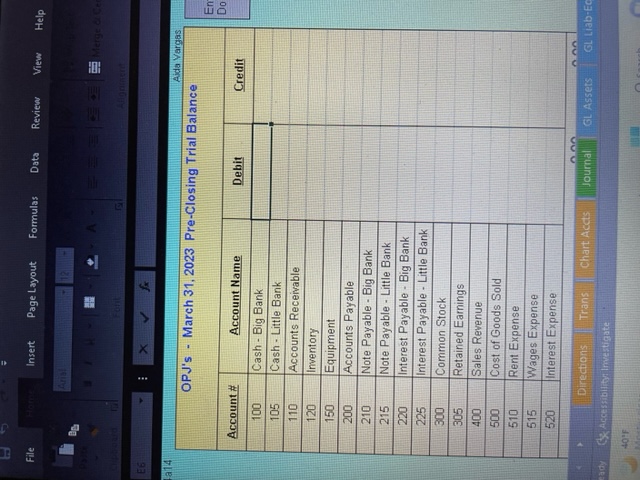
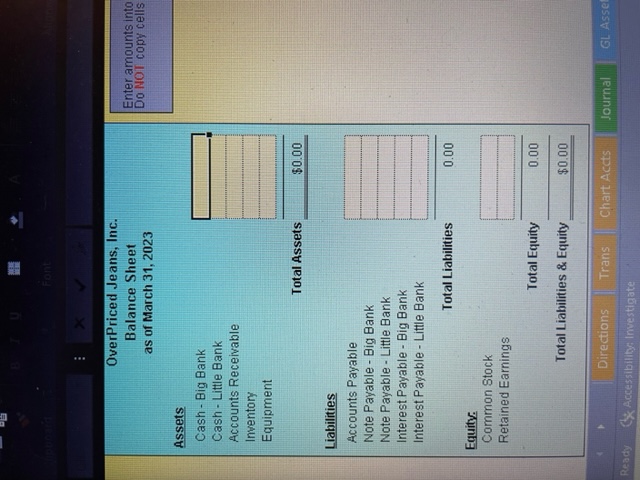
Instructions: You will be recording the March 2023 transactions for OverPriced Jeans, Inc. (OPJ). After recording the March transactions you will be preparing a Pre-Closing Trial Balance, Income Statement, Calculation of Retained Earnings, Balance Sheet, and Post-Closing Trial Balance. You are given the following: March transactions and Additional Information - Trans tab Chart of Accounts with Account Numbers and Account Names - Chart Accts tab General Joumal pages . Journal tab General Ledger - GL Assets, GL. Liab.Equity. GL. Rev. Exp tabs Forms for the March 31: Pre-Closing Trial Balance (Trial Bal tab), Income Statement and Calculation of Retained Earnings (IS \& RE tab), Balance Sheet (BalSht tab), and Post-Closing Trial Balance (Post Close TB tab) To Complete Your Workbook do the following: Print the March Transactions (click the Trans tab and then click the Printer Icon) Uso YouR Transoction sheets - do not use another student's shoets Print the Chart of Accounts (click the Chart Accts tab and then click the Printer Icon) 5 Record the March transactions in the General Joumal. Click the Joumal tab and record your entries dieectly into the General Journal. Look at the March 1 Common Stock transaction, which has already been entered, for an example of how to make your entries. To Complete Your Workheok do the fallewing: 5) Prirt the March Transactions (click the Trans tab and then clek the Printer loon) USe YOUR Transeitson sheves - co not use another stugleres ahoots 5 Print the Chart of Accourts (click the Chart Accts tab and then click the Prirter lcov) 5. Recond the March transactisns in the General Joumal Click the Joumal abb and record your entress \&eectly into the General Joumal. Lock at the March 1 Correnon Stock transactian, which has aready been entered, for an example of how to make your erenes. Do net put the " X ' in the Posted colurin at this time. Use the printed Chat of Accounts as a reference source for the Account Numbers atd Account Names that are walable in OPJ's accounting fystem. is To make posting from the General Journal to the Gereral Ledgar earier, it is reconmensed that you prirt the General Journal - click the Journal tab and then click the Pentee Icon 48 Pest the entries froen the prnted General Jeurnal to the Geseral Ledser accounte. Click the GL Asset, GL. Liab Equity. and GL. Rev-Exp tabs to find the accourts to be posted. Record your postings drectly into the General Ledget. As you post an imsunt to an account be sure to erter the General Joumal Page \# indo the Journal Page If column. See tho firat posting to the Cash-Big Bink account for an exariple. Ater you post an ansourt to a Gerseal Ledger account, then hand write an X ' in the Posted column of the prited Gereral deumal. Tris will help you keep track of which entres you have polled. e Enter the ' X 's, which yos hand waste on your Geraral Journal pages, inss the General Jeumyl Click the sournall tab and anter the " X 's in the Pested column. \& Enter the "X"s. which you hand weote on ysur General Joumal pageb, inte the General Jounal. Click the Journal tab and enter the "X's in the Posted calumn Prepare the March 31 adjusting enfry foe irtesest due on the Note Payable to Big Bank The irformution for this adjusting entry is under the hyading "Addtional infurmation" on the rage that prirted when you printed the Trans tab. Click the Journal tab and record the adjusting entry in the Ganeral Joumal Use the printed Chant of Accourts as a ifference sbure for the Account Nurbers and Account Names that are arailable in CPIs accounting system. o6. Post the adjusting entry frem the Gentral Joumal to the General Ledger accosnts. Click the GL. Liab-Equity and GL. Rev Exp tabs to fnd the accounts to be posted As yeu post an amourt to an accourt be sure to enter the General Joumal Page a irto the Journal Page st column. After you post an amoust to a General Ledger accourt, cick back on the Jearnal tab ard enter an ' X ' in the Posted colums of the General Joumal 5. Prict OPJs Gencral Ledger by clicking the GL. Assets tab and then cleking the Prirter ison. cliching the GL. Liab Fquity tab and then clcking the Printer icos, and clicking the GL. Rerv-Exp tal and then clicking the Prister icon as. Using the grated General Lodger, eater the ending accoure balarices into the March 31 Pre-Clocing Trial Balance. Click the Trial Bal tab and entet the amourts into the Pre-Clesing Traa Balance. Print the Mirch 31 PereClosing Irial Balatce by clicking the Prittericon. Using the printed March 31 Pre-Clesing Trial Balance, prepare the March 2023 income Staternent. Click the is \& RE tab and enter the amouts into the hcome Stxement. Using the pented Pre-Closing Tal Dalance and the Net lhcome anount, prepare the Calculaticn of Peetaned Earningb as of March 3t fse the Dalance Sheet Clitk the IS R aE tab and enter the amounte ifto the schedale. of Using the printed March 31 Pre Closing Tral Balance and the strount from the Carculation of Retained Earrings as of March 31, prepare the March 31, 2023 Balance Sheet Chik the Balsla lab and enter the arnounts into the Balance Sheet. Prepase the closing ertries. Clich the Journal tab and erter the closing entres into the Gesteral Jcurnal Place your closing entries on Page 83 of the Gesecal Journal. 40. Prepare the closing entres. Cick the Journal tab and enter the closing entries iato the Gansral Journy. Place yeur closing entries on Page it 3 of the General Journal. Step 8 in the Accourting Cycle Prepare and enter the reptinue 5. Post the closing entres fron the Gereral Joumal to the General Ladper accounts. and expense closing Clek the GL. Liab Equity, and GL. Rev Exp tabs to find the accounts to be posted. As ycu gost an anourt to an acceure be sure to enter the Gentral Journal Page \# into the Journal Page H columh Ater you post as amount 10 a General Ledger account, click back on the Journal tab and erter an " X " in the Posted column of the General Joumal. \& Click the Post Gose TB tab and prepaeo the March 31 Post.Closing Trial Balance. entrias into the General Journal, and post the closing. entrias to the Ceneral Ledger accounts. Scep 9 in the Accounting Cycle Prepare a Post'Closing Tral Balance to determine that the accounts in the General Lodger are in balance and reacy 10 OverPriced Jeans, Inc. - Transactions - Additional Information March 2023 Transactions Date Description of the Transaction March 1 Owhers of OPJ hwested an additional 355,00000 cash ireo the business. The cash is put into Big Bark. imo the General Journal and pored to the GoneralLedgei] March 1 Pay off the $60,000,00 Note Payable owed to Lelle Bank. The cash to payoff the note is taken out of Big Bark. Also pay to Lette Bank $450.00 for interest owed on the Note Payable for February. The $450.00cash is asso taken out of Big Bonk. March 1 Take 35,32500 cash cut of Big Bank to psy for March's rent. March 2 The cussonter that purchased on credt on February 15 pays $80,000,00 cash to pay off the anount due. The cashis deposted into Big Bink. March 10 Swe of inventory to a custoner selling price $79,300,00 cost of inventory sold $32,000,00 The customer pays cash. The cash is deposted into Letle Bank. March 15 Take $22,550,00 cashout of Lthe Bsnk to poy entrioyees tor woges they have earned. March 16 Purchase $85,800,00 of aditional imertory, OPJ will pay the manufacturer 50% of the $85,800,00 in 10 days. OPJ wil psy the renaining 505 in 30 days March 17 Sale of inventory to a customer - seling price $104,000,00 cost of the invertory sola $44,000.00 The customer will pay for the purchase in 30 days. March 20 Sale of invertary to a customer - seling peice $130,500.00 - cost of the mventory sold $33,500.00 Accessibility: Investigate March 20 Sale of mertory to a custorner. seling price $138,500,00 cost of the irventory soid 433,50000 The customer pays $38500.00 cash that is deposited into Litle Bonk. The customer wil pay the remarizh arount in 30 doys. March 22 Purchase mvertory for $49,000,00 cash. The cash is taken out of By Bank. March 26 Pay the manutacturer the 50% due on the March 16th purchase of imvertory. The cash is taken out of Bg Bank. March 30 Take $30,750.00 cash out of Litte Bark to pay empioyees for wages they have earned. Additional Information Ulote Payable Interest due to Big Bank cn the Note Payable for the month of March is $920.00. As of March 31 Big Bank: OPJ owes Big Bank a total of $1,520.00 for interest (9500.00 for February +$920.00 for March). interest will be paid to Eig Bank in June. OverPriced Jeans, Inc. - Chart of Accounts Account \# Account Name \begin{tabular}{|l|l|} \cline { 2 - 2 } \multicolumn{1}{l|}{} & Assets: \\ \hline 100 & Cash - Big Bank \\ \hline 105 & Cash - Little Bank \\ \hline 110 & Accounts Receivable \\ \hline 120 & Inventory \\ \hline 150 & Equipment \\ \hline & \\ \cline { 2 - 2 } & Liabilities: \\ \hline 200 & Accounts Payable \\ \hline 210 & Note Payable - Big Bank \\ \hline 215 & Note Payable - Little Bank \\ \hline 220 & Interest Payable - Big Bank \\ \hline 225 & Interest Payable - Little Bank \\ \hline & \\ \hline & Equity: \\ \hline 300 & Common Stock \\ \hline 305 & Retained Earnings \\ \hline & \\ \hline & Revenues: \\ \hline Directions Trans Chart Accts \\ \hline \end{tabular} C) Accessibility: Imrestigate \begin{tabular}{|c|c|} \hline 215 & Note Payable - Little Bank \\ \hline 220 & Interest Payable - Big Bank \\ \hline 225 & Interest Payable - Little Bank \\ \hline & \\ \hline & Equity: \\ \hline 300 & Common Stock \\ \hline 305 & Retained Earnings \\ \hline & \\ \hline & Revenues: \\ \hline 400 & Sales Revenue \\ \hline & \\ \hline & Expenses: \\ \hline 500 & Cost of Goods Sold \\ \hline 510 & Rent Expense \\ \hline 515 & Wages Expense \\ \hline 520 & Interest Expense \\ \hline & \\ \hline \end{tabular} Account \# 120 Inventory Directions Trans Chart Accts / Journal GL Assets GL. Liab:Equity Account \# 215 Note Payable - Little Bank \begin{tabular}{||c|c|c|c|c|c|} \hline \multicolumn{2}{|c|}{ Note Payable - Little Bank } \\ \hline Mo23 & & Journal Page : & Debit & Credit & Balance \\ \hline Month-Dar & & 60,000.00 & 60,000.00 & Cr \\ \hline 31 Beginning Balance & & & & \\ \hline \end{tabular} Account =225 Interest Payable - Little Bank Directions Trans Chart Accts JJoumal GL Assets GL Liab. Equity Accessibilitya lmestigate 40F search \begin{tabular}{l} \multicolumn{1}{c}{ Income Statement } \\ for the Month Ended March 31, 2023 \\ Sales Revenue \\ Cost of Goods Sold \\ Gross Profit \\ Expenses: \\ Rent Expense \\ Wages Expense \\ Interest Expense \\ Total Expenses \\ \multicolumn{1}{c}{ Net Income } \\ \hline \end{tabular} \begin{tabular}{|l|} \hline \multicolumn{1}{|c|}{ Calculation of } \\ \multicolumn{1}{|c|}{ Retained Earnings as of } \\ March 31 for the Balance Sheet \end{tabular} +14 OverPriced Jeans, Inc. Enter amounts into Do NOT copy cells Instructions: You will be recording the March 2023 transactions for OverPriced Jeans, Inc. (OPJ). After recording the March transactions you will be preparing a Pre-Closing Trial Balance, Income Statement, Calculation of Retained Earnings, Balance Sheet, and Post-Closing Trial Balance. You are given the following: March transactions and Additional Information - Trans tab Chart of Accounts with Account Numbers and Account Names - Chart Accts tab General Joumal pages . Journal tab General Ledger - GL Assets, GL. Liab.Equity. GL. Rev. Exp tabs Forms for the March 31: Pre-Closing Trial Balance (Trial Bal tab), Income Statement and Calculation of Retained Earnings (IS \& RE tab), Balance Sheet (BalSht tab), and Post-Closing Trial Balance (Post Close TB tab) To Complete Your Workbook do the following: Print the March Transactions (click the Trans tab and then click the Printer Icon) Uso YouR Transoction sheets - do not use another student's shoets Print the Chart of Accounts (click the Chart Accts tab and then click the Printer Icon) 5 Record the March transactions in the General Joumal. Click the Joumal tab and record your entries dieectly into the General Journal. Look at the March 1 Common Stock transaction, which has already been entered, for an example of how to make your entries. To Complete Your Workheok do the fallewing: 5) Prirt the March Transactions (click the Trans tab and then clek the Printer loon) USe YOUR Transeitson sheves - co not use another stugleres ahoots 5 Print the Chart of Accourts (click the Chart Accts tab and then click the Prirter lcov) 5. Recond the March transactisns in the General Joumal Click the Joumal abb and record your entress \&eectly into the General Joumal. Lock at the March 1 Correnon Stock transactian, which has aready been entered, for an example of how to make your erenes. Do net put the " X ' in the Posted colurin at this time. Use the printed Chat of Accounts as a reference source for the Account Numbers atd Account Names that are walable in OPJ's accounting fystem. is To make posting from the General Journal to the Gereral Ledgar earier, it is reconmensed that you prirt the General Journal - click the Journal tab and then click the Pentee Icon 48 Pest the entries froen the prnted General Jeurnal to the Geseral Ledser accounte. Click the GL Asset, GL. Liab Equity. and GL. Rev-Exp tabs to find the accourts to be posted. Record your postings drectly into the General Ledget. As you post an imsunt to an account be sure to erter the General Joumal Page \# indo the Journal Page If column. See tho firat posting to the Cash-Big Bink account for an exariple. Ater you post an ansourt to a Gerseal Ledger account, then hand write an X ' in the Posted column of the prited Gereral deumal. Tris will help you keep track of which entres you have polled. e Enter the ' X 's, which yos hand waste on your Geraral Journal pages, inss the General Jeumyl Click the sournall tab and anter the " X 's in the Pested column. \& Enter the "X"s. which you hand weote on ysur General Joumal pageb, inte the General Jounal. Click the Journal tab and enter the "X's in the Posted calumn Prepare the March 31 adjusting enfry foe irtesest due on the Note Payable to Big Bank The irformution for this adjusting entry is under the hyading "Addtional infurmation" on the rage that prirted when you printed the Trans tab. Click the Journal tab and record the adjusting entry in the Ganeral Joumal Use the printed Chant of Accourts as a ifference sbure for the Account Nurbers and Account Names that are arailable in CPIs accounting system. o6. Post the adjusting entry frem the Gentral Joumal to the General Ledger accosnts. Click the GL. Liab-Equity and GL. Rev Exp tabs to fnd the accounts to be posted As yeu post an amourt to an accourt be sure to enter the General Joumal Page a irto the Journal Page st column. After you post an amoust to a General Ledger accourt, cick back on the Jearnal tab ard enter an ' X ' in the Posted colums of the General Joumal 5. Prict OPJs Gencral Ledger by clicking the GL. Assets tab and then cleking the Prirter ison. cliching the GL. Liab Fquity tab and then clcking the Printer icos, and clicking the GL. Rerv-Exp tal and then clicking the Prister icon as. Using the grated General Lodger, eater the ending accoure balarices into the March 31 Pre-Clocing Trial Balance. Click the Trial Bal tab and entet the amourts into the Pre-Clesing Traa Balance. Print the Mirch 31 PereClosing Irial Balatce by clicking the Prittericon. Using the printed March 31 Pre-Clesing Trial Balance, prepare the March 2023 income Staternent. Click the is \& RE tab and enter the amouts into the hcome Stxement. Using the pented Pre-Closing Tal Dalance and the Net lhcome anount, prepare the Calculaticn of Peetaned Earningb as of March 3t fse the Dalance Sheet Clitk the IS R aE tab and enter the amounte ifto the schedale. of Using the printed March 31 Pre Closing Tral Balance and the strount from the Carculation of Retained Earrings as of March 31, prepare the March 31, 2023 Balance Sheet Chik the Balsla lab and enter the arnounts into the Balance Sheet. Prepase the closing ertries. Clich the Journal tab and erter the closing entres into the Gesteral Jcurnal Place your closing entries on Page 83 of the Gesecal Journal. 40. Prepare the closing entres. Cick the Journal tab and enter the closing entries iato the Gansral Journy. Place yeur closing entries on Page it 3 of the General Journal. Step 8 in the Accourting Cycle Prepare and enter the reptinue 5. Post the closing entres fron the Gereral Joumal to the General Ladper accounts. and expense closing Clek the GL. Liab Equity, and GL. Rev Exp tabs to find the accounts to be posted. As ycu gost an anourt to an acceure be sure to enter the Gentral Journal Page \# into the Journal Page H columh Ater you post as amount 10 a General Ledger account, click back on the Journal tab and erter an " X " in the Posted column of the General Joumal. \& Click the Post Gose TB tab and prepaeo the March 31 Post.Closing Trial Balance. entrias into the General Journal, and post the closing. entrias to the Ceneral Ledger accounts. Scep 9 in the Accounting Cycle Prepare a Post'Closing Tral Balance to determine that the accounts in the General Lodger are in balance and reacy 10 OverPriced Jeans, Inc. - Transactions - Additional Information March 2023 Transactions Date Description of the Transaction March 1 Owhers of OPJ hwested an additional 355,00000 cash ireo the business. The cash is put into Big Bark. imo the General Journal and pored to the GoneralLedgei] March 1 Pay off the $60,000,00 Note Payable owed to Lelle Bank. The cash to payoff the note is taken out of Big Bark. Also pay to Lette Bank $450.00 for interest owed on the Note Payable for February. The $450.00cash is asso taken out of Big Bonk. March 1 Take 35,32500 cash cut of Big Bank to psy for March's rent. March 2 The cussonter that purchased on credt on February 15 pays $80,000,00 cash to pay off the anount due. The cashis deposted into Big Bink. March 10 Swe of inventory to a custoner selling price $79,300,00 cost of inventory sold $32,000,00 The customer pays cash. The cash is deposted into Letle Bank. March 15 Take $22,550,00 cashout of Lthe Bsnk to poy entrioyees tor woges they have earned. March 16 Purchase $85,800,00 of aditional imertory, OPJ will pay the manufacturer 50% of the $85,800,00 in 10 days. OPJ wil psy the renaining 505 in 30 days March 17 Sale of inventory to a customer - seling price $104,000,00 cost of the invertory sola $44,000.00 The customer will pay for the purchase in 30 days. March 20 Sale of invertary to a customer - seling peice $130,500.00 - cost of the mventory sold $33,500.00 Accessibility: Investigate March 20 Sale of mertory to a custorner. seling price $138,500,00 cost of the irventory soid 433,50000 The customer pays $38500.00 cash that is deposited into Litle Bonk. The customer wil pay the remarizh arount in 30 doys. March 22 Purchase mvertory for $49,000,00 cash. The cash is taken out of By Bank. March 26 Pay the manutacturer the 50% due on the March 16th purchase of imvertory. The cash is taken out of Bg Bank. March 30 Take $30,750.00 cash out of Litte Bark to pay empioyees for wages they have earned. Additional Information Ulote Payable Interest due to Big Bank cn the Note Payable for the month of March is $920.00. As of March 31 Big Bank: OPJ owes Big Bank a total of $1,520.00 for interest (9500.00 for February +$920.00 for March). interest will be paid to Eig Bank in June. OverPriced Jeans, Inc. - Chart of Accounts Account \# Account Name \begin{tabular}{|l|l|} \cline { 2 - 2 } \multicolumn{1}{l|}{} & Assets: \\ \hline 100 & Cash - Big Bank \\ \hline 105 & Cash - Little Bank \\ \hline 110 & Accounts Receivable \\ \hline 120 & Inventory \\ \hline 150 & Equipment \\ \hline & \\ \cline { 2 - 2 } & Liabilities: \\ \hline 200 & Accounts Payable \\ \hline 210 & Note Payable - Big Bank \\ \hline 215 & Note Payable - Little Bank \\ \hline 220 & Interest Payable - Big Bank \\ \hline 225 & Interest Payable - Little Bank \\ \hline & \\ \hline & Equity: \\ \hline 300 & Common Stock \\ \hline 305 & Retained Earnings \\ \hline & \\ \hline & Revenues: \\ \hline Directions Trans Chart Accts \\ \hline \end{tabular} C) Accessibility: Imrestigate \begin{tabular}{|c|c|} \hline 215 & Note Payable - Little Bank \\ \hline 220 & Interest Payable - Big Bank \\ \hline 225 & Interest Payable - Little Bank \\ \hline & \\ \hline & Equity: \\ \hline 300 & Common Stock \\ \hline 305 & Retained Earnings \\ \hline & \\ \hline & Revenues: \\ \hline 400 & Sales Revenue \\ \hline & \\ \hline & Expenses: \\ \hline 500 & Cost of Goods Sold \\ \hline 510 & Rent Expense \\ \hline 515 & Wages Expense \\ \hline 520 & Interest Expense \\ \hline & \\ \hline \end{tabular} Account \# 120 Inventory Directions Trans Chart Accts / Journal GL Assets GL. Liab:Equity Account \# 215 Note Payable - Little Bank \begin{tabular}{||c|c|c|c|c|c|} \hline \multicolumn{2}{|c|}{ Note Payable - Little Bank } \\ \hline Mo23 & & Journal Page : & Debit & Credit & Balance \\ \hline Month-Dar & & 60,000.00 & 60,000.00 & Cr \\ \hline 31 Beginning Balance & & & & \\ \hline \end{tabular} Account =225 Interest Payable - Little Bank Directions Trans Chart Accts JJoumal GL Assets GL Liab. Equity Accessibilitya lmestigate 40F search \begin{tabular}{l} \multicolumn{1}{c}{ Income Statement } \\ for the Month Ended March 31, 2023 \\ Sales Revenue \\ Cost of Goods Sold \\ Gross Profit \\ Expenses: \\ Rent Expense \\ Wages Expense \\ Interest Expense \\ Total Expenses \\ \multicolumn{1}{c}{ Net Income } \\ \hline \end{tabular} \begin{tabular}{|l|} \hline \multicolumn{1}{|c|}{ Calculation of } \\ \multicolumn{1}{|c|}{ Retained Earnings as of } \\ March 31 for the Balance Sheet \end{tabular} +14 OverPriced Jeans, Inc. Enter amounts into Do NOT copy cells
Step by Step Solution
There are 3 Steps involved in it

Get step-by-step solutions from verified subject matter experts
 Study Help