







Question: 1.SOLVE USING JAVA FX (ADD COMMENTS PLEASE, THANK YOU) QUESTION 2 Electrol Electrocal v1.0.0 VAT: Previous reading 2547 Cuenta Coat before VAT: 11867 10,020 To
1.SOLVE USING JAVA FX (ADD COMMENTS PLEASE, THANK YOU)
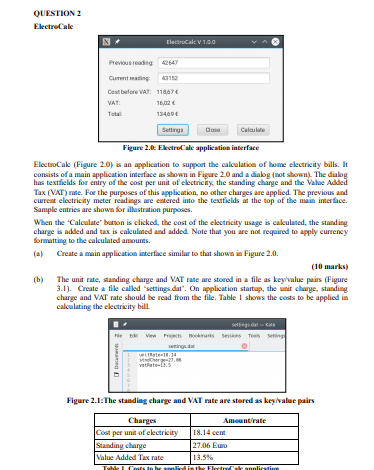
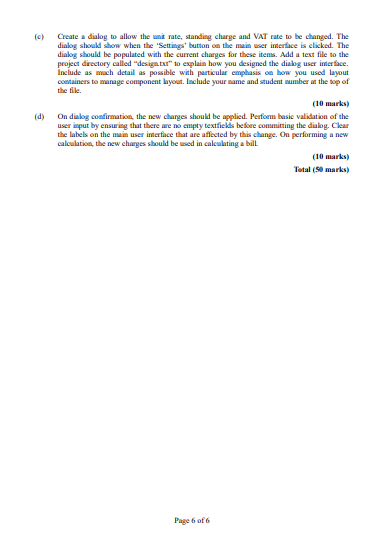
QUESTION 2 Electrol Electrocal v1.0.0 VAT: Previous reading 2547 Cuenta Coat before VAT: 11867 10,020 To 134000 Settings Calculate Figure 2.t: Electrocale application interface ElectroCak (Figure 20) is an application to support the calculation of home electricity bills. It consists of a main application interface as shown in Figure 2.0 and a dialog (not shown). The dialog has textfields for entry of the cost per unit of electricity, the standing charge and the Value Added Tax (VAT) rate. For the purposes of this application, no other charges are applied. The previous and current electricity meter readings are entered into the textfields at the top of the main interface. Sample entries are shown for illustration purposes. When the 'Calculate" button is clicked, the cost of the electricity usage is calculated, the standing charge is added and tax is calculated and added Note that you are not required to apply currency formatting to the calculated amounts. (a) Create a main application interface similar to that shown in Figure 2.0. (10 marks) b) The unit rate, standing charge and VAT rate are stored in a file as key/value pairs (Figure 3.1). Create a file called settings.dat". On application startup, the unit charge, standing charge and VAT rate should be read from the file. Table 1 shows the costs to be applied in calculating the electricity bill. stings e Vie Bohrs Ses To . Chr. vata. Figure 2.1: The standing charge and VAT rate are stored as key/value pairs Charges Cost per unit of electricity Standing charge Value Added Tax rate Amount rate 18.14 cent 27.06 Euro 13.5% Flor Canlire TI Create a dialog to allow the unit rate, standing charge and VAT rate to be changed. The dialog should show when the 'Settings' button on the main user interface is clicked. The dialog should be populated with the current charges for these items. Add a text file to the project directory called "design.txt" to explain how you designed the dialog user interface. Include as much detail as possible with particular emphasis on how you used layout containers to manage component layout. Include your name and student number at the top of the file (10 marks) On dialog confirmation, the new charges should be applied. Perform basic validation of the user input by ensuring that there are no compty textfields before committing the dialog. Clear the labels on the main user interface that are affected by this change. On performing a new calculation, the new charges should be used in calculating a bill (10 marks) Total (50 marks) Page 6 of 6 QUESTION 2 Electrol Electrocal v1.0.0 VAT: Previous reading 2547 Cuenta Coat before VAT: 11867 10,020 To 134000 Settings Calculate Figure 2.t: Electrocale application interface ElectroCak (Figure 20) is an application to support the calculation of home electricity bills. It consists of a main application interface as shown in Figure 2.0 and a dialog (not shown). The dialog has textfields for entry of the cost per unit of electricity, the standing charge and the Value Added Tax (VAT) rate. For the purposes of this application, no other charges are applied. The previous and current electricity meter readings are entered into the textfields at the top of the main interface. Sample entries are shown for illustration purposes. When the 'Calculate" button is clicked, the cost of the electricity usage is calculated, the standing charge is added and tax is calculated and added Note that you are not required to apply currency formatting to the calculated amounts. (a) Create a main application interface similar to that shown in Figure 2.0. (10 marks) b) The unit rate, standing charge and VAT rate are stored in a file as key/value pairs (Figure 3.1). Create a file called settings.dat". On application startup, the unit charge, standing charge and VAT rate should be read from the file. Table 1 shows the costs to be applied in calculating the electricity bill. stings e Vie Bohrs Ses To . Chr. vata. Figure 2.1: The standing charge and VAT rate are stored as key/value pairs Charges Cost per unit of electricity Standing charge Value Added Tax rate Amount rate 18.14 cent 27.06 Euro 13.5% Flor Canlire TI Create a dialog to allow the unit rate, standing charge and VAT rate to be changed. The dialog should show when the 'Settings' button on the main user interface is clicked. The dialog should be populated with the current charges for these items. Add a text file to the project directory called "design.txt" to explain how you designed the dialog user interface. Include as much detail as possible with particular emphasis on how you used layout containers to manage component layout. Include your name and student number at the top of the file (10 marks) On dialog confirmation, the new charges should be applied. Perform basic validation of the user input by ensuring that there are no compty textfields before committing the dialog. Clear the labels on the main user interface that are affected by this change. On performing a new calculation, the new charges should be used in calculating a bill (10 marks) Total (50 marks) Page 6 of 6
Step by Step Solution
There are 3 Steps involved in it

Get step-by-step solutions from verified subject matter experts
 Study Help