







Question: 1.Write the SQL statement to update the invoices table. Set the current invoice_total to be 10% less for all vendors who have more than 10
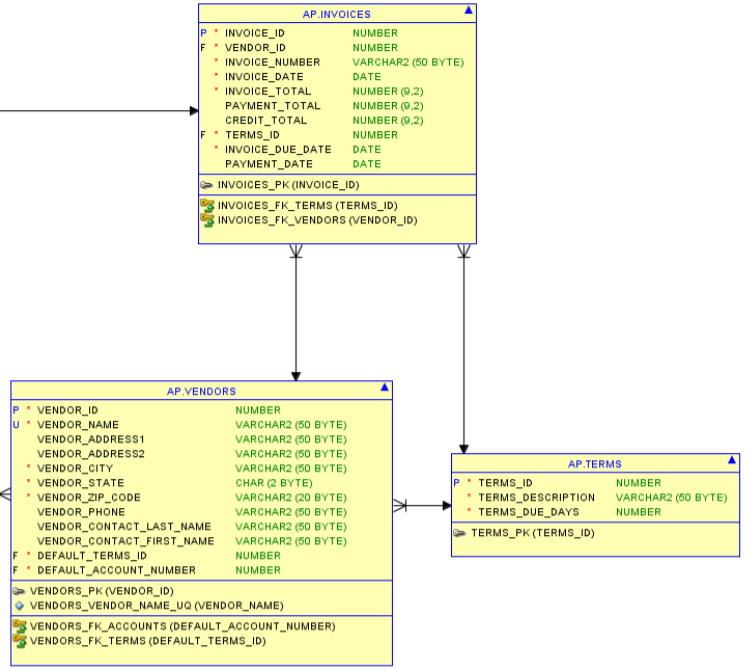
1.Write the SQL statement to update the invoices table. Set the current invoice_total to be 10% less for all vendors who have more than 10 invoices. Only update invoices with a current balance due
2.Use a correlated subquery to return vendor information, representing the vendors invoices that have a two week grace period or more to be paid (the date range between invoice_date and invoice_due_date of two weeks or more). The output should include the vendor_name, invoice_number, invoice_total, and the grace period in days.
3.Write an INSERT statement to add the following record into the invoice table:
invoice_id: 99
vendor_id: 71
invoice_number: EX-FALL-2
invoice_date: todays date
invoice_total: $999.99
payment_total: 10% of invoice_total
invoice_due_date: two weeks from today ( you must use a function to compute this )
AP.INVOICES P INVOICE ID FVENDOR_ID NUMBER NUMBER ARCHAR2 (50 BYTE) DATE NUMBER (9.2) NUMBER (9.2) NUMBER (9.2) NUMBER INVOICE NUMBER INVOICE DATE INVOICE TOTAL PAYMENT TOTAL CREDIT_TOTAL F TERMS_ID INVOICE_DUE_DATE DATE DATE PAYMENT_DATE INVOICES_PK (INVOICE_ID) INVOICES FK TERMS (TERMS ID) INVOICES_FK_VENDORS (VENDOR ID) AP.VENDORS PVENDOR ID u VENDORNAME NUMBER ARCHAR2 (50 BYTE) ARCHAR2 (50 BYTE ARCHAR2 (50 BYTE) VARCHAR2 (50 BYTE) CHAR (2 BYTE) ARCHAR2 (20 BYTE VARCHAR2 (50 BYTE - VENDOR_ADDRESS1 ENDORADDRESS2 VENDOR CITY VENDOR STATE VENDOR_ZIP_CODE VENDOR_PHONE ENDOR CONTACT_LAST_NAME VARCHAR2 (50 BYTE) ENDOR_CONTACT_FIRST_NAME VARCHAR2 (50 BYTE AP TERMS P TERMS_ID NUMBER TERMS_DESCRIPTION VARCHAR2 (50 BYTE) TERMS_DUE_DAYS TERMS_PK (TERMS_ID) NUMBER F "DEFAULT TERMS ID F DEFAULT_ACCOUNT NUMBER NUMBER NUMBER VENDORS_PK (VENDOR ID) VENDORS-VENDOR-NAME-UQ(VENDOR-NAME) VENDORS_FK_ACCOUNTS (DEFAULT ACCOUNT NUMBER) VENDORS_FKTERMS (DEFAULT_TERMS_ID)
Step by Step Solution
There are 3 Steps involved in it

Get step-by-step solutions from verified subject matter experts
 Study Help